1. Tap Skype.
2. Sign in with the same Microsoft account that you use with your phone.
3. Swipe to people, and tap the contact you want to chat with.
4. Write your message, and tap
.
For more info on Skype-to-Skype instant messages, see the video at www.youtube.com/
watch?v=AF2HRYdPnAM (in English only).
Tip: To save on data costs, use a Wi-Fi network connection with Skype whenever
possible.
Share your location in a Skype chat
While in a chat, tap
> share location > .
Send your location in a message
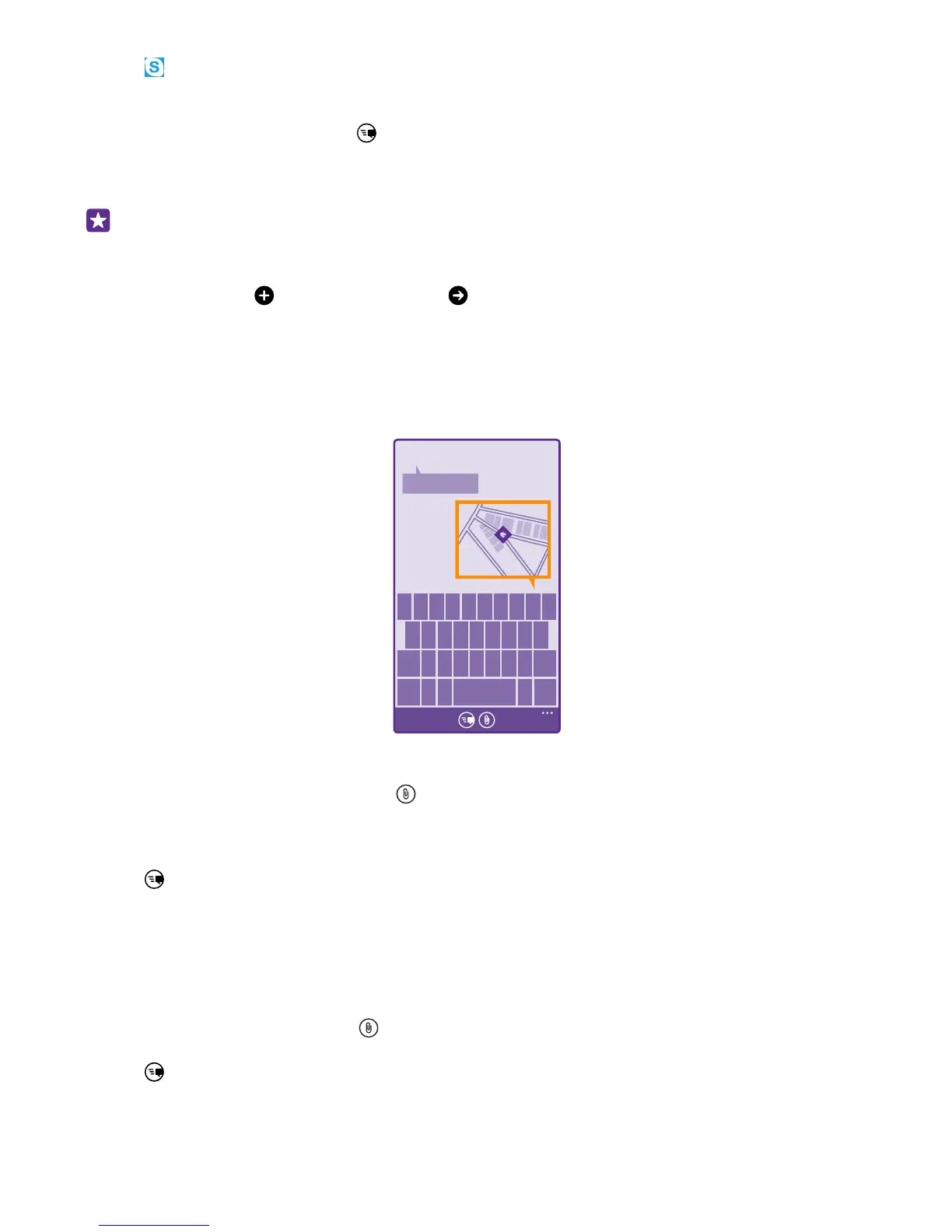
When you ask your friends to come and meet you, you can send them your location on a map.
This feature may not be available for all regions.
Your phone may ask you about using your location. You need to allow it to use this feature.
1. When writing a text message, tap
> my location.
Sending a message with an attachment may be more expensive than sending a normal text
message. For more info, contact your service provider.
2. Tap
.
Your friends receive a message with a picture of where you are on the map.
Send an audio message
Celebrate your friend's birthday with a song – send your song as an audio message.
1. When writing a message, tap
> voice note.
2. Record your message, and tap done.
3. Tap
.
© 2015 Microsoft Mobile. All rights reserved.
76


 To Next Page