invuesecurity.com
4
Microsoft Surface Book Installation
1
6
3
7
4
85
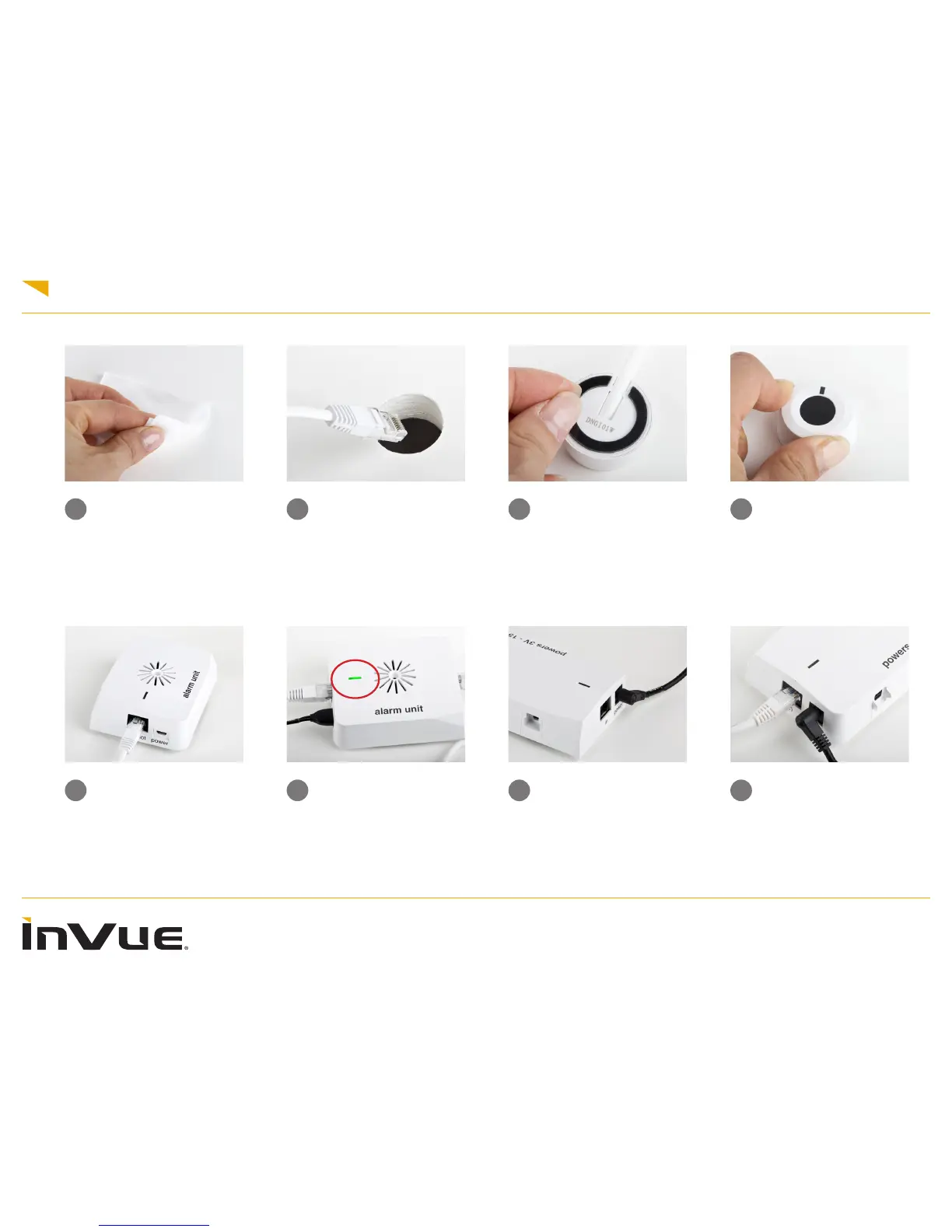
Wipe the xture with the
supplied alcohol wipe to
ensure proper installation.
Plug the IR Dot cable into the
alarm unit. This cable will
“snap” in when fully plugged
in
Press the IR dot rmly onto
the xture for 10 seconds to
ensure proper installation.
Remove the clear adhesive
backing from the IR Dot to
place where you have cleaned
with the alcohol wipe
Plug the round-tipped
power supply into the 4
position power box and
the other end into power
outlet.
Plug the IR Dot cable into
the alarm unit and the power
supply into the Micro USB
port. The Alarm Unit will
light up when plugged into
power and the IR dot has
been plugged in.
Plug in the white cable into
the “in” port on the 4-position
power box.
2
Slide the IR dot cord through
the top of the xture.











 To Next Page