44 M1179886
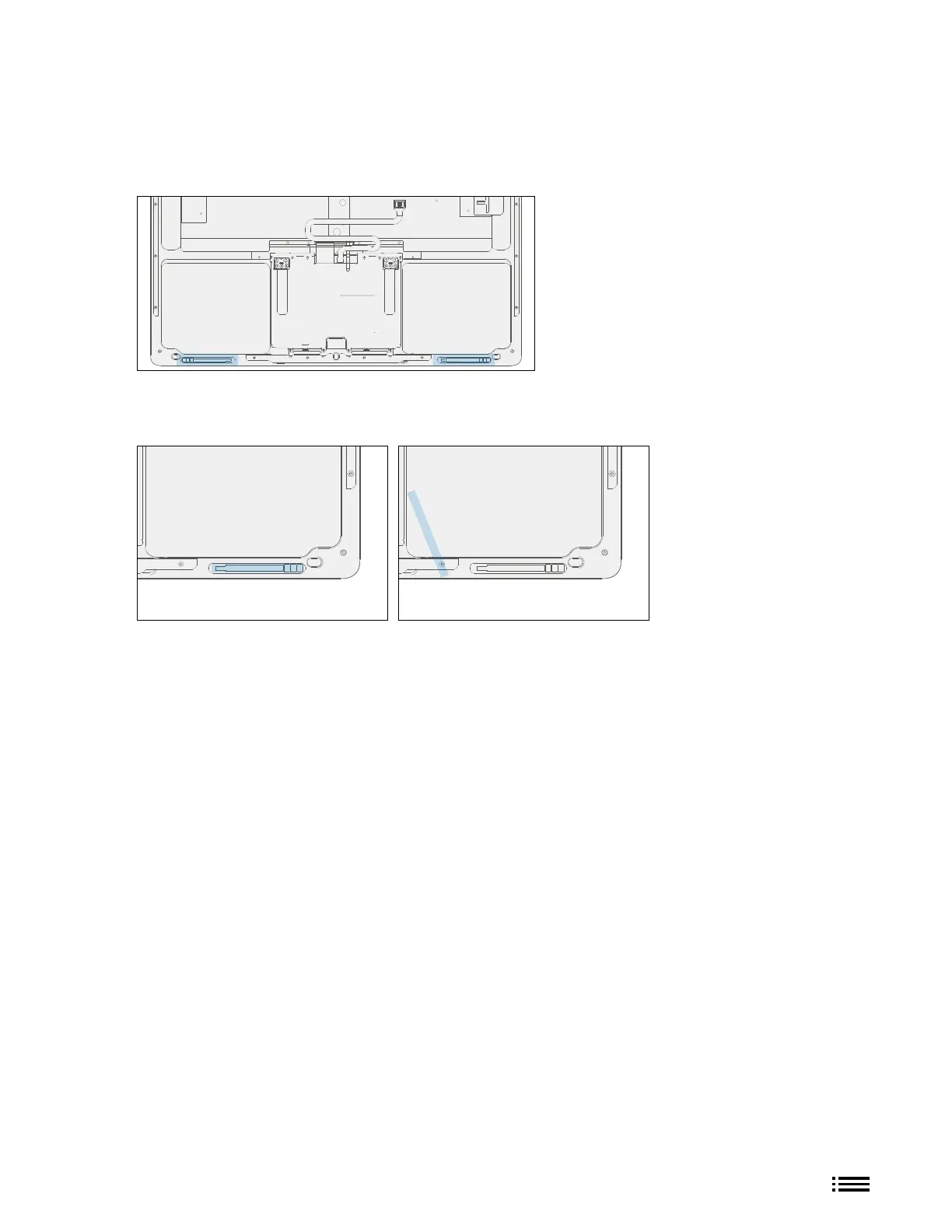
10. Opening Strength Adjustment (Metal C-cover) – As part of the AB-cover removal process, we will need
to remove the current C-cover steels which are located at the bottom front edge pockets and install new
provided steels.
a. C-cover Steels Mylar Removal – Take C-cover and remove mylars covering the closure steels using
tweezers.
b. C-cover Steels Removal – Using tweezers again, remove the closure steels located in the two regions at
the front edge of the C-cover.
c. Clean Closure Steel Area – Clean off the closure steel area thoroughly with a cotton swab and IPA. Be
sure there is no debris or residue left over.
d. Install New Closure Steels – Install new closure steels about 2mm from the outside edge of the C-cover
as shown in the image below using tweezers.
e. Left Closure Steel Placement – Place single closure steel into left enclosure pocket about 2mm from
the outside left edge of C-cover.
f. Secure Left Closure Steel – Using the back of the tweezers, press continuously and rmly along the
surface of the steel for 80 seconds.
g. Tape Left Closure Steel – Place mylar tape over the steel. Black tape should fully cover steel and
overlap onto the C-cover.
h. Smooth Left Closure Steel Tape – Use Spudger tool to smooth out and atten the tape to secure the
steel.
i. Right Closure Steel Placement – Place single closure steel into right enclosure pocket about 2mm
from the outside right edge of C-cover.











 To Next Page