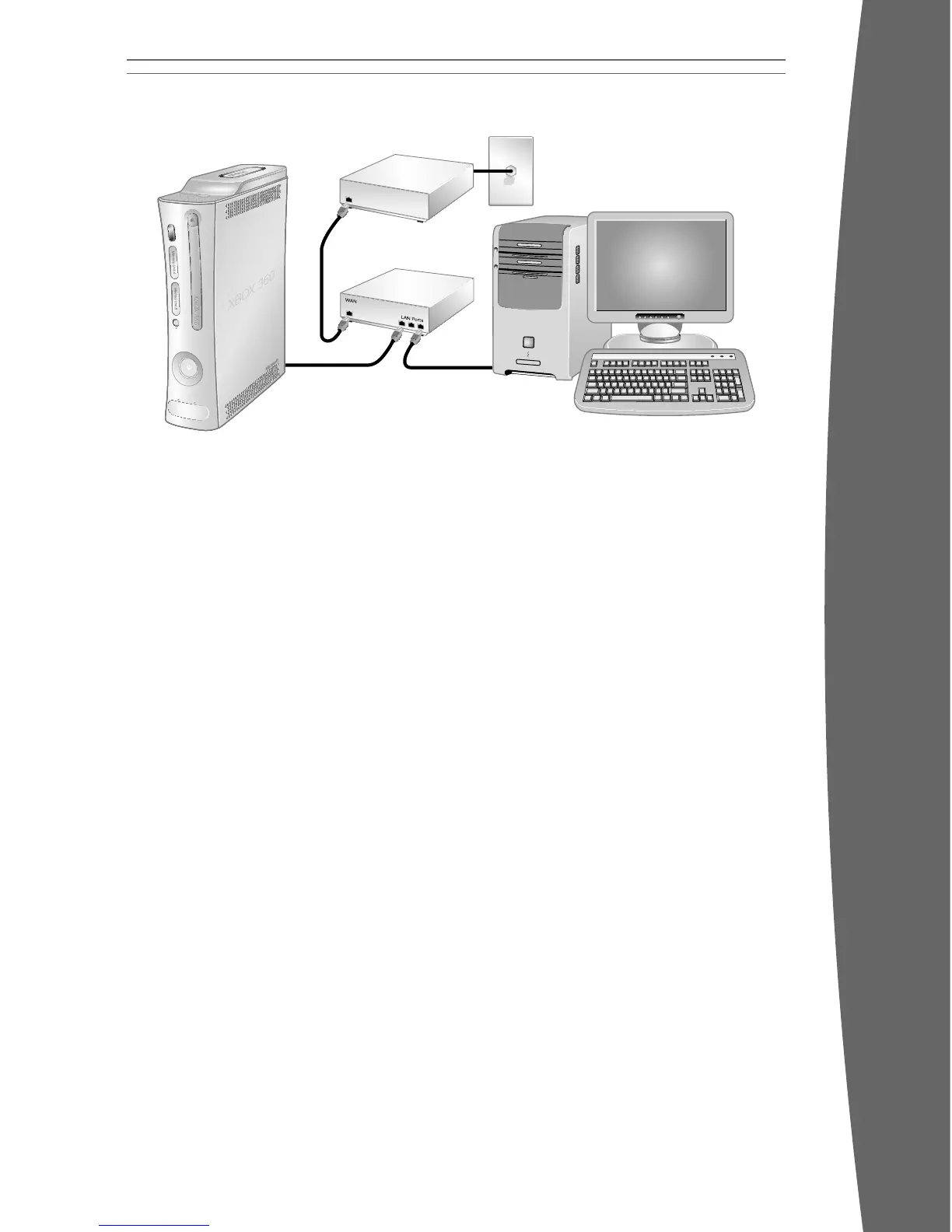
Router Connection
Choose a router connection if you want to
share your Internet connection with your PC
(or other device), your high-speed modem
supports an Ethernet connection, and you
want to be able to play on Xbox LIVE whether
your PC is on or off.
To set up a router connection:
1 Connect one end of an Ethernet cable to
the Ethernet port on your high-speed
modem and the other end to the WAN or
Uplink port on your router.
2 Connect one end of an Ethernet cable to
an Ethernet LAN port on your router and
the other end to the Ethernet port on your
PC (or other device). Follow the instructions
from your ISP to use your PC’s browser or
software to congure the router,
then verify that your PC is connected
to the Internet.
3 Connect one end of an Ethernet cable to
an Ethernet LAN port on your router and
the other end to the Ethernet port on the
back of your Xbox 360 console.
nOTE
Some modems and devices may require
a network hub instead of a router.
4 Follow the on-screen instructions.
You may need to enter information
provided by your ISP in the System
area of the Xbox Dashboard.













 To Next Page