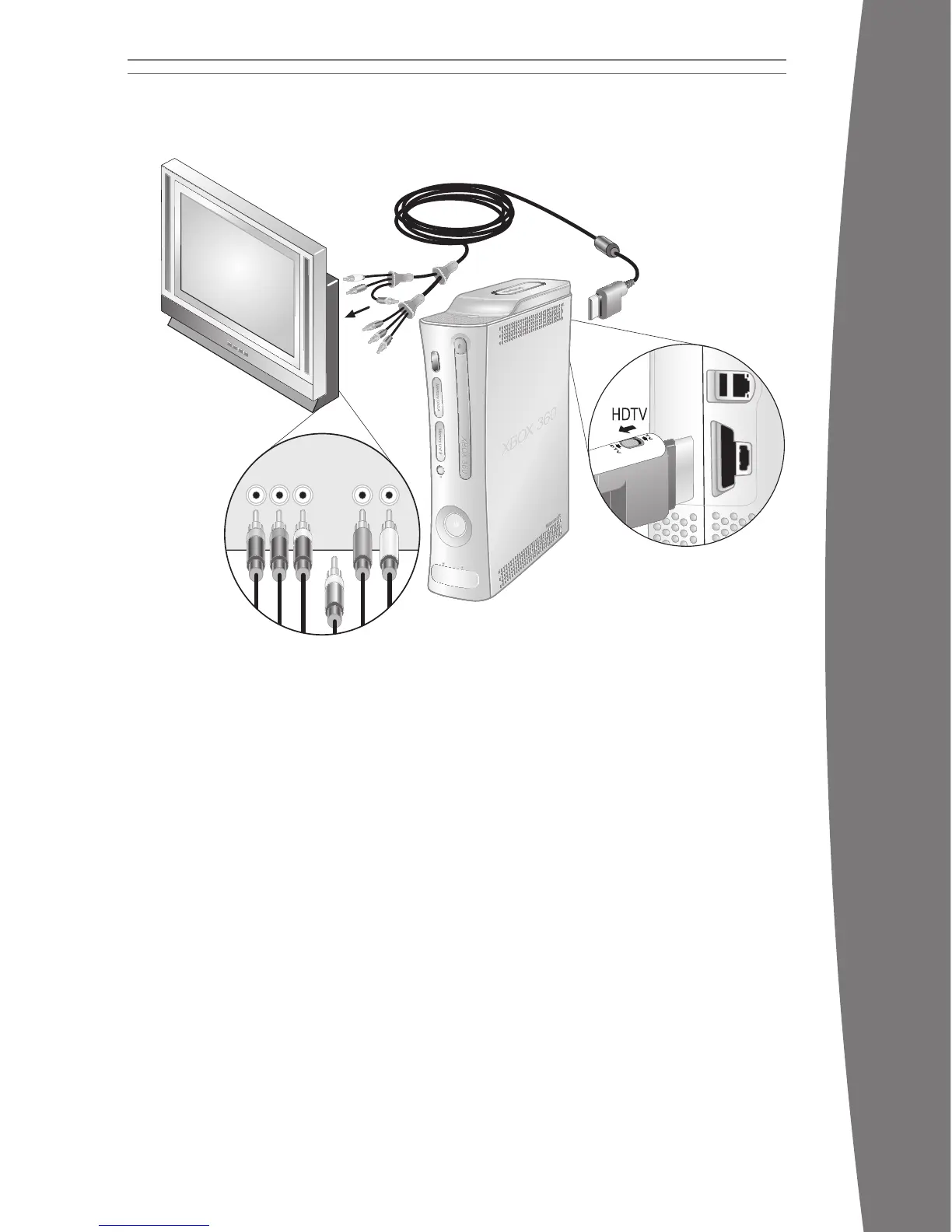
To connect to your high denition TV:
1 Connect the HD AV Cable connector to the
AV port on the console.
2 Set the switch on the AV port connector to
TV or HDTV. The HDTV position should be
selected if your TV supports high denition
reso
lutions such as 480p, 720p, 1080i, or
1080p.
3 Connect the red, green, and blue color-
banded video connectors on the HD AV
cable to the corresponding color inputs (Y,
Cb/Pb, Cr/Pr) on your TV. Leave the yellow
color-banded composite video connector
unconnected.
4 Connect the solid color left and right (white
and red) audio connectors on the HD AV
cable to the audio inputs on your TV or
stereo receiver.
5 Select the appropriate video input on your
TV (see “No Picture” under
“Troubleshooting” for further information).
After you’ve set up your console, you can
congure additional console audio settings
and te
st your connection from the System
area of the Xbox Dashboard. But before doing
so, proceed through the steps in the following
pages for connecting to power, connecting
your controller, and other initial settings.
Other AV Input
You can also connect to additional TV input
types by using the Xbox 360 S-Video AV Cable,
the Xbox 360 VGA HD AV Cable, or the Xbox
360 HDMI AV Cable (all sold separately). For
more information, go to www.xbox.com/setup.
iMPOrTanT
Stationary images in video games can “burn”
into some TV screens, creating a permanent
shadow. Consult your TV owner’s manual or
manufacturer before playing games.
Connect the Component HD AV Cable
Use your component HD AV cable to connect
your console to your TV.
To connect to your standard TV:
1 Connect the HD AV cable connector to the
AV port on the console.
2 Set the switch on the AV port connector to
TV.
3 Connect the yellow color-banded
composite signal video connector on the
HD AV cable to the yellow input on your TV.
Leave the red, green, and blue color-
banded video connectors unconnected.
4 Connect the solid color left and right (white
and red) audio connectors on the HD AV
cable to the audio inputs on your TV or
stereo receiver.
For monaural (mono) TVs, which have only
one audio input, connect either the right or
left audio connector to the audio input.
5 Select the appropriate video input on your
TV (see No Picture under “Troubleshooting”
for more information).
nOTE
Your Xbox 360 Component HD AV Cable has
two distinct sets of connectors on the TV end
grouped by audio and video. Do not confuse
the red connector from the audio group with
the red connector from the video group.
CONNECT TO YOUR TV AND AUDIO SYSTEM
X130405002MNL.indb 5 8/10/2007 6:28:16 PM














 To Next Page