To avoid damaging the power cords and power supply:
• Protect the power cords from being
walked on.
• Protect cords from being pinched or
sharply bent, particularly where they
connect to the power outlet, the power
supply unit, and the console.
• Do not jerk, knot, sharply bend, or
otherwise abuse the power cords.
• Do not expose the power cords to
sources of heat.
• Do not wrap power cords around the
power supply unit.
• Keep children and pets away from the
power cords. Do not allow them to bite
or chew on them.
• When disconnecting the power cords,
pull on the plug—do not pull on the
cord.
• Do n
ot let the power supply hang
from e
ither power cord.
If a power cord or power supply becomes
damaged in any way, stop using it
immediately and contact Xbox Customer
Support for a replacement.
Unplug your Xbox 360 console during
lightning storms or when unused for long
periods of time.
Always connect th
e power cords
according to the following instructions:
1 Fully insert the power supply cord
into the Xbox 360 console.
2 Plug the AC power cord into the power
supply until it stops.
3 Plug the other end of the AC power
cord into the wall outlet.
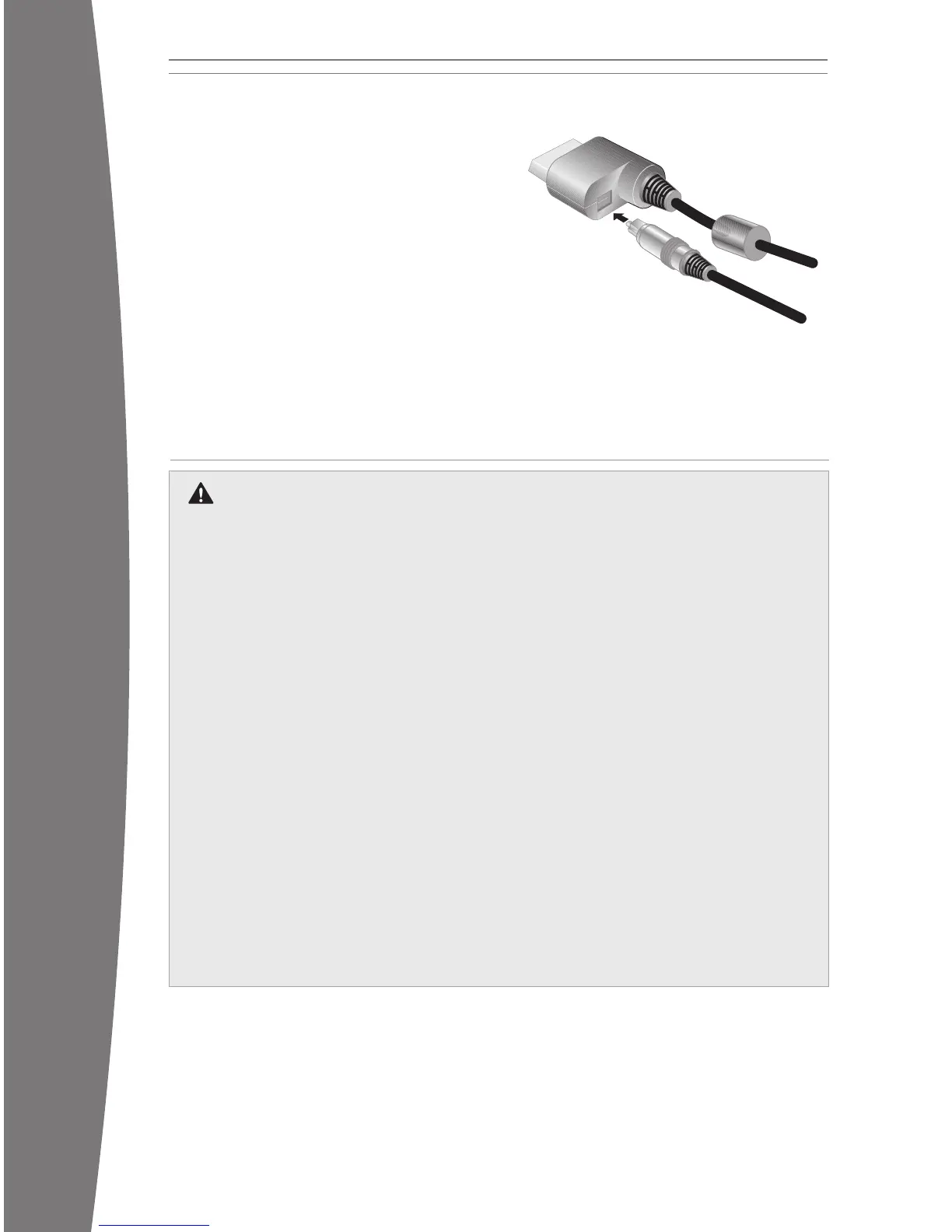
Connect to a Digital Audio System
If your system (typically, a receiver or
amplier) supports digital audio input, you can
conn
ect to digital audio rather than to the
standard left and right audio. Digital audio
should produce higher-quality sound.
To connect to digital audio:
1 Connect your video input as described in
the preceding sections.
2 Connect your digital audio cable (not
included) to the digital audio output on
your AV cable and to the digital audio input
on your receiver.
CONNECT TO POWER
Electrical Safety
As with many other electrical devices,
failure to take the following precautions
can result in serious injury or death from
electric shock or re or damage to the
Xbox 3
60 video game and entertainment
system.
Sel
ect an appropriate power source for
your Xbox 360 console:
• Use only the power supply unit and AC
power cord that came with your
console or that you received from an
authorized repair center. If you are not
sure if you have the correct power
supply unit, compare the model
number on the power supply unit with
the model number specied on your
cons
ole. If you need a replacement
power supply unit or AC power cord,
contact Xbox Customer Support.
• Conrm that your electrical outlet
provides the type of power indicated
on the power supply unit (in terms of
voltage [V] and frequency [Hz]). If you
are not sure of the type of power
supplied to your home, consult a
qualied electrician.
• Do n
ot use non-standard power
sources, such as generators or
inverters, even if the voltage and
frequency appear acceptable. Only use
AC power provided by a standard wall
outlet.
• Do n
ot overload your wall outlet,
extension cord, power strip, or other
electrical receptacle. Conrm that they
are rat
ed to handle the total current (in
amps [A]) drawn by the Xbox 360
console (indicated on the power supply
unit) and any other devices that are on
the same circuit.
• Do not connect any other devices
between the Xbox 360 power supply
unit and the Xbox 360 console or
between the power cord and the Xbox
360 power supply unit.
X130405002MNL.indb 6 8/10/2007 6:28:20 PM














 To Next Page