6
*
M34 DIGITAL BTE
STD
AGC PP
PP-AGC
FC OPEN
HIGHPOWER
1
2
3
4
5
6
6
7
2
3
4
5
7
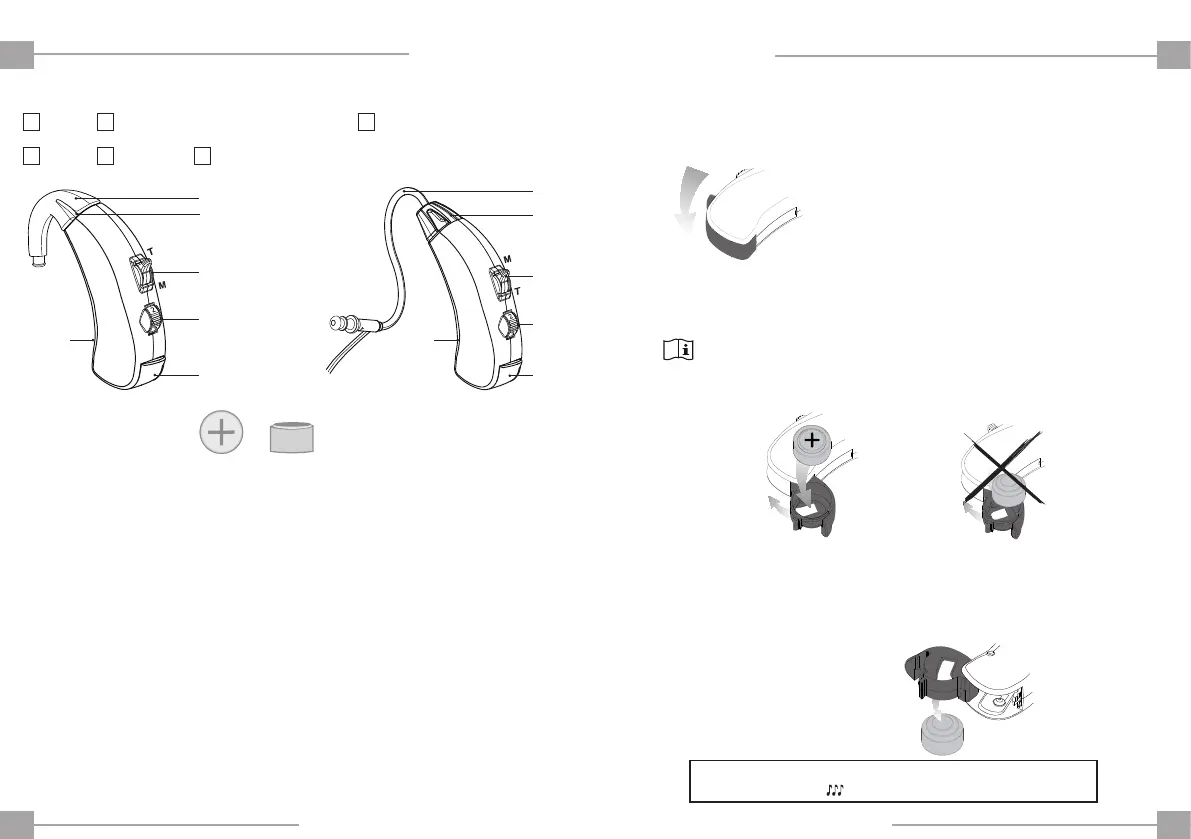
1- Opening the battery compartment.
BATTERY INSERTION AND REMOVAL
Battery Type 13
1
(Size original)*
2- Insert the battery with the “+” symbol facing upwards and
close the battery compartment.
If the battery is not correctly inserted, the hearing aid will
not function.
3- To remove the battery, face the opening of the hearing aid
downwards, open the battery compartment and allow it to fall
into your hand.
ENEN
REMEMBER THAT YOUR HEARING AID WILL WARN YOU VIA THREE AUDIBLE
TONES WHEN THE BATTERY IS DEAD.
1
IEC 60086 Designation: PR48
DESCRIPTION OF YOUR HEARING AID
Ergonomic ear-hook1.
Microphone2.
M-T Switch3.
Volume Control4.
Battery compartment* 5.
Thin Tube7.
(For use exclusively by the Hearing Aid specialist)
Trimmers6.


 To Next Page