8 9
M-34 DIGITAL
STD / HIGHPOWER / AGC / PP-AGC / PP FC OPEN
M
T
M
T
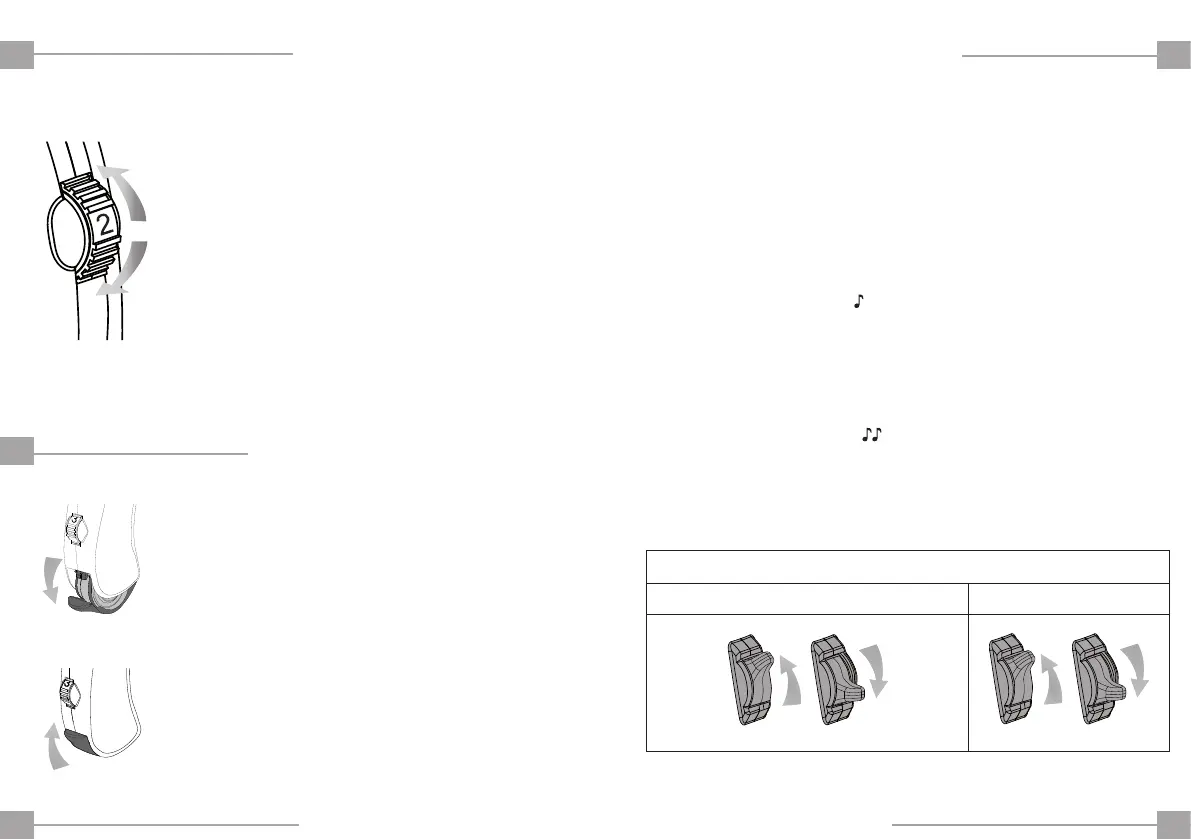
ADJUSTING THE VOLUME
RAISELOWER
SWITCHING ON / OFF
DISCONNECT
CONNECT
ENEN
The volume control allows you to adjust
the amplification of your hearing aid.
Use a finger to rotate the volume control
wheel, as indicated in the figure.
Number 1 is the lowest level.
Number 4 is the highest level.
Your hearing aid has 2-position (T-M) switch for:
Switch Position T:
Program designed for talking on the phone or for use in
public places such as theatres and churches with induction
loop. (Consult your specialist).
You will hear one tone
when you select this program.
Switch Position M:
Normal hearing program.
This program is recommended for mobile phone* use.
You will hear two tones
when you select this program.
*Your hearing aid complies with the IEC 60118-13 standard on electromagnetic compatibility.
SWITCH POSITION
TURNING ON:
To turn on your hearing aid, close the
battery compartment.
TURNING OFF:
To turn off your hearing aid, partially open
the battery compartment.


 To Next Page