4.3 Operator Interface Panel
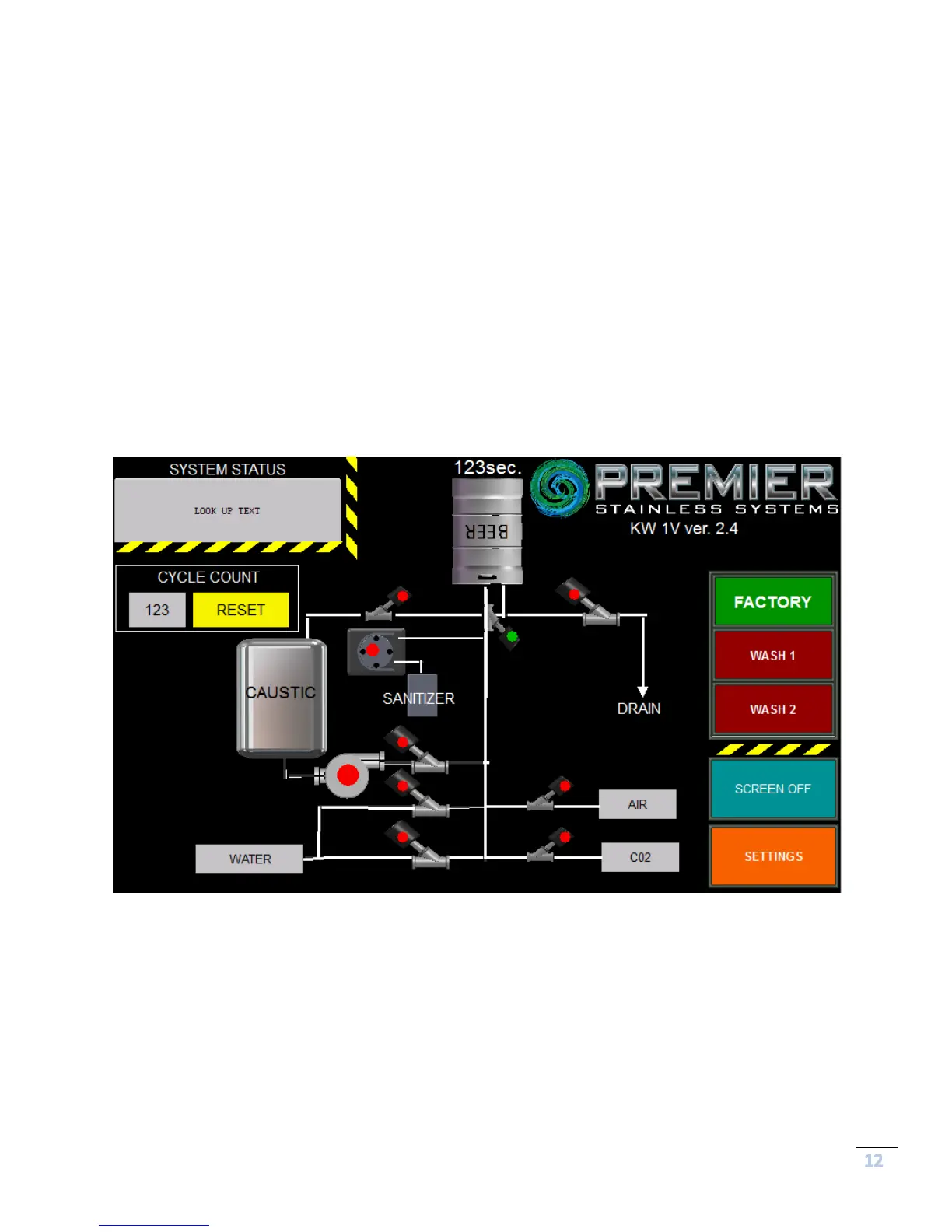
The Operator Interface Panel is used to monitor keg washing cycles, choose cleaning
programs, and count cleaning cycles. Once powered up, the keg washer will display the
wash programs available.
PRIOR TO USE, ALWAYS FOLLOW ALL PREPARATION AND SAFETY PROCEDURES.
You can toggle between the factory and user pre-sets by touching the “Factory” or “Wash
1/Wash 2” buttons seen in Figure 5 below. The operator can customize the cleaning
program to match their specific requirements. The selected cycle will be listed on the
screen in green.
The Premier Stainless keg washer allows the user to easily adjust their cleaning times by
touching the “Settings” button bringing up the selection screens shown in subsequent figures
where the parameters for custom wash programs can be entered.


 To Next Page