75730 Instructions for Kit #75729 = West Temperature Controller • Rev. H • 09-27-21 Page 8 of 8
OPERATING INSTRUCTIONS
NOTE: After 1 minute of no key activity, the controller will go to “Set Point Only” with the lower display blank.
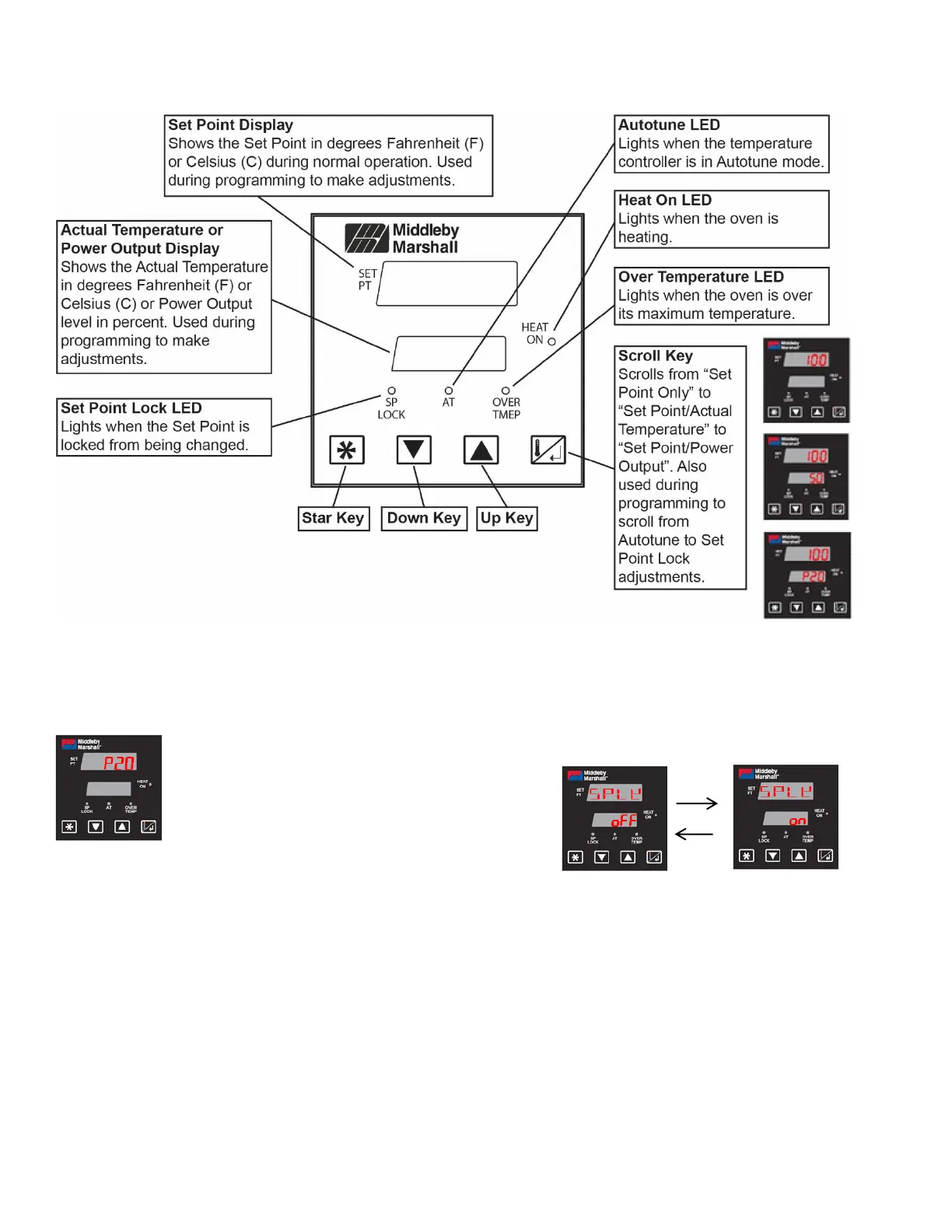
OPERATION ADJUSTMENTS
Adjusting the Set Point
The set point appears in the upper
display and can only be adjusted when
the lower display is blank. Press the
Scroll key until you reach this “Set
Point Only” display. Use the Up and
Down keys to adjust the temperature.
Holding in the pressed key will adjust
at a faster rate.
Adjusting for °F/°C
Press the Up and Down keys together for 3 seconds.
The units will switch between Fahrenheit and Celsius.
PROGRAMMING ADJUSTMENTS
Locking and Unlocking Set Point
The Set Point can be locked so that it isn’t changed
during operation. Press the Star key for 3 seconds, then
use the Scroll key to choose Set Point Lock. Use the Up
and Down keys to turn the Set Point Lock on and off.
Press the Star key for 3 seconds to exit.



 To Previous Page