2-7
SECTION 2
INSTALLATION
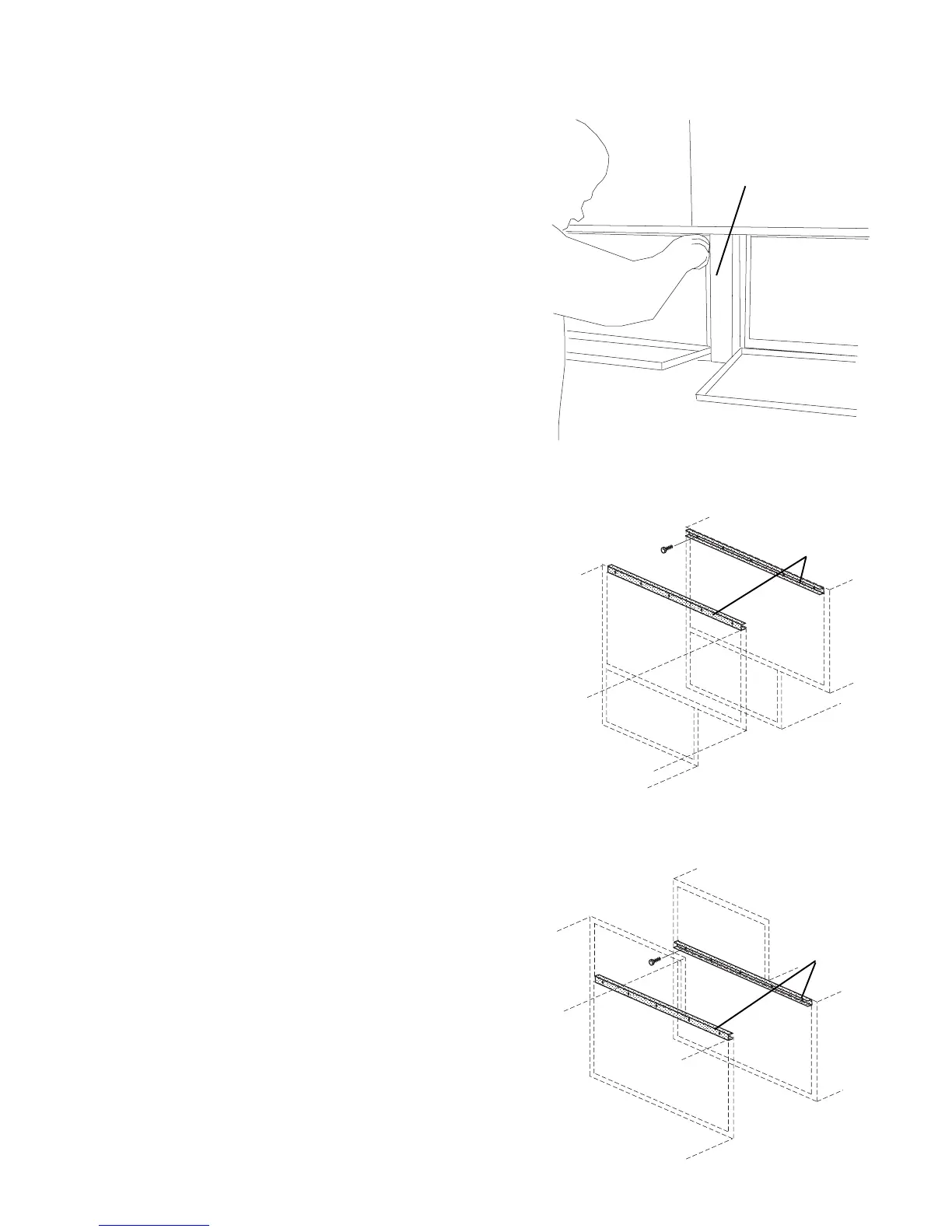
7. Attach the front trim strip between the two ovens, as
shown in Figure 2-11.
8. Replace the rear axial cooling fans. See Figure 2-8.
9. Perform one of the following, as appropriate:
For PS360/360WB Tandem and Double Tandem
installations, skip ahead to Part D, INSTALLING
THE CONVEYOR FRAME AND BELT (Page 2-9).
For PS360/360WB Tri Tandem installations, perform
Steps 1-8 again to attach the third oven to the two
that have just been assembled. Then, skip ahead to
Part D, INSTALLING THE CONVEYOR FRAME
AND BELT (Page 2-9).
For PS360/360WB Quad Tandem installations,
perform Steps 1-8 again to attach the two remaining
ovens to each other. Then, continue on to Part C,
INSTALLING THE CENTER TRANSITION.
Figure 2-11 - Trim Strip Installation
Figure 2-12
Support Channel Installation - Lower Oven
Figure 2-13
Support Channel Installation - Upper Oven
Support
channels
C. INSTALLING THE CENTER TRANSITION
1. Install the upper support channels to the two center
ovens as shown in Figures 2-12 and 2-13.
Trim strip
Support
channels




 To Next Page