R-410A will raise pressures (vapor, liquid and discharge).
If adding R-410A raises both vapor pressure and temperature, the unit is over-
charge.
8.1 CHARGING BY LIQUID PRESSURE
The liquid pressure method is used for charging systems in the cooling and heating
mode. The service port on the liquid (small valve) and suction (large valve) is used
for this purpose.
Verify that the outdoor unit is running and the indoor air mover is delivering the
maximum airflow for this system size. Read and record the outdoor ambient tem-
perature. Read and record the liquid and suction pressures at the ports on the liquid
and suction valves.
8.0 CHECKING REFRIGERANT CHARGE
17
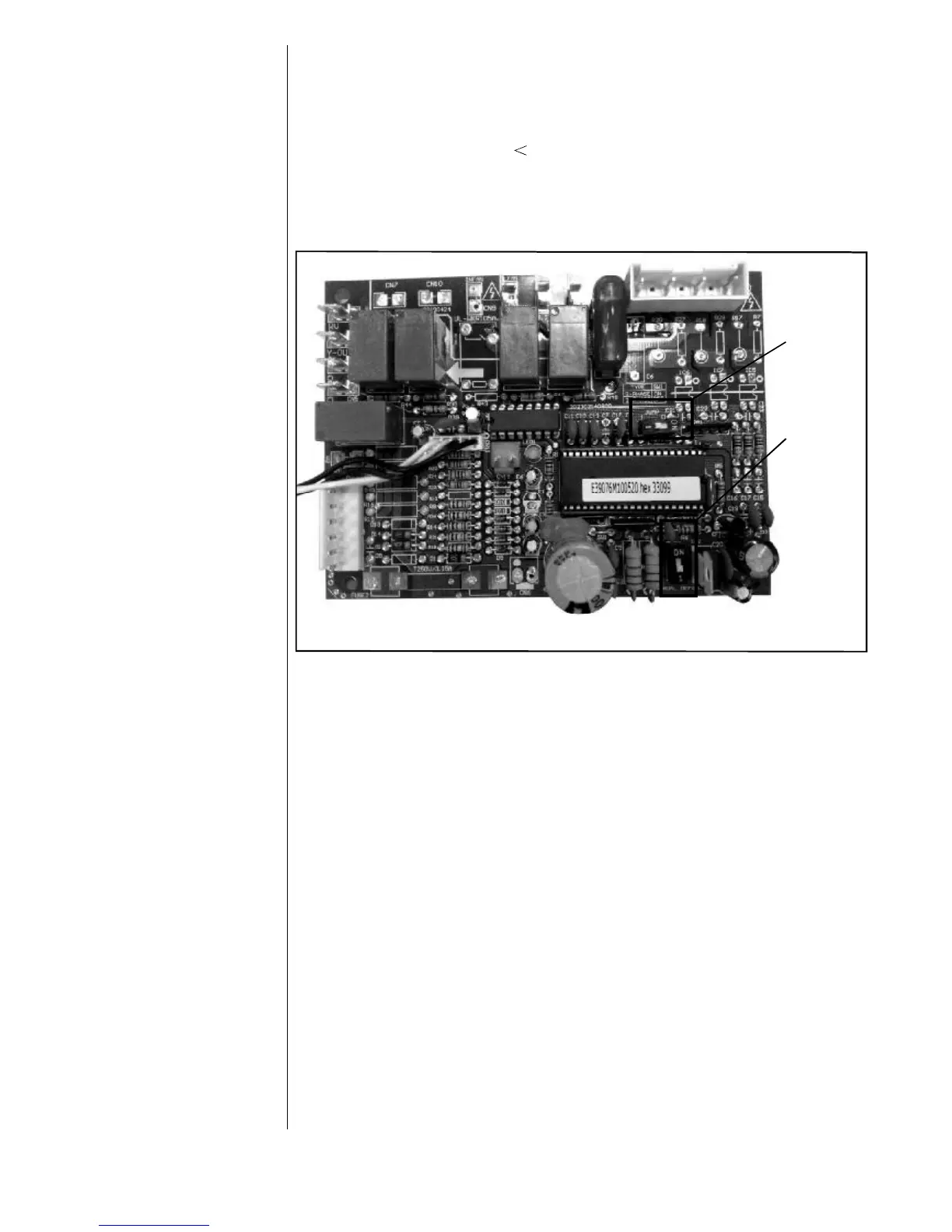
7.5 MANUAL DEFROST MODE (For HP system only)
When MANUAL DEFROST switch in PCB is set to “1”, system will perform as
above 7.4 description.
When the switch is set to “0”, T3 32°F, compressor keeps running and lasting
for 40 seconds, the system turns to the Defrost Mode. By the logic of 7.4 to
exit the Defrost Mode.
Caution: Once finishes the manual defrost, please switch the MANUAL
DEFROST in PCB to “1”.
Fig.11 Switch location in the PCB board
JUMP
MANUAL
DEFROST



 To Next Page