13
NOTE
• Use manganese or alkaline batteries of type “AAA”.
• Do not dispose of batteries in fire, batteries may explode or leak.
• Do not mix old and new batteries.
• Do not mix alkaline, standard (carbon-zinc) or rechargeable (nickel-cadmium)
batteries.
Battery not included in the packaging
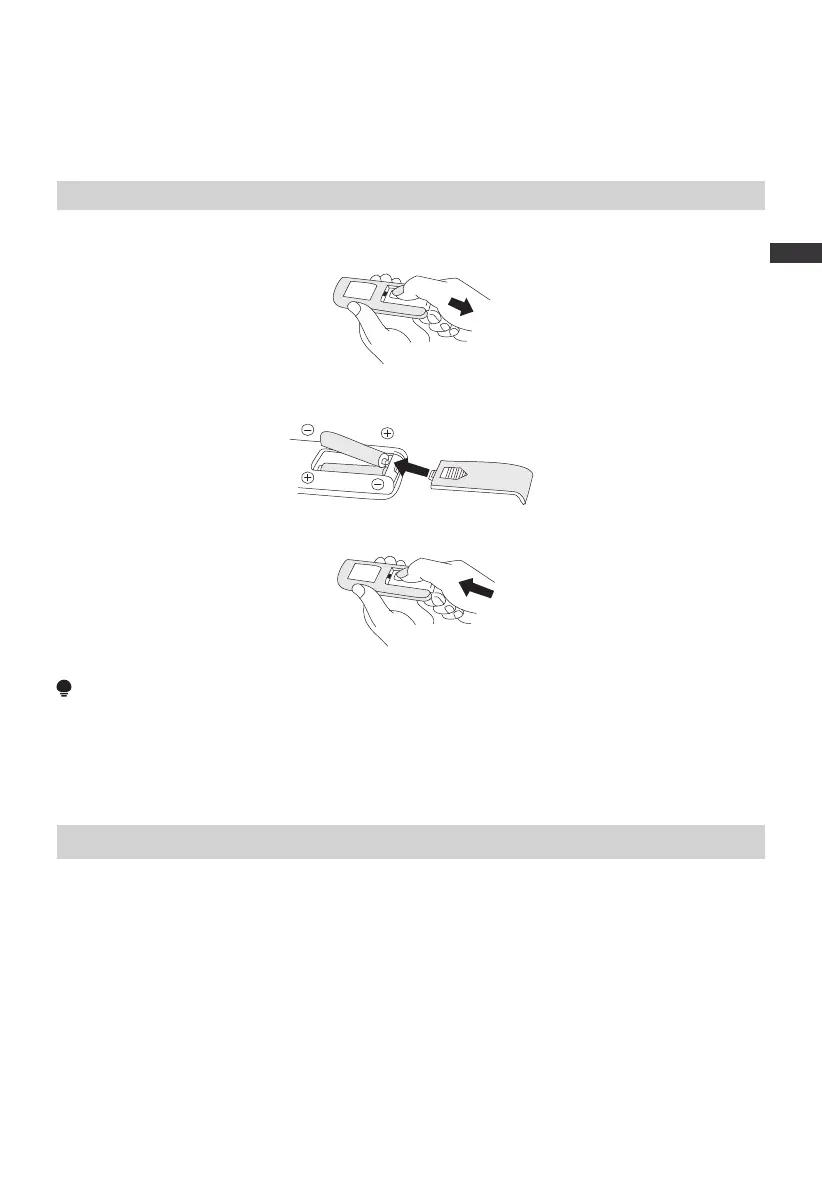
1 Slide the battery compartment cover.
2 Insert the batteries, and make sure that the batteries are placed as shown in the Fig 2.
3 Slide back the battery cover.
Fig 2
Fig 1
Fig 3
Batteries Installation
• Do not dispose of batteries in fire, batteries may explode or leak.
• Do not mix old and new batteries.
• Do not mix alkaline, standard (carbon-zinc) or rechargeable (nickel-cadmium)
batteries.
• Non-rechargeable batteries are not to be recharged.
• Batteries are to be inserted with the correct polarity.
• Exhausted batteries are to be removed from the product.
• The batteries must be removed from the remote controller before it is scrapped and
that they are disposed of safely.
• The battery needs to be recharged at least once every 6 months.
Batteries Warning As Below
Screen-off function
• In case of no operation for 60 seconds during normal operation, the indicator light on
the body will be automatically off, but the fan will continue to operate. Press the
ON/OFF button to turn off the fan when the screen is off, and press the other button
to restore display.
EN


 To Next Page