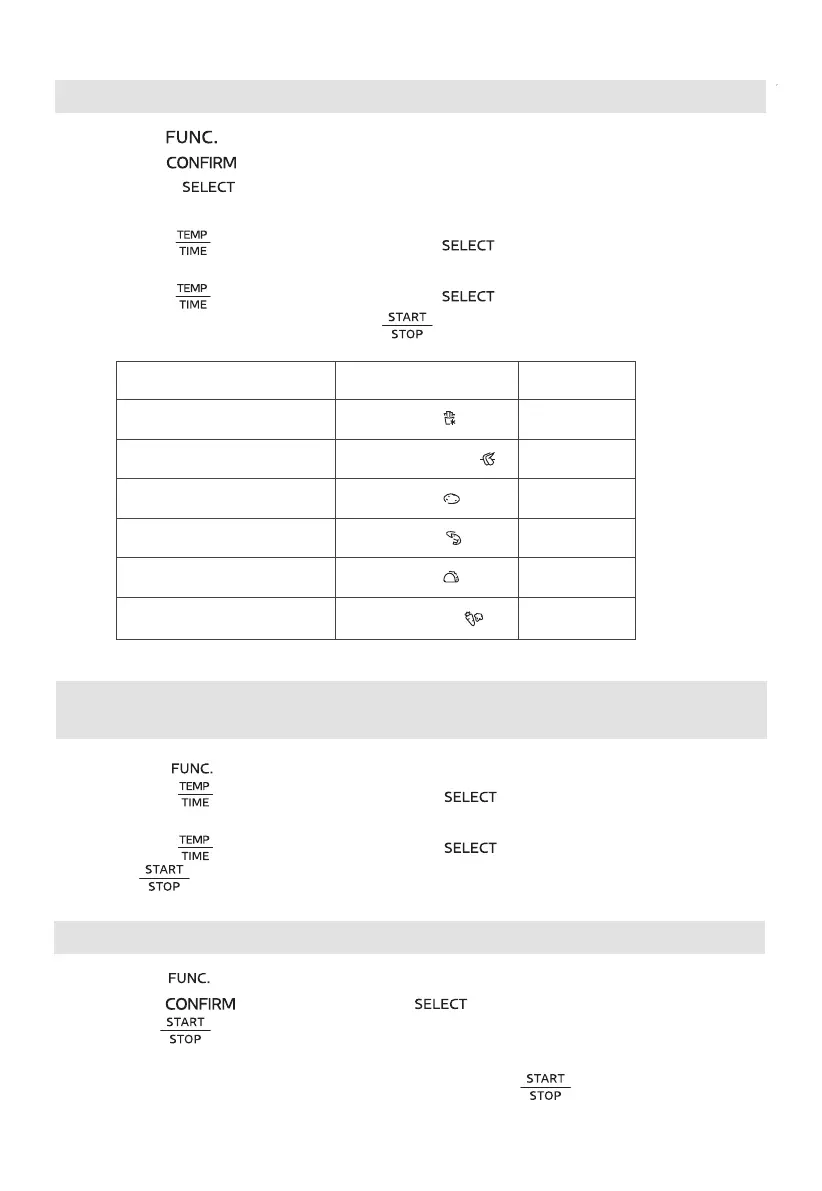
Using the air fry function
1. Press the " " button to select the air fry function.
2. Press the " " button, A01 flashes.
3. Rotate the " " knob to select A01~A06 (when you use the “A01”, please
put the chips into the air fry basket , and use the default time and default temperature).
Display AIR FRY Menu
A01
A02
A03
A04
A05
A06
Fries
Chicken Wings
Potato
Shrimp
Tacos
Vegetables
6. Put the food into the oven and press “ ” to start cooking.
4. Press the " " button and then rotate " " knob to
select cooking temperature.
5. Press the " " button and then rotate " " knob to select cooking time.
Default time
19min
11min
18min
8min
3min
10min
Using the dehydrate, slow cook, warm, reheat, roast, broil and
bake Function
1. Press the " " button to select the desired function.
2. Press the " " button and then rotate " " knob to
select cooking temperature.
3. Press the " " button and then rotate " " knob to select cooking time.
4. Press " " to start cooking.
3. Press the " " button to
Using the pizza function
1. Press the " " button to select the pizza function. The screen displays " 9 INCH ".
2. Press the " " button, rotate the " " knob to select the 6, 9 or 12 inches.
start preheating, when preheat temperature reached,
the buzzer will sound 5 times.
4. Put the food into the oven and close the door, press the " " to start cookong.



 To Next Page