45
How to Use Basic Functions
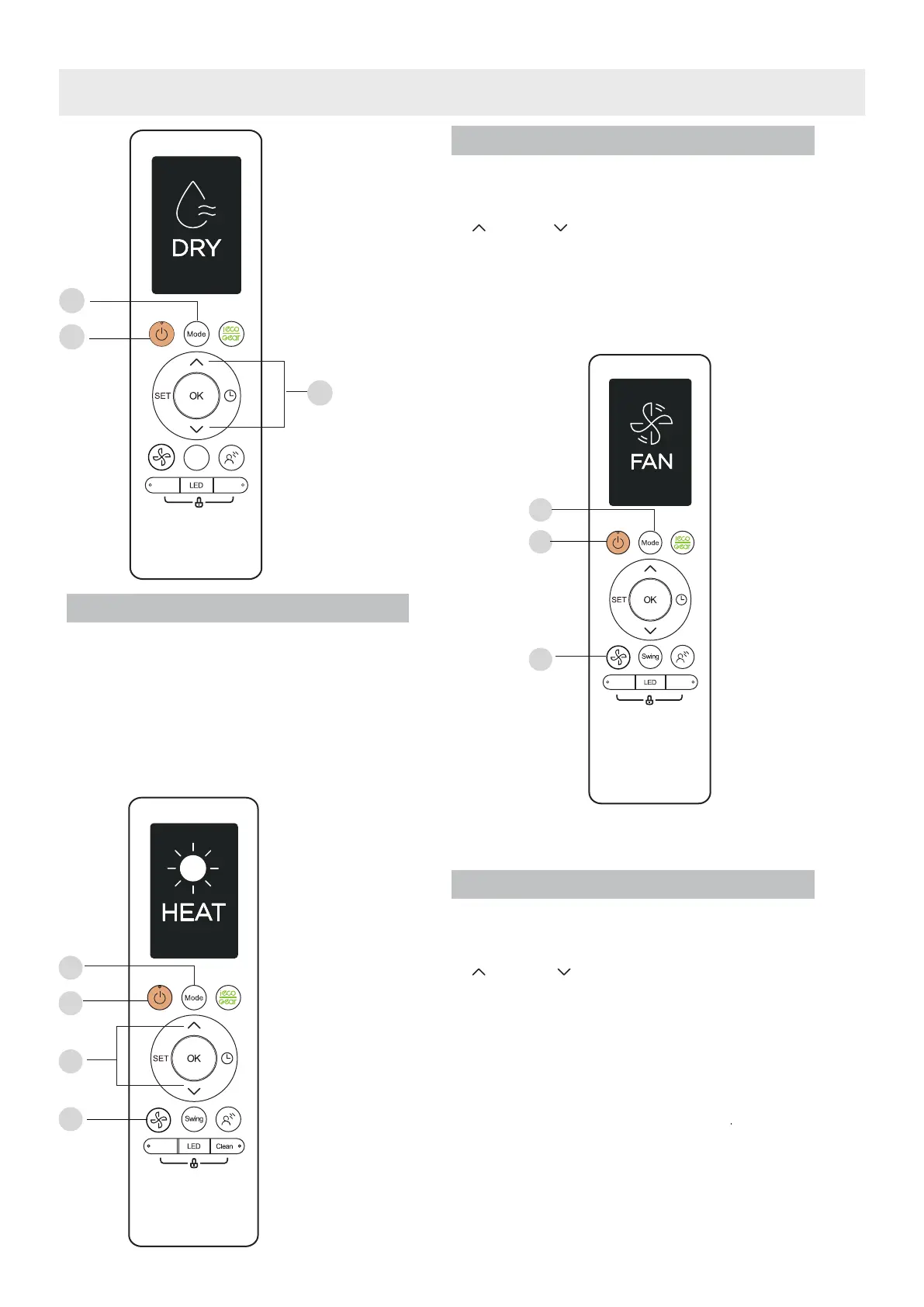
FAN Mode
DRY Mode (dehumidifying)
NOTE:
FAN SPEED can’t be changed in DRY
mode.
1. Press the MODE button to select DRY mode.
2. Set your desired temperature using the TEMP
or TEMP button.
3. Press the ON/OFF button to start the unit.
HEAT Mode
NOTE: As outdoor temperature drops, the
performance of your unit’s HEAT function may
be affected. In such instances, we recommend
using this air conditioner in conjunction with
other heating appliances.
1. Press the MODE button to select HEAT mode.
2. Set your desired temperature using the TEMP
or TEMP button.
3. Press FAN button to select the fan speed in a
range of AU-100%.
4. Press the ON/OFF button to start the unit.
1. Press the MODE button to select FAN mode.
2. Press button to select the fan speed in
a range of AU-100%..
3
. Press the ON/OFF button to start the unit.
NOTE:
You can’t set temperature in FAN mode.
As a result, your remote control’s LCD screen
will not display temperature.
Swing
Boost
Clean
1
3
2
Boost
Clean
1
3
2
1
3
2
4
B o o s t




 To Next Page