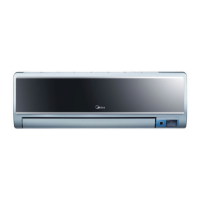
This document is a user's manual for a split-type room air conditioner, providing essential information for its safe operation, maintenance, and optimal performance. It emphasizes the importance of reading the manual carefully and keeping it for future reference.
Function Description:
The air conditioner is designed to provide cooling and heating (for reverse cycle models) for indoor spaces. It features various operating modes, including AUTO, COOL, HEAT, DRY, and FAN ONLY, allowing users to select the desired climate control. A key function is the "CLEAN AIR" feature, which utilizes an ionizer device to generate abundant anions, aiming to fill the room with refreshing and natural air for improved air quality. The "Auto Clean" function is designed to clean the evaporator after cooling operation, helping to maintain freshness for subsequent use and prevent bacterial growth. The "Follow Me" function allows the remote control to act as a remote thermostat, enabling precise temperature control at its location by sending temperature signals to the unit at regular intervals. The "Dry & Antibacterial" function, a factory default setting, helps to dry up water inside the evaporator after operation in COOL, DRY, or AUTO (Cool) modes, preventing bacterial multiplication and ensuring clean, fresh air.
Usage Features:
The air conditioner offers both remote control and manual operation options. For manual operation, in case the remote control is unavailable or its batteries are exhausted, the unit can be operated by pressing a button, which cycles through AUTO, COOL, and OFF modes. The default setting temperature in AUTO mode is 24°C.
Airflow direction can be adjusted both vertically and horizontally. The vertical airflow direction is automatically adjusted based on the operating mode, but can also be manually set using the SWING button on the remote control. Keeping the SWING button pressed for more than 2 seconds activates automatic horizontal louvre swing. Horizontal airflow direction is adjusted manually using a lever on the vertical louvre arm.
The unit includes a "SLEEP OPERATION" feature, which, when activated during cooling, heating, or AUTO operation, automatically adjusts the set temperature by 1°C per hour, stabilizing after two hours. The fan speed is also automatically controlled in this mode, and the unit will turn off after seven hours.
The "DRYING OPERATION" automatically selects the drying operation based on the difference between the set temperature and the actual room temperature, regulating temperature while dehumidifying by cycling cooling or fan-only operation at a low fan speed.
The manual also highlights several operational tips for optimal performance, such as correctly adjusting airflow, setting comfortable temperatures, closing doors and windows during COOL or HEAT modes, using the Timer ON function, avoiding obstructions near air inlets/outlets, and periodically cleaning the air filter.
The air conditioner incorporates protection features, including a 3-minute compressor protection delay before restarting. For reverse cycle models, an "Anti-cold air" feature prevents cold air from being blown during the initial stages of heating, defrosting, or low-temperature heating. Defrosting occurs automatically when frost builds up on the outdoor unit during heat cycle, with the duration varying based on outdoor conditions. The unit also has an "Auto-restart function" that restores previous settings after a power cut.
Maintenance Features:
Regular cleaning and maintenance are crucial for the air conditioner's efficiency and longevity. The manual provides instructions for cleaning both the indoor unit and the air filters.
For the indoor unit, a dry cloth is recommended for general cleaning. For very dirty surfaces, a cloth dampened with cold water can be used, followed by wiping with a dry cloth. Users are explicitly warned against using detergents, chemical products, benzine, thinner, or polishing powder, as these can damage the unit's appearance or cause fire/electric shock.
Air filters, located behind the front panel, should be checked and cleaned every two weeks or more often if necessary, as clogged filters reduce cooling/heating efficiency. To clean, the front panel is opened, the air filter is removed, cleaned with a vacuum cleaner or water, dried in a cool place, and then reinstalled.
The rear air inlet grille also requires periodic cleaning (every two weeks or more often). It can be removed by pushing its sides, cleaned with water, wiped dry, and then reinstalled.
For long periods of disuse, specific maintenance steps are recommended: cleaning the indoor unit and air filter, running the indoor fan in FAN only mode to dry the unit's interior, disconnecting power, and removing batteries from the remote control. Periodic checks of outdoor unit components and contacting a service center for servicing are also advised. Before operating the unit after a long period of disuse, users should check wiring, air filter installation, and ensure air outlets/inlets are not blocked.
The manual also includes a troubleshooting section with common malfunctions and their solutions, emphasizing that users should not attempt to repair the unit themselves but rather consult an authorized service provider.


 To Next Page
 General