Need help?
Do you have a question about the Midea R51 and is the answer not in the manual?
Manual override of settings using COOL, DRY, HEAT, or FAN ONLY modes. Includes temperature and fan speed adjustments.
Operation mode for dehumidifying. Includes setting desired temperature and starting/stopping the unit.
Function to set the on and off times for the air conditioner unit.
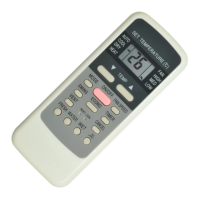
Explanation of indicators like TRANSMISSION, MODE, HEAT PUMP, TIMER, and Digital Display.
Instructions for installing and replacing the two alkaline dry batteries in the remote controller.
Steps to operate the air conditioner in AUTO mode, including selecting mode, setting temperature, and starting/stopping.
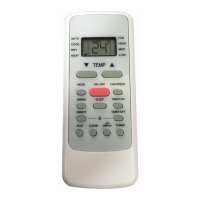
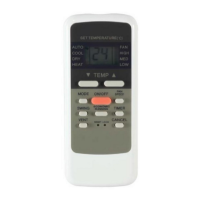
This document serves as the owner's manual for a remote controller, specifically model R51/E-30, designed for use with an air conditioner. It outlines the various functions, operational procedures, and maintenance considerations for the device.
The remote controller is a versatile tool for managing an air conditioner, offering a range of operating modes including COOL, HEAT, DRY, FAN, and AUTO. This allows users to select the most appropriate setting for their comfort needs, whether it's for cooling down a room, providing warmth, reducing humidity, circulating air, or allowing the system to automatically adjust based on ambient conditions.
A key feature is the 24-hour Timer Setting Function, which enables users to program the air conditioner to turn on or off at specific times. This is particularly useful for energy saving and ensuring a comfortable environment upon arrival or waking. The timer can be set for a single start time, a single stop time, or a combination of both, providing flexibility in scheduling the unit's operation. The controller also supports a wide indoor setting temperature range, typically from 17°C to 30°C, allowing for precise temperature control.
The remote controller incorporates an LCD (Liquid Crystal Display) that clearly shows all active functions and settings, making it easy for users to monitor the air conditioner's status. For specific models (R51/BG), a Night Light Function is available, enhancing usability in low-light conditions. The controller is also designed to be compatible with older R11 models, ensuring broader applicability.
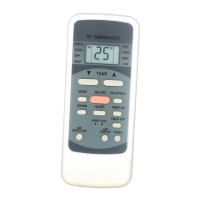
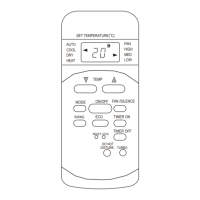
Operating the remote controller involves a series of intuitive button presses. The "MODE Select Button" allows users to cycle through the available operating modes (AUTO, COOL, DRY, HEAT, FAN). The "TEMP Button" is used to adjust the desired room temperature, either increasing or decreasing it. For timer settings, the "TIMER Button" initiates the programming sequence, and the "TEMP Button" is then used to set the specific start or stop times. The "CANCEL Button" can clear any previously set timer programs.
The "FAN SPEED Button" offers control over the fan's intensity, with options for AUTO, LOW, MED, and HIGH, allowing users to regulate airflow as needed. A "SWING Button" is available to adjust the louver angle, directing the airflow for optimal comfort. The "ON/OFF Button" serves as the primary control for starting and stopping the air conditioner's operation.
For enhanced functionality, the remote controller includes specialized buttons. The "ECONOMIC RUNNING Button" activates an energy-saving operation mode, which can help reduce power consumption. The "LOCK Button" allows users to lock all current settings, preventing accidental changes, and can be pressed again to release the lock. A "RESET Button" is provided to cancel all current settings and revert the control to its initial state, useful for troubleshooting or starting fresh.
The controller also features indicators on its display panel. A "TRANSMISSION Indicator" lights up when the remote controller sends signals to the indoor unit, confirming communication. A "MODE Display" shows the currently active operation mode. A "TIMER Display" indicates the status of any programmed timer settings, showing "TIMER ON" for a start time, "TIMER OFF" for a stop time, or "TIMER ON OFF" if both are set. A "FAN Display" illuminates when the fan button is pressed, and a "Digital Display Area" shows the set temperature and, in timer mode, the ON and OFF settings.
Maintaining the remote controller primarily involves proper battery management. The device uses two alkaline dry batteries (R03/Ir03X2). To install or replace batteries, users need to slide back the battery compartment cover and insert the batteries according to the polarity markings (+ and -). It is crucial to avoid mixing old and new batteries or different types of batteries, as this can lead to malfunction.
If the remote controller is not going to be used for several weeks, it is recommended to remove the batteries to prevent leakage, which could damage the device. Under normal use, the average battery life is approximately six months. Users should replace the batteries when the indoor unit no longer emits an answering beep upon receiving a signal, or if the "Transmission Indicator" light fails to appear, indicating low battery power.
The manual also provides important warnings for optimal performance and longevity. Users should ensure there are no physical barriers between the remote controller and the indoor unit's receiver to guarantee proper communication. The remote controller should be kept away from liquids, high temperatures, and direct exposure to radiation. Additionally, the indoor receiver should be protected from direct sunlight to prevent malfunction, and the controller itself should be kept away from electromagnetic interference (EMI) generated by other household appliances. These guidelines help ensure the remote controller functions reliably and effectively over time.
 General
| Brand | Midea |
|---|---|
| Model | R51 |
| Compatibility | Midea Air Conditioners |
| Power Source | 2 x AAA batteries |
| Display | LCD |
| Type | Remote Control |
| Wireless Communication | Infrared (IR) |
| Buttons | Power, Mode, Fan Speed, Temperature, Swing, Timer, Sleep, Turbo |
| Range | Up to 8 meters |

 To Next Page