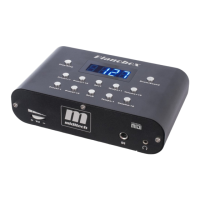
Drum-Mode overview:
Please switch with the Drum/Sound button in the drum mode, the display shows a „d“.
1.Preset +1 – this button switches the drum pattern program number in one step up
display: „d“ for drum and then the program-number, e.g. d.xxx
2.Preset +10 – this button switches the drum pattern program number in 10 step up
display: „d“ for drum and then the program-number, e.g. d.xxx
3.RevT – with this button you can choose a reverb type. In the Pianobox II there are 8
reverb types usable.
display: „P“ for the reverb type and then the type number, e.g. P.008
4.Tempo +1 - in drum-mode this button controls the tempo of the pattern in 1 step up
display: „t“ for drum tempo and then the number, e.g. t.112
5.Volume +10 - in drum-mode this button controls the volume +10 step up
display: „L“ for the volume level and then the number, e.g. L.127
6.Preset -1 – this button switches the drum pattern program number in one step down
display: „d“ for drum and then the program-number, e.g. d.xxx
7.Preset -10 – this button switches the drum pattern program number in 10 step down
display: „d“ for drum and then the program-number, e.g. d.xxx
8.RevD – with this button you can choose a reverb type parameter.
display: „e“ for the effect power from 0-127, e.g. e.110
9.Tempo -1 - in drum-mode this button controls the tempo of the pattern in 1 step down
display: „t“ for drum tempo and then the number, e.g. t.112
10.Volume -10 - in drum-mode this button controls the volume -10 step down
display: „L“ for the volume level and then the number, e.g. L.127
Because the Pianobox USB is fully General MIDI compatible, you can send normal GM bank select
and program change orders with a sequenzer or a masterkeyboard. So you will reach the additional
sounds and drumsets. The drumsounds are only triggered on MIDI channel 10. You can use 16
channels at one time with different sounds, because the sound engine of the Pianobox USB is
multitimbral.
If you use the Pianobox USB with the USB port on a PC, the Pianobox USB will be fully USB
powered. You can use the internal USB MIDI Interface to record and playback MIDI files.
16



 To Next Page