TO OPEN/CLOSE CONFERENCE
Status: Conference
Press once
opens/closes
Conference to
the unit paired to
button 1
Press once
opens Conference
to all units paired
Press once
opens/closes
Conference to unit
paired to button 3
Note: The device paired to Vol+ is temporary discon-
nected, while the one paired to Vol- is still active.
TO OPEN/CLOSE UNIVERSAL
INTERCOM
Status: Intercom mode
Press 3 seconds
activates
Universal intercom
Blinking
Sound alert
Press once
to deactivate
Universal Intercom
Note: to open/close the audio from a dierent brand
unit, use the voice dial command (for some
models you have to send the command twice)
Note: if you have another device as Universal Intercom,
follow the same procedure but press button 3.
BT NEXT PRO
ENGLISH
POCKET GUIDE
Frequency: 2.4GHz - Max power: 100Mw
Press 3 seconds
Blinking
Musical sound alert
Operating mode
status
Battery status
3”
3”
OPERATION
X”
Press X seconds
X
Press x times
AUDIO FEEDBACK
Sound alert
Musical sound alert
VISUAL FEEDBACK
Blue led blinking
Red led blinking
Red/blue led blinking
Purple led
Steady blue led
Steady red led
LEGENDA
POWER OFF
Press 3 seconds at
the same time
Blinking
Musical sound alert
Vol -
Vol+
Led
Button 3
Button 2
Button 1
CONTROLS DESCRIPTION - LEGENDA
PAIRING
PAIRING TO A MIDLAND UNIT
Status: Both units in setup mode
Press 3 seconds
(start procedure on
both units at the
same time)
Blinking
Steady 1 second,
pairing successful
Steady,
pairing complete
Note: To pair other Midland units, follow the same
procedure but press buttons 1 or 3.
PAIRING TO A PHONE/GPS
Status: Setup mode
Press 3 seconds
Blinking
Select device on
the phone
Steady 1 second,
pairing successful
Note: the unit paired to Vol- is in background to the
intercom. To pair the unit and interrupt the intercom,
repeat the procedure but press Vol+.
Pairing to:
• Midland unit
• Dierent brand unit
(Universal Intercom)
Pairing to a Midland unit
(passenger)
Pairing to:
• Midland unit
• Dierent brand unit
(Universal Intercom)
CONFERENCE
CONFERENCE
MUSIC SHARE VOX
TO ENTER SETUP MODE
Status: Power o
Press 7 seconds
Lights up
TO EXIT SETUP MODE/INTERRUPT
THE PAIRING
Status: Setup mode and during pairing
Press twice
TO RESET THE PAIRING
Status: Setup mode
Press 3 seconds at
the same time
Lights up
Steady led
PAIRING DESCRIPTION
Stereo background pairing (in
background to the intercom)
Ex.: phone with navigator-TFT-GPS
Main pairing stereo
(stops intercom)
Ex.: phone-TFT
7”
2
3”
3”
PAIRING TO A DIFFERENT
BRAND UNIT
Status: Setup mode
1st Unit
Press 7 seconds
(start procedure on
both units at the
same time)
Blinking fast
(keep pressed)
Blinking slowly
(release)
Steady,
pairing complete
2nd Unit
Follow the “phone”
pairing procedure
Note: to pair another Universal Intercom, follow the
same procedure but press Button 3.
7”
PAIRING 4 UNITS IN CONFERENCE
Status: Setup mode
7”
3” 3” 3”
Note: the Conference mode allows the simultaneous
communication amongst units.
All units must be paired in a “chain” configuration: the
Backwards button of the first unit must be paired to
the Forwards button of the second unit and so on.
For a detailed description of the function go to para-
graph “Conference” of the complete user manual.
FOR MORE INFO VISIT:
www.midlandeurope.com
Watch tutorial video
Download software
Download application
Read complete manual instruction
Prodotto o importato da/Produced or imported by: CTE INTERNATIONAL srl. Via R. Sevardi 7 - 42124
Reggio Emilia - Italy. Prima dell’uso leggere attentamente le istruzioni. Read the instructions carefully
before installation and use. Vertrieb durch: BIHR S.A.S. www.bihr.eu. Vor Benutzung Bedienungsanleitung
beachten. Importado por: MIDLAND IBERIA, SA. C/Cobalt, 48 - 08940 Cornellà de Llobregat,
Barcelona - España. Antes de utilizar, lea atentamente el manual de uso. Distributed by: BIKEIT.
Unit 9, Oriana Way Nursling Industrial Estate Southampton, Hampshire SO16 0YU United Kingdom -
www.bikeittrade.com. Read the instructions carefully before installation and use. Distribué par: BIHR S.A.S.
www.bihr.eu. Avant l’utilisation, lire les instructions.
A. MODALITÀ INTERCOM
OPERATING MODES
SHORTCUT - Remind - Operating mode status:
Press Vol-/Vol+ at the same time.
TO CHANGE THE OPERATING MODE
Status: Power on
Press 3 seconds
Operating mode
status
TO OPEN/CLOSE INTERCOM
MANUALLY
Status: Intercom mode
Press once
Sound alert
Blinking
Note: if you have paired another unit, push buttons 1 or
3 to open/close the intercom.
ENABLING/DISABLING VOX
Status: All modes
Press 7 seconds
Sound alert
SHORTCUT - To open the intercom while listening
to/sharing music in phone mode:
press button 2 twice.
TO OPEN/CLOSE INTERCOM USING
THE VOICE
Status: All modes
Say “Hello”
Sound alert
Blinking
40”
Mute for 40 sec.,
intercom is closed
Sound alert
Note: the voice activation is possible only if the unit is
paired to button 2.
A. Intercom mode: to talk to another unit.
B. Phone mode: phone calls or manage music.
C. FM radio mode: to listen to, seek and store
FM radio stations.
Note: Intercom and phone modes are possible only
when the units are paired.
RIDER 1
RIDER 2
(passenger)
RIDER 3
RIDER 4
(Press 3 seconds
Universal Intercom)
RIDER 5
(Press 3 seconds
Universal Intercom)
3”
7”
1
FM RADIO
Status: FM Radio mode
1
Radio station up
3”
Memory up
1
Radio station down
3”
Memory down
B. PHONE MODE
(Phone paired on Vol+)
• Make a call
• Answer a call
• End a call
• Reject a call
• Song forward
TO MAKE A CALL
Status: phone mode
Press once
Voice assistant
(Google assistant,
Siri)
Give instructions
to your assistant
Call starts
ANSWER/END A CALL
Press 3 seconds
MUSIC
Status: phone mode
Select a music APP
1
Press once
Song backward
3”
Press 3 seconds
activates/interrupts
music sharing with
passenger (Music
Share)
SHORTCUT - Music Play/pause in Intercom/FM
radio mode: press twice button 2.
C. FM RADIO MODE
CONTROLS DESCRIPTIONS
TO ENABLE/DISABLE CONFERENCE
Status: Intercom mode
Press 7 seconds
enables/disables
Conference
Sound alert
Conference status
Note: if your phone is paired to Vol-, press button 3.
3”
7” 1
1
1
1 1
3”
1
1
1
REMOTE MUSIC CONTROL
VOL+/VOL
Status: all modes
Press 3 seconds
Remote control
Vol+/Vol-
Note: if you have paired two multi-media devices, to
control the music of the device paired on Vol-, you
have to set the music control from Vol-; while to con-
trol the music of the device paired on Vol+, set the
music control from Vol+.
3”
PUBLIC/PRIVATE MODE
Status: all modes
Press 3 seconds
Private
Public
If Public mode is enabled, you can share in intercom mode
the information coming from the unit paired to Vol-.
Phone calls are always private.
3”
1
CONTROLS DESCRIPTIONPAIRING DESCRIPTION
A. INTERCOM MODE
(Phone paired on Vol-)
• Make a call
• Answer a call
• End a call
• Reject a call
• Song backward
Play/pause
Radio station up
Memory up
Radio station down
Memory down
FM radio On/O
INTERCOM MODE
PHONE
MODE
FM RADIO
MODE


 To Next Page
 Need help?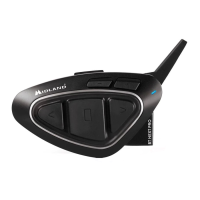

 General