EasyManua.ls Logo

MidNite Solar Classic 150 - User Manual

MidNite Solar Classic 150
102 pages
Print Icon
To Next Page IconTo Next Page
Loading...
1 | P a g e
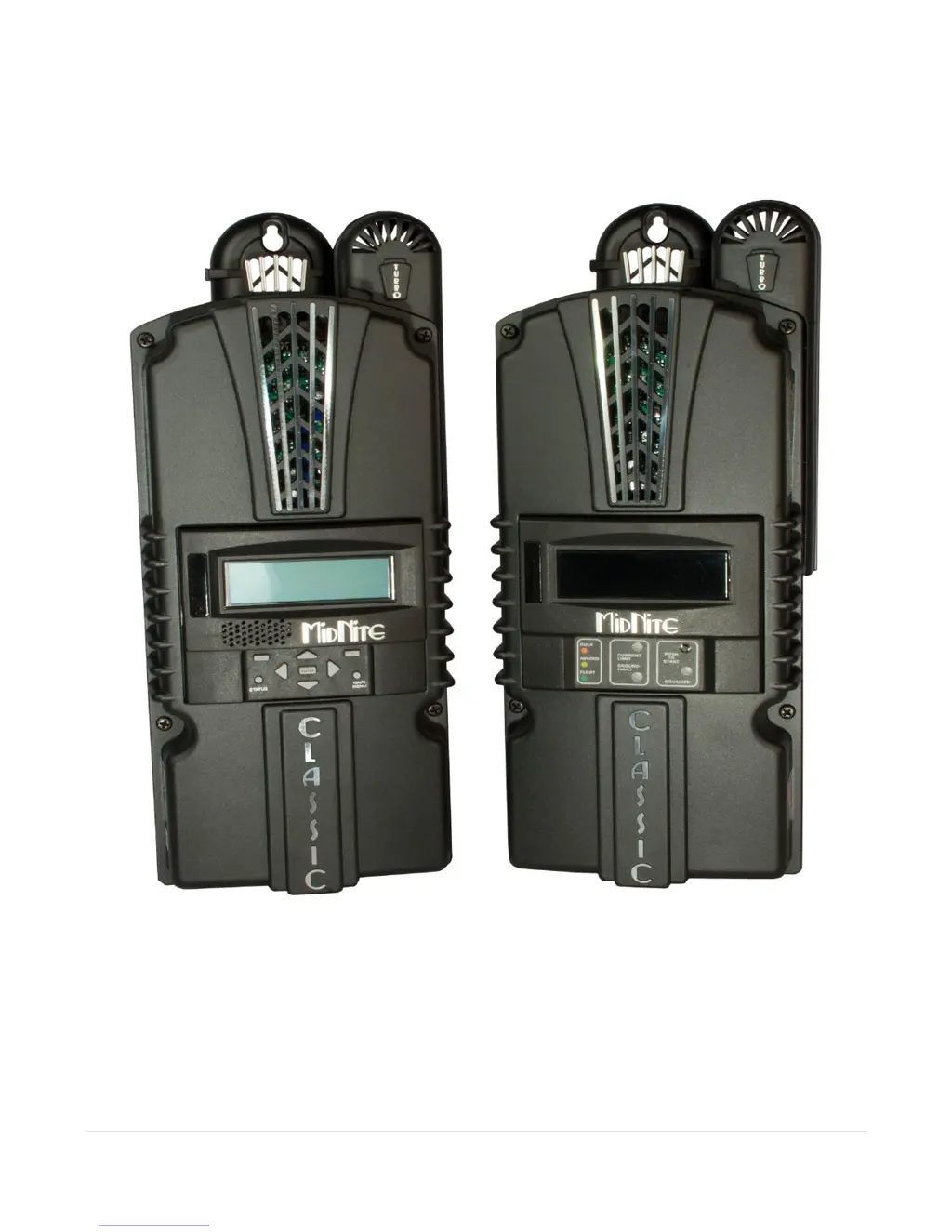
MidNite Solar Classic
Owners Manual
Standard Classic Classic Lite
This Manual covers models Classic 150, 200, 250 &
250KS as well as the Classic 150, 200, 250 & 250KS LITE

Table of Contents

Questions and Answers

  • A
    angela25Jul 27, 2025
    What to do if MidNite Solar Battery Charger display shows 0 volts in?
    • W
      Wendy HernandezJul 27, 2025
      If the MidNite Solar Battery Charger Classic displays a reading of 0 volts (or close to it) while the battery voltage appears correct, and if this is a new installation or has been recently altered, check for reverse polarity on the DC input. If this issue arises unexpectedly or after confirming the absence of reverse polarity, contact customer service.
  • J
    Joseph ParsonsJul 31, 2025
    How to fix MidNite Solar Battery Charger that will not power on?
    • B
      Brett MorrisJul 31, 2025
      Check for voltage between the Battery + and the common – on the blue terminal block inside the MidNite Solar Battery Charger Classic. If voltage is present and above 10vdc, contact customer service. If no voltage is present, trace back through the + and – to identify the fault.
  • C
    Chad ArmstrongAug 5, 2025
    How to turn on Mode on MidNite Solar Battery Charger?
    • B
      Brad LivingstonAug 5, 2025
      If the MidNite Solar Battery Charger display shows “Mode is Off”, enter the main menu, select Mode, turn the Mode ON, and press Enter to save the setting.
  • M
    michaelnguyenAug 10, 2025
    Why MidNite Solar Battery Charger switches between Resting and Bulk MPPT?
    • S
      Scott LongAug 10, 2025
      If the MidNite Solar Battery Charger Classic switches between Resting and Bulk MPPT repeatedly but produces 0 watts, monitor the IN voltage. If the IN voltage remains stable when the Classic transitions from Resting to Bulk MPPT, contact customer service. However, if the IN voltage gradually drops to battery voltage (or close to it) during the switch to Bulk MPPT, it typically indicates a high resistance connection, such as a loose connection between the Classic and the DC source.
  • K
    Kimberly HillAug 15, 2025
    What to do if MidNite Solar Battery Charger Classic says “Resting”?
    • J
      Jill RodriguezAug 15, 2025
      If the MidNite Solar Battery Charger Classic says “Resting” when the sun is out, verify that the voltage on the display under “IN” is greater than the battery voltage. Also, confirm that the charging mode is correct for the source and the mode is set to “ON.”
  • M
    Misty VelazquezAug 20, 2025
    How to fix a blank display on MidNite Solar Battery Charger?
    • N
      Nicole FlynnAug 20, 2025
      If the MidNite Solar Battery Charger Classic display is blank but the Classic is on, check that the blue cable is securely plugged in between the display and the topmost jack on the circuit board. Try using another cable; a standard short 4-conductor phone cable will work.

Summary

Safety and Installation Procedures

Safety Warnings and Standards

Essential safety precautions, electrical codes, and installation standards for safe operation.

DC and Battery Installation Requirements

Critical DC wiring, grounding, and battery connection requirements for system integrity.

Hardware Setup and Basic Functions

Mounting the Classic

Detailed guidance on mounting the Classic unit, including direct E-Panel attachment.

Chassis and DC System Grounding

Covers essential grounding procedures for the chassis and DC system for safety.

System Integration and Wiring

DC Ground Fault Protection (GFP)

Explains the built-in DC-GFP feature and how to enable, disable, or reset it.

Wiring the Classic

Provides instructions and warnings for correctly wiring the Classic unit to the system.

Over Current Protection and Wire Sizing

Details requirements for over-current protection and appropriate wire sizing for the Classic.

Charging and Configuration

Equalization Settings

Covers manual and automatic equalization settings for the Classic Lite.

Standard Classic Programming

Guides through initial setup and basic programming of the standard Classic unit.

Adjusting Voltages and Current Limit

Instructions for adjusting absorb, equalize, float voltages and setting current limits.

Configuring for Wind Input Source

Explains how to select and configure power curves for wind turbine input.

Advanced Features and Diagnostics

Arc Fault Detection System

Explains the integrated Arc Fault Detector and how to reset it after detection.

Classic Lite Programming

Classic Lite Programming Overview

Introduces programming methods for the Classic Lite model.

Programming Lite with MNGP Remote

How to program the Classic Lite using an MNGP as a remote interface.

Software Updates and Connectivity

Uploading New Firmware

Step-by-step guide to updating the Classic's firmware using a USB cable and PC.

Communication and Advanced Data

MODBUS Communication Protocol

Details the MODBUS protocol conventions, registers, and operations for the Classic.

MODBUS Base Register Map

Lists and describes the base registers for reading unit information and status.

MidNite Solar Classic 150 Specifications

General IconGeneral
ModelClassic 150
TypeMPPT Charge Controller
Maximum PV Input Voltage150V
Efficiency98%
Maximum Charge Current96A
Maximum Output Current96A
CommunicationEthernet, RS-232
DisplayLCD
ProtectionsOver-temperature
Battery Voltage12V, 24V, 36V, 48V
Operating Temperature-40°C to +60°C

Related product manuals