EasyManua.ls Logo

MidNite Solar Classic 250 - User Manual

MidNite Solar Classic 250
102 pages
Print Icon
To Next Page IconTo Next Page
Loading...
1 | P a g e
MidNite Solar Classic
Owners Manual
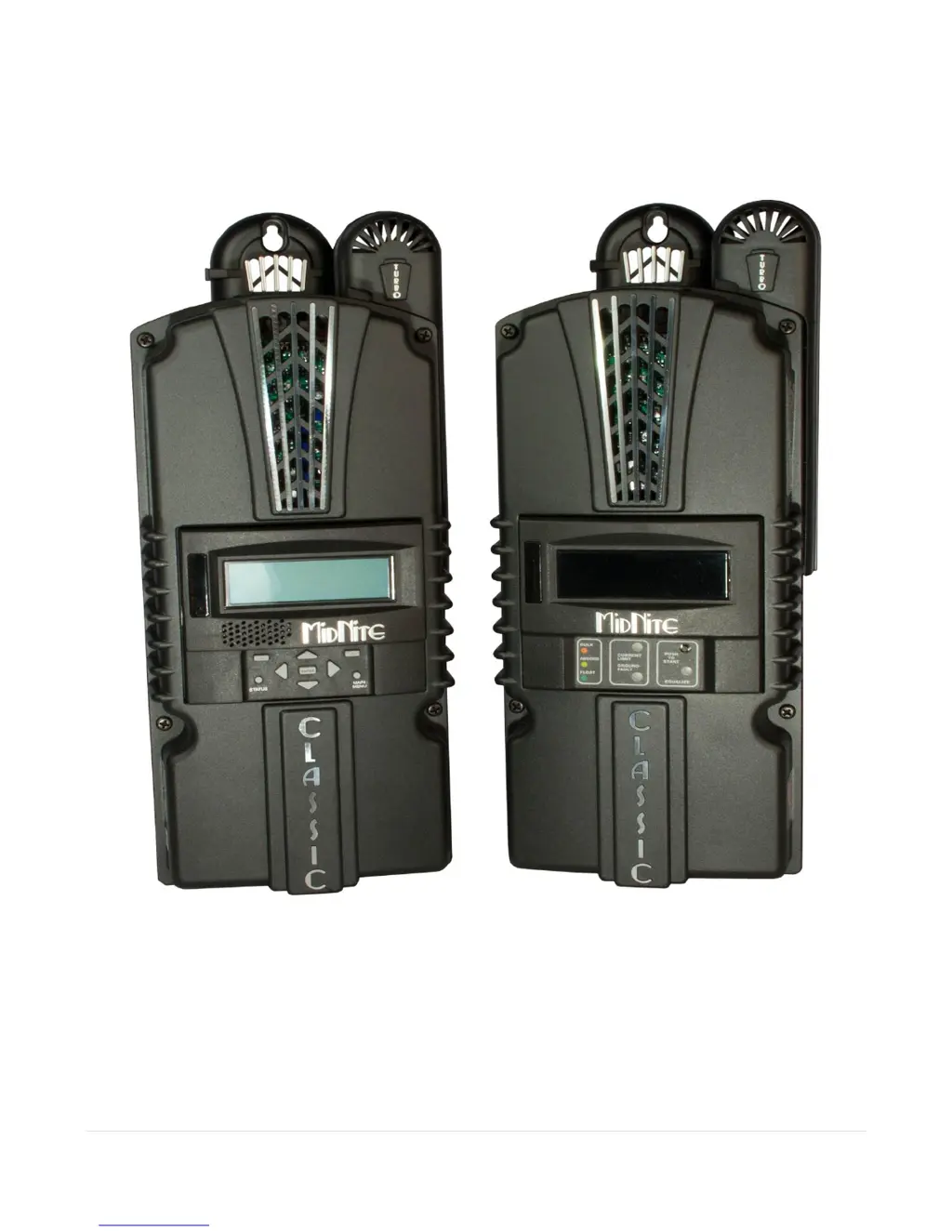
Standard Classic Classic Lite
This Manual covers models Classic 150, 200, 250 &
250KS as well as the Classic 150, 200, 250 & 250KS LITE

Table of Contents

Questions and Answers

Summary

Glossary of Terms

Introduction and Scope

Introduction to the Classic Controller

Overview of the MidNite Classic charge controller's unique features and capabilities.

Manual Scope Definition

Defines the manual's content, focusing on safety and installation, not component specifics.

Classic Power Curves

Getting Started with the Classic

Unpacking and Initial Cover Access

Details package contents and instructions for removing/re-attaching the front cover.

Mounting and Environmental Considerations

Classic Mounting Procedures

Covers standard E-Panel mounting and alternative plywood surface mounting.

Sealed Configuration and Temp Compensation

Instructions for sealing the unit and using the battery temperature sensor for compensation.

System Connections and Wiring

Cable Routing and Sensor Installation

Guidelines for stacking cables and installing the battery temperature sensor.

Grounding, GFP, and Wiring

Chassis, DC System Grounding, and GFP

Covers chassis/DC grounding, GFP function, and disabling GFP for specific systems.

Classic Wiring Procedures

Provides instructions and torque specs for connecting DC source and battery wires.

Electrical Specifications and Protection

DC Terminal Connector and Current Ratings

Details DC terminal connector capabilities and current ratings for Classic models.

Over Current Protection and Wire Sizing

Covers requirements for over current protection and selecting appropriate wire sizes.

Equalization Settings

Equalization Methods for Classic Models

Explains equalization settings for Classic Lite and Standard Classic models.

Standard Classic Programming

Quick Start Setup and Charge Stages

Steps for Quick Start wizard and explanation of battery charge stages (Bulk, Absorb, Float).

Advanced Settings and Modes

Mode Selection, Voltage Adjustment, and LEDs

Covers mode selection, adjusting battery voltages, and understanding LED indicators.

Voltage Calibration and Input Source Configuration

Calibrating Voltages and Configuring Input Source

Procedures for calibrating displayed voltages and selecting the DC input source mode.

MPPT Modes Explained

Micro Hydro, Solar, and Legacy P&O Modes

Details on Micro Hydro, Solar, and Legacy P&O MPPT tracking modes and their settings.

Advanced Input Modes and Wind Configuration

Wind Track, Dynamic Modes, and Wind Configuration

Describes Wind Track, Dynamic modes, and steps for configuring wind input source power curves.

System Configuration and Auxiliary Ports

Setting Date;Time and Configuring Aux Ports

Instructions for setting date/time and configuring the two auxiliary ports for inputs/outputs.

Auxiliary Port Functions - Aux 1

Aux 1: Vent Fan, Float Control, and Clipper

Describes Aux 1 functions for vent fans, float status, and MidNite Clipper control.

Auxiliary Port Functions - Aux 1 (Continued)

Aux 1: Voltage Triggers and Diversion Modes

Explains Aux 1 functions for PV voltage triggers, opportunity, and diversion modes.

Auxiliary Port Functions - Aux 2

Aux 2: Float, Day;Night Light, and Voltage Triggers

Describes Aux 2 functions for float status, day/night light, and PV voltage triggers.

Auxiliary Port Functions - Aux 2 (Continued)

Aux 2: Opportunity, Diversion, and Function Summary

Explains Aux 2 diversion modes and provides a summary of Aux 1 functions.

Setting Aux Port Parameters

Aux 2 Function Summary and Parameter Adjustment

Provides Aux 2 function summary and instructions for adjusting threshold voltages and times.

MNGP Interface and Navigation

Setting MNGP Features and Navigating Menus

Covers setting MNGP features like contrast/volume and navigating the menu system.

Networking and System Integration

Connecting Multiple MNGPs and Arc Fault Detection

Instructions for connecting multiple MNGPs and explanation of the Arc Fault Detection system.

Faults, Warnings, and Data Logging

Viewing Faults;Warnings and Logged Data Overview

How to view faults/warnings and an overview of Daily and Hourly data logging.

Data Logging Display and Navigation

Accessing Daily and Hourly History Data

Instructions for entering and navigating the Daily and Hourly history data viewing menus.

Graphical Data Display

Graphical Logging Modes and Interpretation

How to view logged data graphically and interpret the display elements.

Dealer Information Screen

Classic Lite Programming Overview

Lite Features, Limitations, and LED Indicators

Highlights Lite features, limitations, and explains the MNLP panel's LED indicators.

Classic Lite Dip Switch Programming

Programming Methods and Dip Switch Access

Lists programming methods and provides instructions for accessing the dip switches.

Classic Lite Dip Switch Settings

Section 1 and Section 2 Switch Configurations

Details the function of Section 1 (Mode, Voltage, Type, EQ) and Section 2 (IP, ModBus) switches.

Battery Voltage and Time Settings

Advanced Programming Methods for Classic Lite

Remote and Networked Programming for Lite

Using MNGP remote or a networked Standard Classic to program the Lite.

Lite Specific Notes and Modes

Local App, Fault Clearing, and MPPT Modes

Covers Lite programming via Local App, fault clearing, and Solar/Legacy MPPT modes.

Firmware Updates

Uploading and Preparing for Firmware Update

Procedure for updating Classic firmware via USB and preparation steps.

Network Connectivity

Connecting to the Internet and Local Networks

Overview of connecting the Classic to the internet and various local network topographies.

Network Setup Configuration

Network Setup via MNGP and IP Addressing

Configuring network settings via MNGP, covering DHCP vs. Static IP.

IP Address and Network Parameters

Static IP Allocation and Network Details

Steps for static IP allocation and understanding IP, Subnet, Gateway, and DNS settings.

Web Access and Positive Ground Systems

Enabling Web Access and Positive Ground Considerations

Instructions for enabling web access and specific considerations for positive ground systems.

Unique Classic Features

HyperVOC Technology and Troubleshooting

Explanation of HyperVOC feature and troubleshooting common operational issues.

Electrical Specifications

Mechanical Specifications

Setup and Approvals

Default Battery Set Points and Regulatory Approval

Lists default battery charge set points and provides regulatory approval information.

Warranty Information

Appendix - Aux Ports and Jumpers

Aux Port Terminals and Relay;12 v Configuration

Details Aux port terminals and configuration for relay or 12v output operation.

Aux Port Voltage-Time Relations

Aux 1 and Aux 2 Voltage-Time Relation Graphs

Graphs illustrating the voltage-time relationship for Aux 1 (Relay/12v) and Aux 2 (PWM).

Classic Breaker Sizing

Classic Menu Map

Labeling Information

MODBUS Communication Protocol

MODBUS Disclaimer, Conventions, and Read;Write Notes

Important notes on MODBUS register write-ability, conventions, and read/write access.

MODBUS Register Map - Unit Information

Unit ID, Network Address, and Measurement Registers

Registers for unit identification, network addresses, and voltage/current measurements.

MODBUS Register Map - Time and Temperature

Time, Temperature, and Charge Stage Registers

Registers for time, temperature readings, charge stages, and counters.

MODBUS Register Map - Set Points and Limits

Current Limit, Voltage Set Points, and Temp Compensation

Registers for current limits, voltage set points, and battery temperature compensation.

MODBUS Register Map - Aux Functions

Aux 1 & 2 Function and PV Voltage Threshold Registers

Registers for configuring Aux 1/2 functions and PV voltage thresholds.

MODBUS Register Map - Advanced Settings

Arc Fault, Sweep Interval, and Flag Registers

Registers for Arc Fault sensitivity, sweep intervals, and system enable flags.

MODBUS Register Map - Commands and Names

Clipper, Wind, Unit Name, and Time Registers

Registers for Clipper commands, wind settings, unit name, and time.

MODBUS Register Map - Operational States

VOC Reading, Absorb Time, and Battery State Registers

Registers for VOC reading, absorb time, battery state, and rebulk voltage.

MODBUS Register Map - Performance Monitoring

Battery Monitoring and Resting Reason Registers

Registers for battery monitoring (SOC, amps) and reasons for resting.

MODBUS Tables - Device Types and Battery Stages

Table 4101-1: Device Type and Table 4120-1: Battery Stage

Defines device types for Classic models and the meanings of battery stage values.

MODBUS Table 4130-1: Info Flag Bits

MODBUS Tables - Battery Types and Force Flags

Table 4158-1: Battery Types and Table 4160-1: Force Flags

Lists battery types (not used) and defines Force Flags bits for function control.

MODBUS Tables - MPPT and LED Modes

Table 4164-1: MPPT Modes and Table 4207-1: LED Modes

Defines MPPT modes and explains the different LED modes on the control panel.

MODBUS Table 4240-1: Internal Flags

Aux 1 and 2 Function Encoding

Tables 4165-1, -2: Aux 1 & 2 Off;Auto;On Encoding

Encodes Aux 1 and 2 states (Off, Auto, On) using combined function bits.

Table 4165-3: Aux 1 Function Encoding

Encodes various Aux 1 functions (e.g., Diversion, Trigger) using specific bits.

Aux 2 Function Encoding and Enable Flags

Table 4165-4: Aux 2 Function Encoding

Encodes various Aux 2 functions (e.g., Diversion, Trigger) using specific bits.

Table 4187-1: Enable Flags Definitions

Defines system enable flags for Ground Fault, Arc Fault, and Shade detection.

Consolidated Time Registers

Time Registers 0, 1, and 2 Definitions

Defines register bits for setting seconds, minutes, hours, day, month, year, and day of year.

MODBUS Table 4275-1: Reasons for Resting

Network Register Map

Network Settings Registers and Flags

Maps network registers (IP, Gateway, Subnet, DNS) and defines network setting flags.

Version Registers

Communication Statistics - Master;Slave Interface

Master;Slave Interface Packet Statistics

Registers for tracking packets for master/slave interfaces (received, errors, requests).

Communication Statistics - Remote;TCP Interfaces

Remote;TCP Interface Packet Statistics

Registers for tracking packets for remote bus and TCP interfaces.

RS232 Jack Pin Out

MidNite Solar Classic 250 Specifications

General IconGeneral
BrandMidNite Solar
ModelClassic 250
CategoryController
LanguageEnglish

Related product manuals