Before using for the first time
23
Con@ctivity via a direct WiFi
connection (Con@ctivity 3.0)
Prerequisite:
- WiFi enabled Miele hob
If you do not have a home network, you
can establish a direct connection
between the hob and the cooker hood.
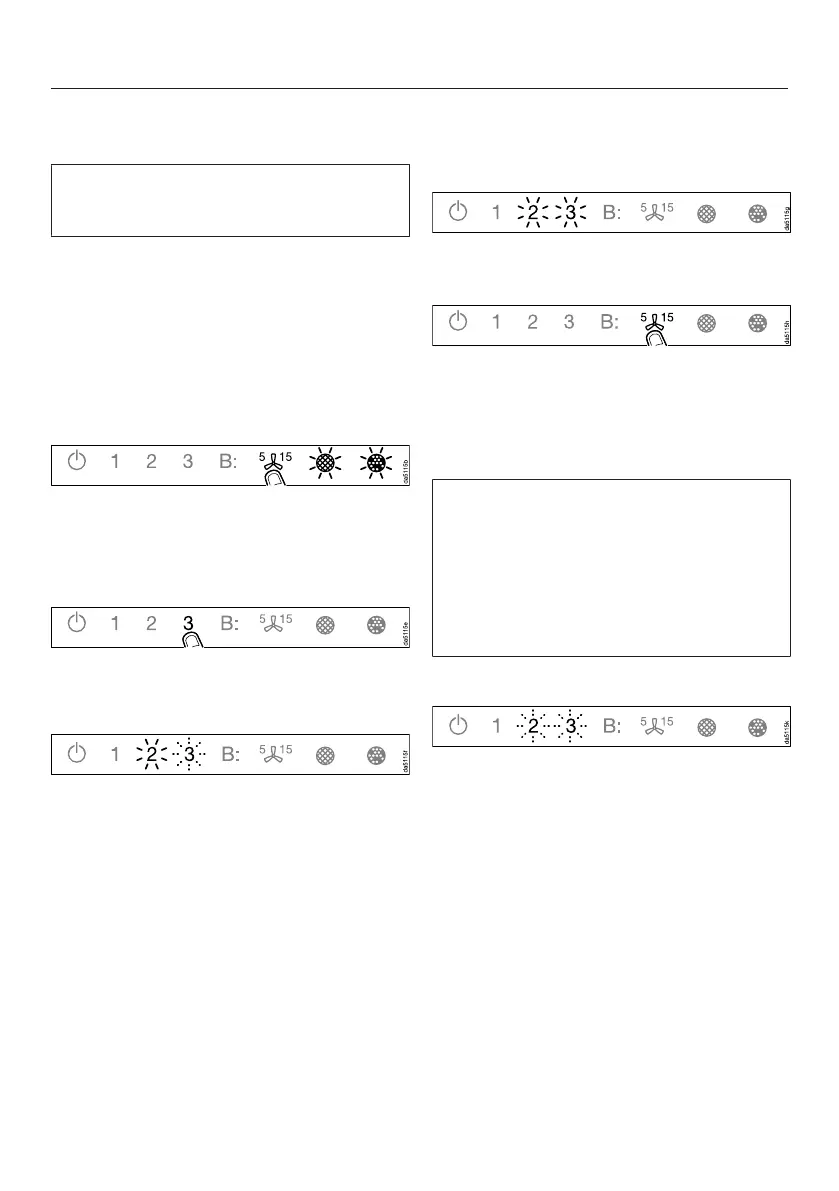
With the deflector plate retracted,
touch the On/Off switch.
All symbols light up with reduced
brightness.
Press and hold the run-on option
control until the grease filter
and charcoal filtersymbols light
up.
Touch 3.
The deflector plate extends.
2will light up constantly, 3will flash.
The cooker hood will be ready for
connection in the next 2minutes.
Start the WiFi connection on the hob.
For further details, see the hob
operating instructions.
When successfully connected, 2and
3will light up constantly.
Quit connection mode on the cooker
hood by touching the run-on option
control.
Con@ctivity is now activated.
With a direct WiFi connection, it is not
possible to connect the hob and the
cooker hood to a home network.
Should this be required at a later date,
the WiFi connection between the hob
and the cooker hood must be
disconnected (see “Sign out of WiFi”).
Reattempting the connection
If it is not possible to connect, 2 and 3
flash or the cooker hood cancels the
process.
Disconnect the connection to the
cooker hood (see “Signing out of
WiFi”) and to the hob.
Attempt to make the connection
again.


 To Next Page