Guide to the appliance
17
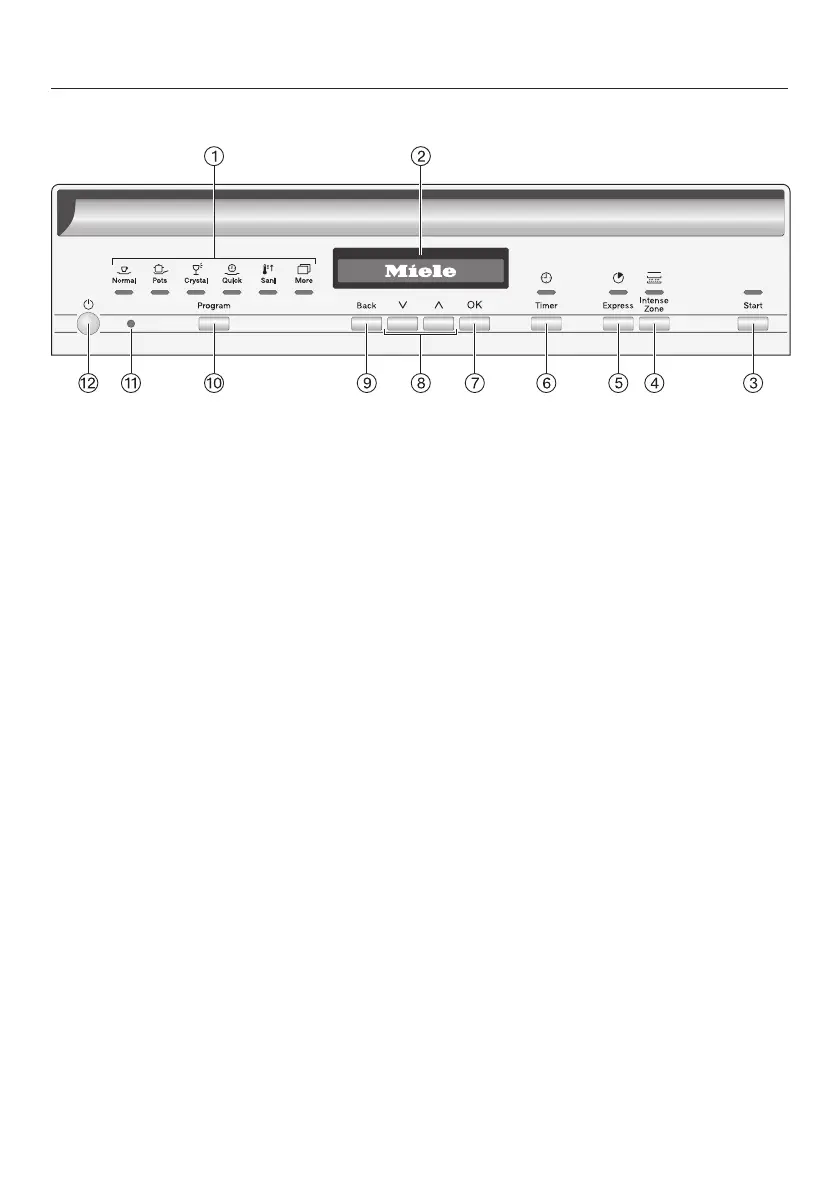
Control panel
a
Program selection
Normal = Normal
Pots = Pots & Pans
Crystal = China & Crystal
Quick = QuickIntenseWash
Sani = SaniWash
More = Additional programs/
settings
b
Display
For further information, see “Display
functions” under “Guide to the appli-
ance”.
c
Start button with indicator light
For starting the selected program.
d
IntenseZone button
Increases cleaning performance in
the lower basket.
e
Express button
For reducing the program cycle time.
f
Timer button
For selecting a later program start.
g
OKbutton
To select menu options and values
displayed.
To confirm messages.
h
buttons
For program selection.
For changing the values displayed.
For scrolling to other menu pages.
i
Backbutton
For navigating back to the previous
menu or deleting values which have
been set previously.
j
Program program selection button
For program selection.
k
Optical interface
For Miele Customer Service.
l
On/Off button
For turning the dishwasher on and
off.


 To Next Page