Maintenance measures
80
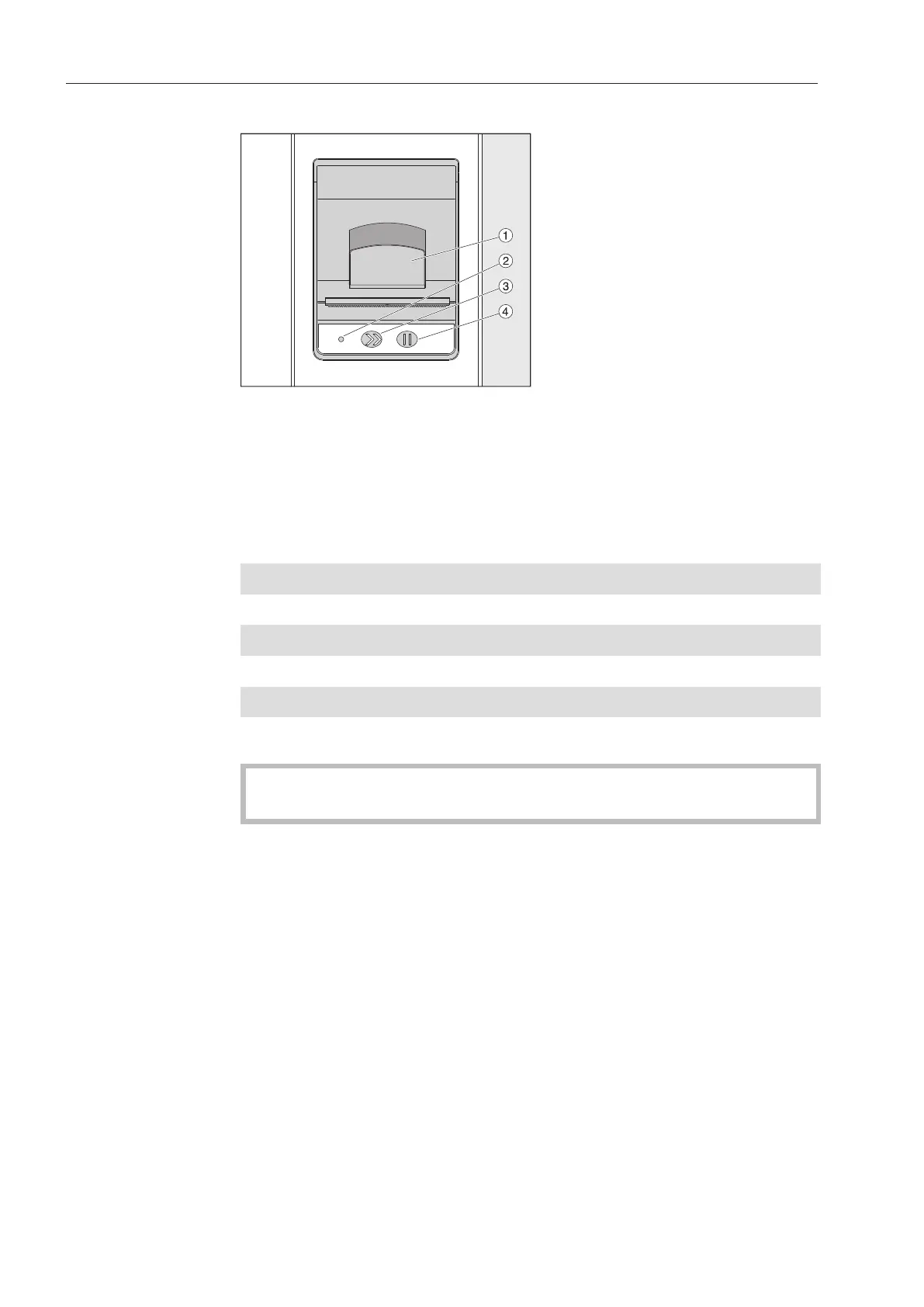
Built-in printer (optional)
a
Lever for opening the flap
b
LED
c
Paper feed
d
Acknowledgement button
LED status Printer status
Off Power supply fault
On Ready for operation
1xflash Not ready for operation
2xflash Fault on the printer head
3xflash Paper jam/paper roll empty
4xflash Temperature fault
Replacing the pa-
per roll
The paper roll for the built-in printer must not be replaced while a
program is running.
When the LED flashes three times, this indicates that the paper roll
has run out. To replace the paper roll, proceed as follows:
Pull the lever on the printer flap and lift the flap upwards.
Take the empty paper roll out of the printer compartment and insert
the new paper roll.
The end of the paper roll is on the bottom side of the compartment.
Pull a bit of the end of the paper out of the compartment and close
the printer flap.
Cut off the protruding strip of paper.
Press the acknowledgement button.
The printing process will continue.



 To Next Page