15
Switching on the robot vacuum
cleaner
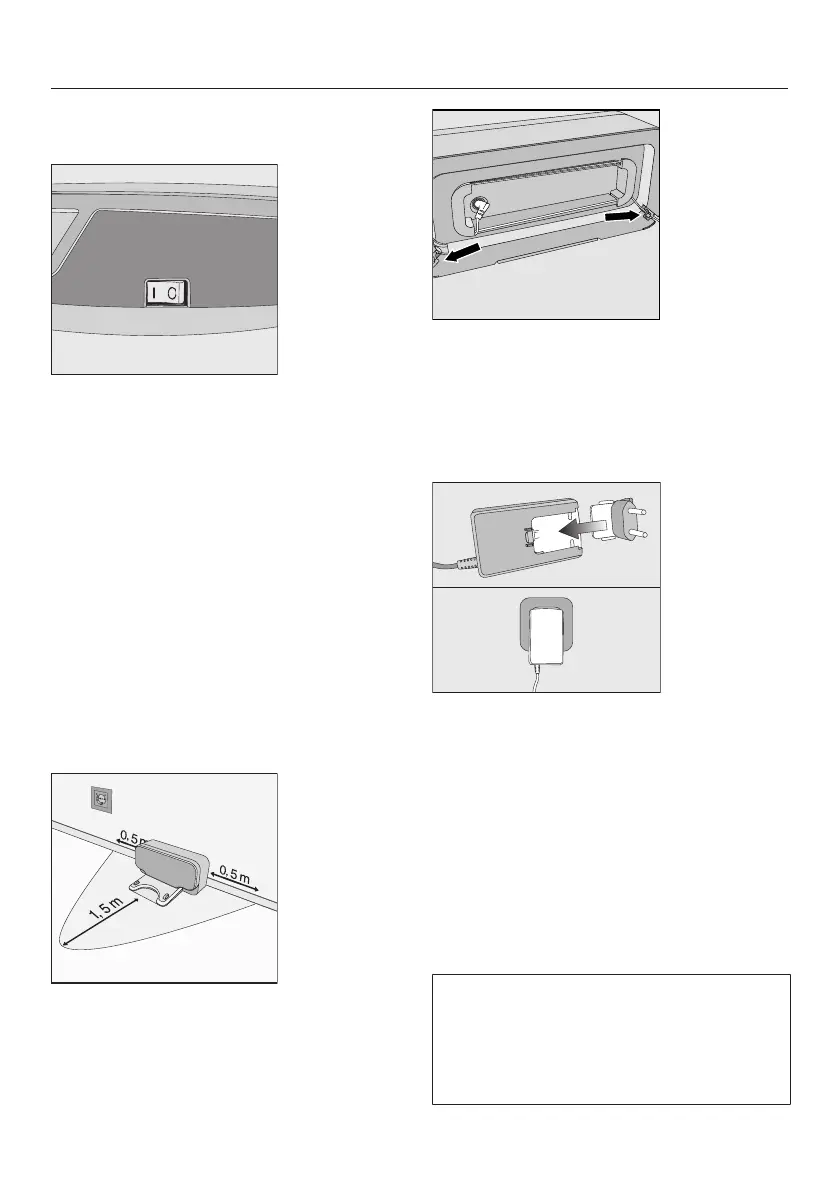
Slide the I/0 switch on the side of the
robot vacuum cleaner to the I posi-
tion.
The rechargeable battery status indic-
ator lights up in the display.
After approx. 60 seconds, the robot va-
cuum cleaner will switch into standby.
The battery status indicator will con-
tinue to light up.
The robot vacuum cleaner is reactivated
by pressing any button on the remote
control or one of the sensor fields in the
display.
Connecting the base station
Place the base station on a level sur-
face against a free wall within easy
access of a power socket. Ensure
that there is an obstacle-free distance
of at least 1.5m in front and 0.5m to
the right and left of the base station.
Insert the supplied power supply plug
into the socket at the back of the
base station. You can wind excess
cable around the cable rewind. Guide
the cable through one of the two
cable runs.
Insert the country-specific power ad-
apter into the power supply until it
audibly engages and then plug it into
the selected power socket.
Charging the rechargeable battery
The rechargeable battery is supplied
not fully charged. Before using for the
first time, it must be fully charged while
the robot vacuum cleaner is switched
on (switch I/0 to I).
The battery can also be charged when
the robot vacuum cleaner is switched
off (switch I/0 to 0). In this case, the
vacuum cleaner indicators will not re-
act.



 To Next Page