16
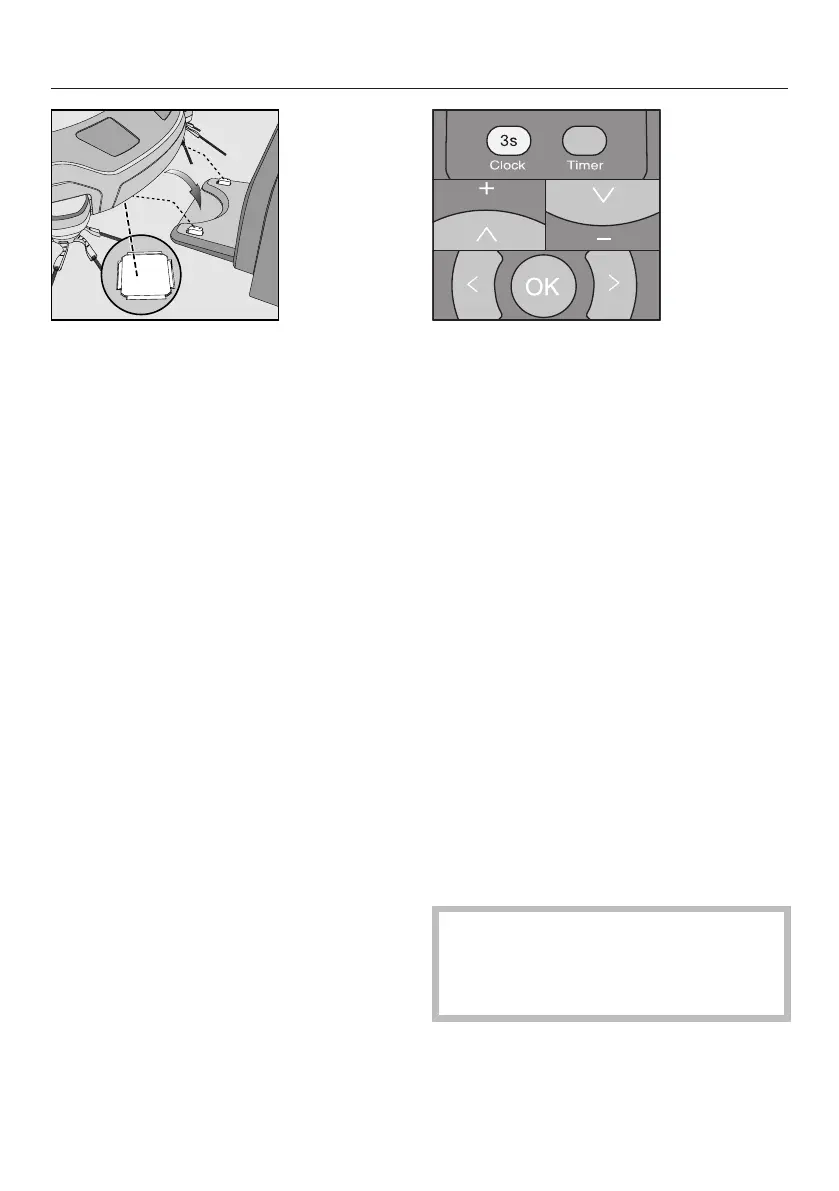
Connect the robot vacuum cleaner
correctly to the charging contacts on
the connected base station.
As the rechargeable battery charges,
the status indicator flashes in the dis-
play.
The charging process takes up to 150
minutes for the Scout RX2. The process
is finished when the rechargeable bat-
tery status indicator lights up green per-
manently in the display.
You can then vacuum for up to one
hour with the Scout RX2.
Rechargeable battery status indic-
ator in the display
Red charged capacity approx. 0%
- 20%
Or-
ange
charged capacity approx.
20% - 50%
Green charged capacity approx.
50% - 100%
Setting the time of day
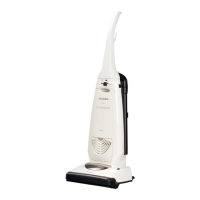
Use the remote control to set the time
of day.
The default factory setting for the robot
vacuum cleaner is the 24-hour time dis-
play.
Press the Clock button for at least
three seconds.
The indicator field flashes in the display.
Press the OK button.
The hour display flashes in the indicator
field.
Press the + or - direction button to
set the current hour.
Press the OK button to confirm your
selection.
The minute display flashes in the indic-
ator field.
Press the + or - direction button to
set the current minutes.
Press the OK button to confirm your
selection.
If you want to alter the time of day, pro-
ceed as described above.
Defining the area to be vacuumed
The robot vacuum cleaner is 85mm
high. Any items under which vacu-
uming is required should have a min-
imum clearance of 87mm.
You can define any areas which the ro-
bot vacuum cleaner should not have
access to.



 To Next Page