Programmable functions
73
Editing and saving the pro-
grammable function
You can either switch a programmable
function on or off or select different op-
tions.
Touch the or sensor control to
switch the programmable function
on/off or to select an option:
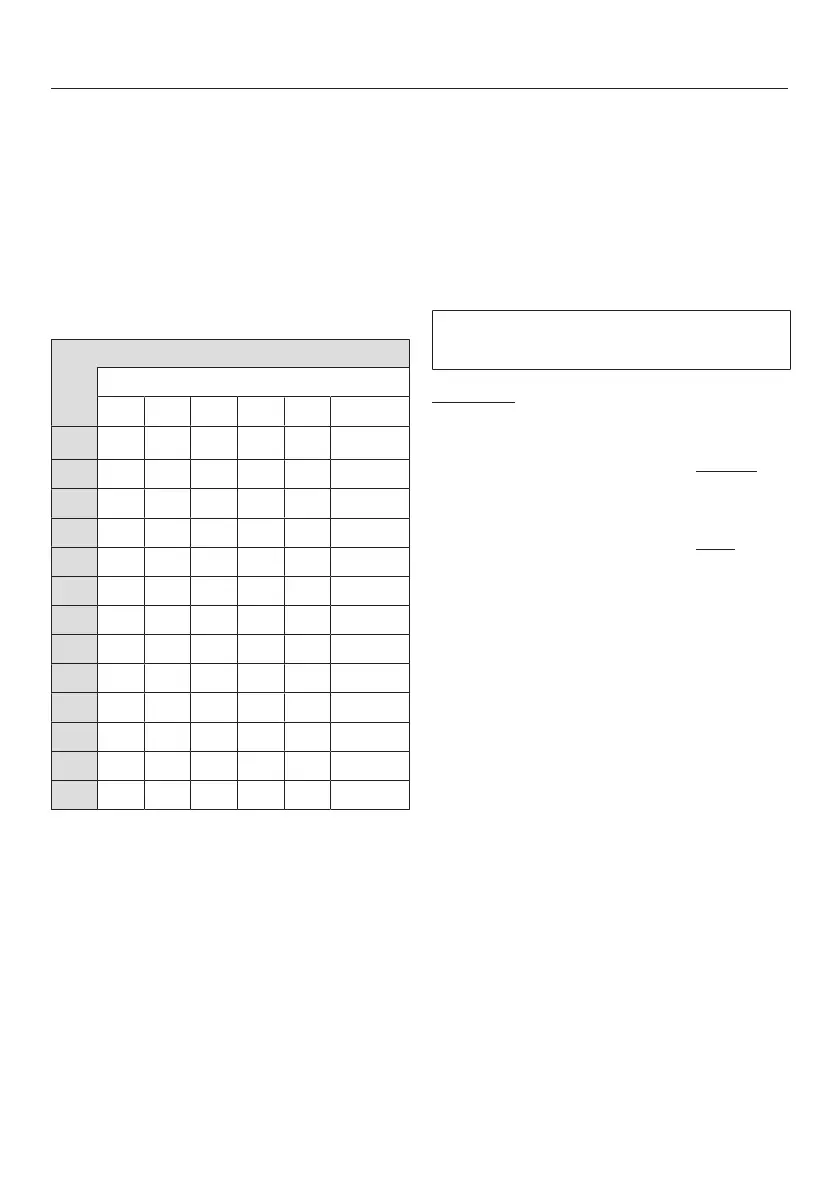
Programmable function
Available options
–
X O
X
O X
X O
O X
O X X X
O X
O X
O X X
O X X X
O X
O X
X O
X X O X X
X = can be selected
O = Factory setting
Confirm the chosen selection with
the Start/Stopsensor control.
The number of the programmable func-
tion, e.g., will then light up again.
Exit programming level
Turn the programme selector to .
The option you have selected is now
stored in memory. You can change it
again at any time.
Sensor tone
Each touch of a sensor control is con-
firmed with an audible tone.
Selection
= Sensor tone is switched off
= Sensor tone is set to normal
volume (factory default set-
ting)
= Sensor tone is set to loud
volume




 To Next Page