Packinglist
02
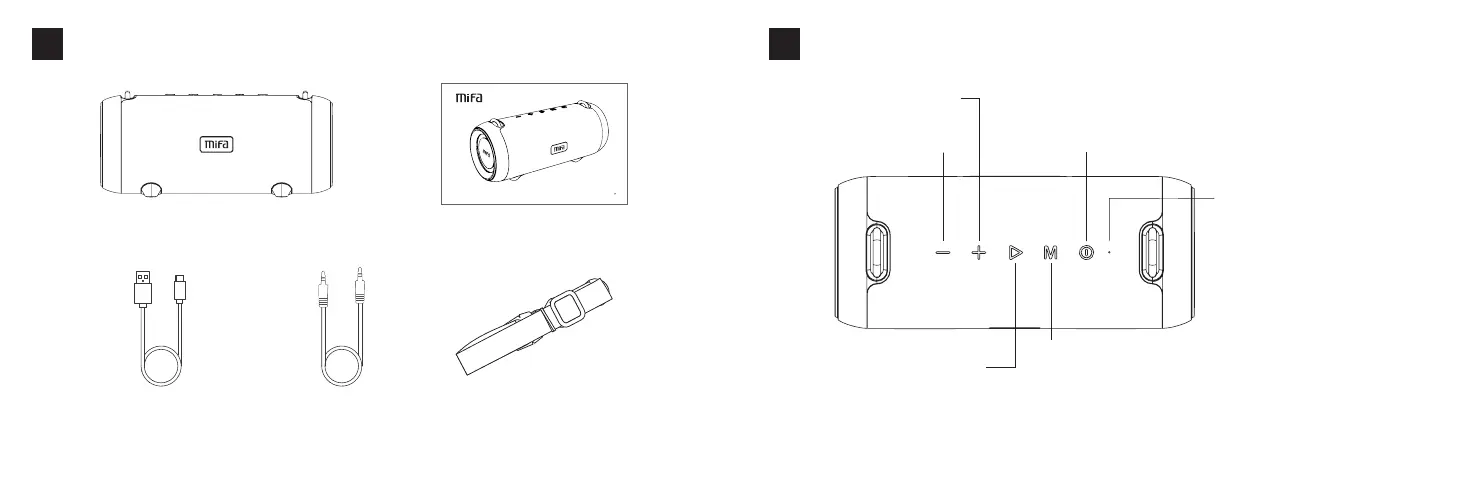
1×BluetoothSpeaker
1×USBType-C
ChargingCable
1×3.5mmAudioCable
1×Strap
1×UserManual
SPE AKER
A90
US ER MA NUA L
English
KeysFunctions
03
ShortPress:Increasevolume
LongPress:Playnextsong
ShortPress:Decreasevolume
LongPress:Playprevioussong
PowerButton:Pressandholdthebuttonfor2secondstoturnonorturnoff
ResetButton:Pressandhloditfor8secondstoresetthespeaker
PowerIndicator:Shortpressthepowerbuttontoshowtheremainingpower
(greenlightflashes)
(100%power:flashes4times75%power:flashes3times
50%:flashes2times25%power:flashesonce)
ModeButton:Shortpresstoswitchthemodeinthepowered-onstatus
IfitisinsertedwithaMicroSDcard,anUSBflashdriverandanaudiocable,modes
switchinturns:Bluetoothmode→MicroSDcardmode→Aux-inmode→USB
flashdrivermode
Pressandholdthebuttonfor2secondstodisconnectthepaireddevice
RGBLightMode:Doubleclickthemodebuttontoturnon/offtheRGBlightand
changetheRGBlightmode.
Play/PauseButton:Shortpressto
playorpause.
CallAnswerButton:Whenacall
coming,shortpresstoansweror
hangup;longpresstoreject.
PairingStatus:Bluelightflickersquickly
PairedStatus:Bluelightstayson
AUX/TF/USBMode:Bluelightstayson
PauseStatus:BluelightflickersSlowly
Min/MaxVolume:Bluelightflickersquickly
LowBattery:Redlightflashes
English


 To Next Page