PortsFunctions
04
MICRO
SD
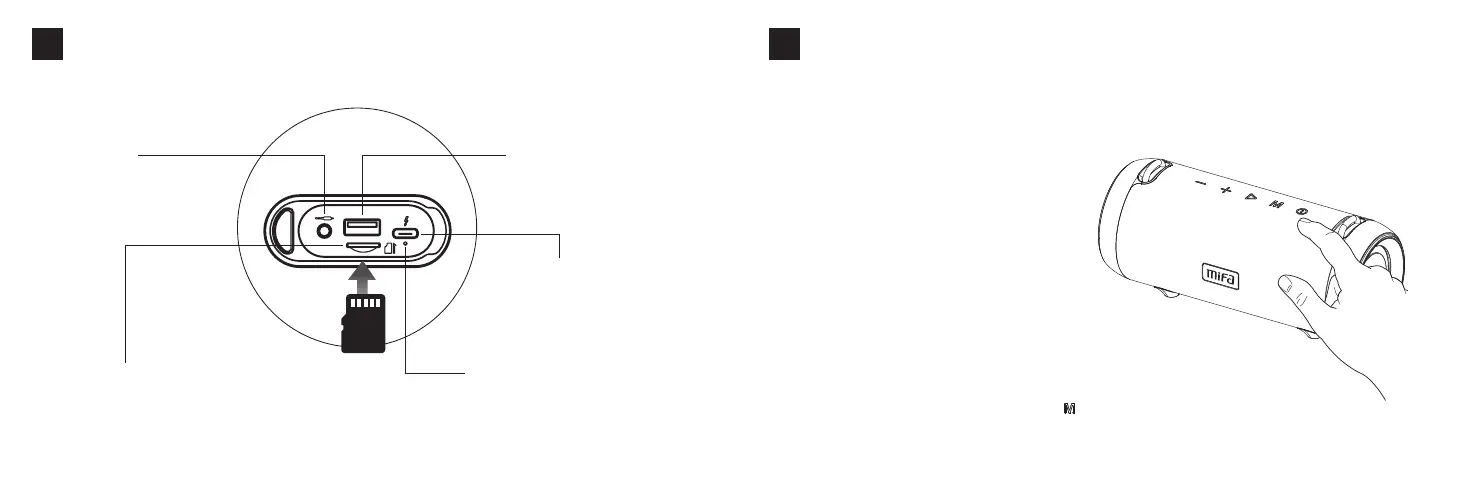
MicroSDCardSlot
Inthepowered-onstate,insertaMicro-
SDcard,itwillplaythemusicstoredin
thecardautomaticallyafterbeeps.
Aux-inJack
Insertedanaudiocablein
thepowered-onstate,itwill
entertheAux-inmode
automatically.
USBFlashDriverPort
InsertedanUSBflashdriverin
thepowered-onstate,,itwill
playthemusicstoredinthe
driverautomaticallyafter
beeps.
USBType-CChargingPort:
UseaDC5V/2Aadaptortocharge
thespeaker
ChargingIndicator:Redlightwill
stayonwhencharging,turnoffafter
finishcharging.
English
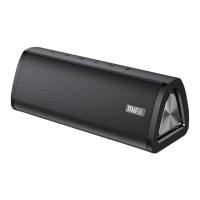
1.Turnonthespeaker
Pressandholdthepowerbuttonfor2seconds
toturnonthespeakerwithapromptsound.
Andthebluelightflashesindicatingitisinthe
pairingmode.
2.Connectittoyourdevice
TurnontheBluetoothofyourdeviceandselect
Mifa_A90.Oncetheconnectioniscompleted,it
willbeepandthebluelightwillstayon.
Thespeakerwillconnecttothelast-connected
deviceautomaticallyoncethedevice's
Bluetoothisturnedon.
BluetoothConnection
05
OtherInstructions
Toconnecttoanotherdevice,pressandholdthebuttonfor2seconds
todisconnectthepairedoneandthespeakerwillenterthepairingmode.
English


 To Next Page