
 Need help?
Do you have a question about the MikroTik RouterBOARD Series and is the answer not in the manual?
Provides step-by-step instructions for physically assembling the hardware, including inserting cards and connecting cables.
Explains the passive PoE powering method via the LAN1 Ethernet port and voltage requirements.
Details initial connection methods using Winbox and the procedure for booting from network via Netinstall.
Describes the function of the bootloader backup button (Reset 1) and the RouterOS reset hole (Reset 2).
Specifies that MikroTik RouterOS (starting from v5) is the currently tested operating system.
Outlines the fifteen (15) month warranty period for RouterBOARD series equipment against defects.
Details the RMA procedure for returning failed units, emphasizing instructions for saving time and costs.
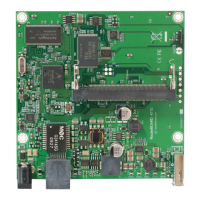
The RouterBOARD 433L is a versatile networking device designed for various applications, offering a balance of performance and expandability. It serves as a router, providing network connectivity and management capabilities.
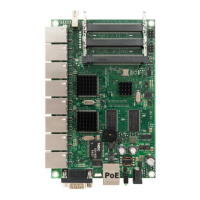
At its core, the RouterBOARD 433L functions as a network router, enabling the routing of data packets between different network segments. It is equipped with multiple Ethernet ports, allowing for connections to local area networks (LANs) and wide area networks (WANs). The device's operating system, MikroTik RouterOS, provides a comprehensive suite of networking features, including firewall capabilities, VPN support, quality of service (QoS), and advanced routing protocols. This makes it suitable for a wide range of uses, from small office/home office (SOHO) setups to more complex enterprise environments. The inclusion of miniPCI slots further enhances its functionality by allowing the integration of wireless cards, fiber optic modules, or other specialized hardware, transforming the device into a wireless access point, a wireless bridge, or a custom network appliance. The passive Power over Ethernet (PoE) capability on one of its Ethernet ports simplifies deployment by allowing the device to receive power and data over a single cable, reducing cable clutter and installation complexity, especially in locations where power outlets are scarce.
The RouterBOARD 433L is designed for ease of use and flexible deployment. To get started, users need to insert miniPCI cards into the available slots, which can include wireless cards for Wi-Fi connectivity or other expansion modules. Once the cards are in place, the board can be installed in a suitable case, and antenna cables should be connected to the miniPCI cards if they are wireless. Other peripherals, such as additional network devices or power sources, can then be connected. The device is powered via passive PoE through its first Ethernet port (Ether1), accepting 8-30V DC input. This means it can be powered by a non-standard (passive) PoE injector, which simplifies cabling by delivering both power and data over a single Ethernet cable. It's important to note that this device does not support IEEE802.3af compliant 48V power injectors.
Initial configuration of the RouterBOARD 433L is typically done using the MikroTik Winbox utility. Since the device does not come with a serial port connector, the first connection is established via an Ethernet cable. Users can connect to the default IP address of 192.168.88.1 using the username "admin" and no password. Winbox provides a graphical interface for managing all aspects of the RouterOS operating system, making it accessible even for users without extensive command-line experience. For situations where an IP connection is not immediately available, Winbox also supports connecting to the device via its MAC address, offering an alternative method for initial setup or troubleshooting.
The device includes two reset buttons, offering different functionalities. "Reset 1" is a bootloader backup button; holding this button during boot-up will cause the device to use a backup bootloader. "Reset 2" is the RouterOS reset hole; holding a metal object (like a screwdriver) in this hole while booting will reset the RouterOS software to its default configuration, which is useful for recovering from misconfigurations or starting fresh. For network booting, such as using MikroTik Netinstall, users can hold the RESET button when starting the device until the LED light turns off, prompting the device to look for Netinstall servers on the network. The Ethernet ports support automatic cross/straight cable correction (Auto MDI/X), meaning users can use either straight or cross-over cables without needing to worry about cable type. The other two Ethernet ports (Ether2 and Ether3) do not support PoE powering, providing standard network connectivity.
Maintaining the RouterBOARD 433L primarily involves managing its RouterOS operating system and ensuring proper hardware functionality. RouterOS is continuously updated, and users can find detailed configuration guides and information on the MikroTik wiki. Regular updates to RouterOS are crucial for security and to access new features and bug fixes. The reset functionalities, particularly the RouterOS reset hole, serve as important maintenance tools. If a configuration error renders the device inaccessible, a factory reset can restore it to a known working state, allowing administrators to reconfigure it from scratch. This is a critical feature for troubleshooting and recovery.
For hardware-related issues, MikroTikls SIA provides a warranty for its RouterBOARD series equipment, covering defects in materials and workmanship under normal use and service for fifteen months from the shipping date. This warranty does not cover damage caused by mechanical, electrical, or other accidental or intended damages, improper use, or acts of nature. If the product was purchased from a MikroTik Reseller, customers are advised to contact the reseller for warranty and repair issues. For direct purchases from MikroTik Latvia, a Return Material Authorization (RMA) procedure must be followed to return failed units. The RMA process is outlined on the MikroTik website, providing instructions to streamline the return and repair process.
The manual itself is provided "as is" without warranty, but MikroTikls SIA makes efforts to ensure its accuracy. Users are encouraged to report any technical inaccuracies, typographical errors, or other issues found in the manual to support@mikrotik.com. This feedback mechanism helps improve the documentation for future users. The ability to boot the device from the network using Netinstall is also a significant maintenance feature, allowing for easy reinstallation of RouterOS or firmware upgrades without requiring direct access to the device's storage. This is particularly useful in deployments where devices are remotely located or difficult to access physically. Overall, the RouterBOARD 433L is designed with both operational flexibility and maintainability in mind, offering various tools and procedures to keep the device running smoothly.
 General
| Product Line | RouterBOARD |
|---|---|
| Manufacturer | MikroTik |
| Category | Network Router |
| CPU | Varies by model |
| RAM | Varies by model |
| Storage | Varies by model |
| Operating System | RouterOS |
| Wireless | Varies by model |
| Ethernet Ports | Varies by model |
| SFP Ports | Varies by model |
| USB Ports | Varies by model |
| Power Supply | Varies by model |
| Dimensions | Varies by model |
| Weight | Varies by model |


 To Next Page