EN 11 millheat.com
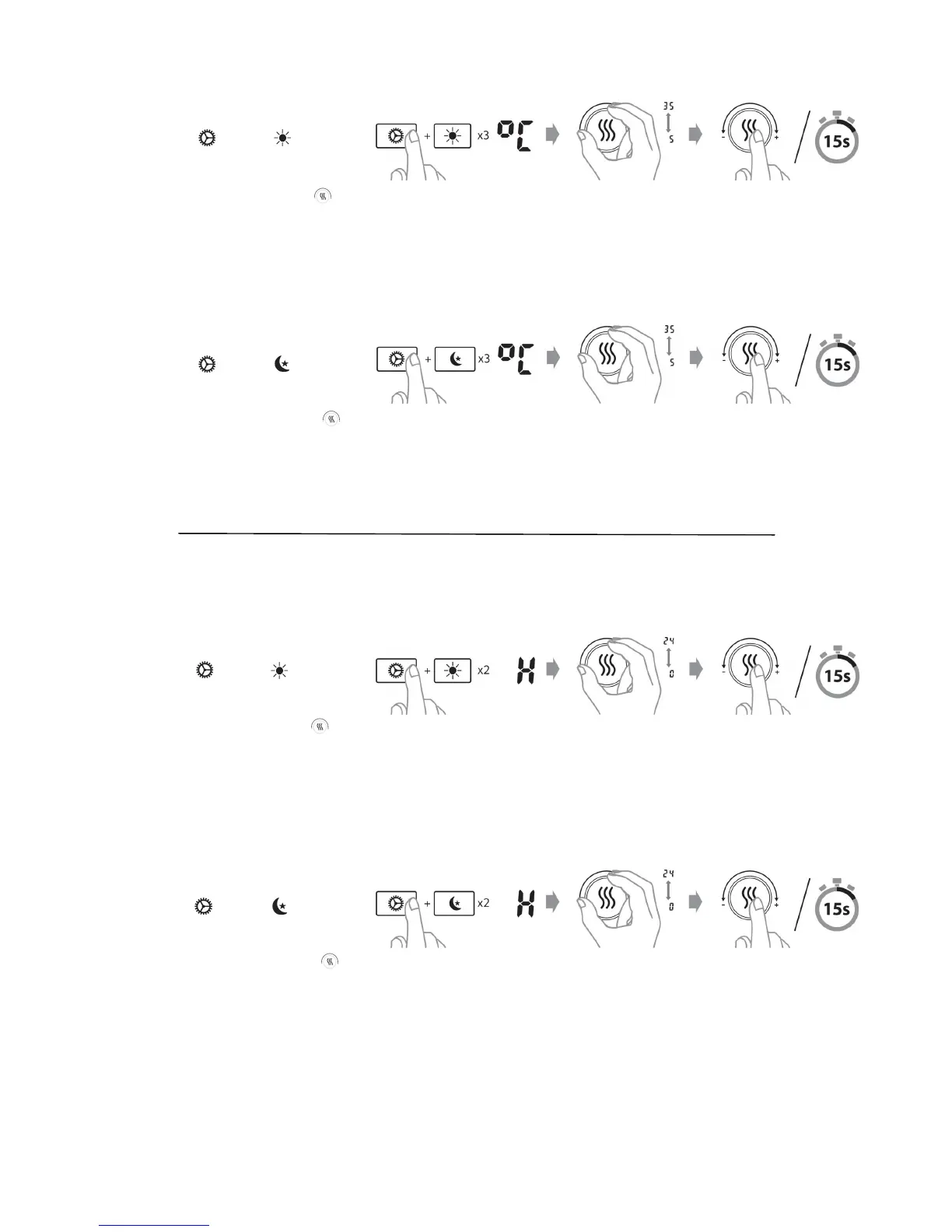
3) Change setback
temperature — Dayme
Press and hold and press 3 mes.
Enter the desired temperature for
dayme setback. Save by pressing or
wait for 15 seconds for automac
conrmaon.
4) Change setback
temperature — Nighme
Press and hold and press 3 mes.
Enter the desired temperature for
nighme setback. Save by pressing or
wait for 15 seconds for automac
conrmaon.
5) Change number of hours
— Dayme
Press and hold and press 2 mes.
Enter the desired number of hours for
dayme setback. Save by pressing or
wait for 15 seconds for automac
conrmaon.
6) Change number of hours
— Nighme
Press and hold and press 2 mes.
Enter the desired number of hours for
nighme setback. Save by pressing
or wait for 15 seconds for automac
conrmaon.


 To Next Page