EN 12 millheat.com
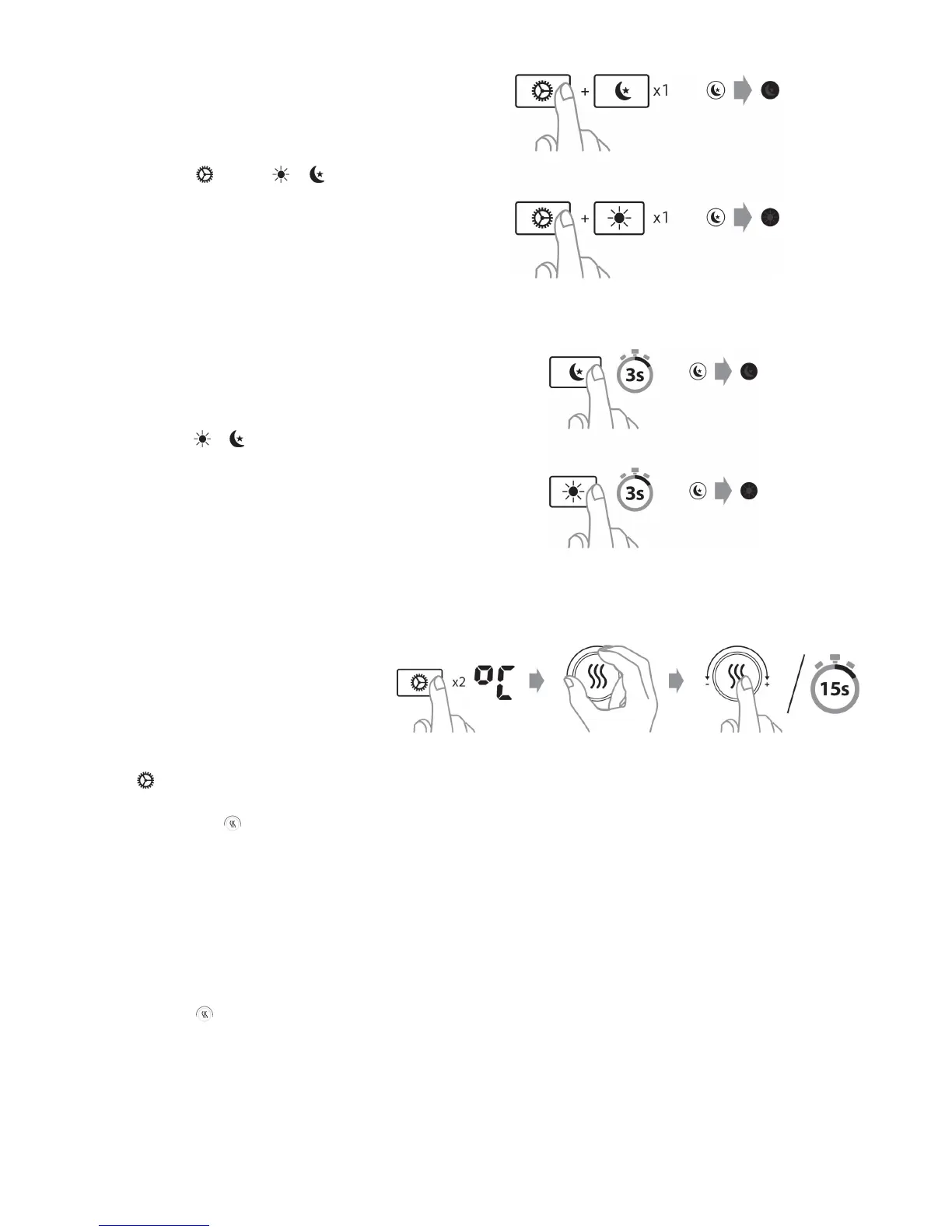
7) Cancel (skip) setback
period
Press and hold and press or
once (depending on which setback
period you want to cancel).
*The heater will skip an acve setback
period or the next setback period.
*During the next setback period, the
heater will automacally resume the
programmed temperature reducon.
8) Delete a setback program
Press and hold or (depending on
which setback period you want to
cancel) for 3 seconds.
9) Temperature calibraon
* Should any deviaons occur between
the desired and actual temperature in
the room, it can be easily adjusted (the
heater should have been set to the same
seng for at least 12 hours in order to
be sure a calibraon is necessary).
Press 2 mes and use + or − to set the
actual temperature observed in the
room. Conrm with or wait for 15
seconds for automac conrmaon.
10) Reseng the heater
Turn o the heater's main switch.
Press and hold while you turn on the
heater's main switch.
11) Memory funcon
*The heater remembers all the
temperature sengs and will
automacally return to the desired
temperature aer a power failure. If you
have changed the temperature seng
for the various setback program, the
heater will also remember it.


 To Next Page