Need help?
Do you have a question about the Millenium DM-30 and is the answer not in the manual?
Details on where to find more information about the product, including downloads, online guides, and service.
Explanation of symbols, signal words (DANGER!, CAUTION!, NOTICE!), and lettering conventions used in the manual.
Explanation of warning signs such as high-voltage and danger zone symbols used to alert users to potential hazards.
Defines the device's intended use and covers critical safety warnings for children, high voltages, and short circuits.
Details risks of hearing damage, fire hazards, improper operating conditions, power supply, and potential staining.
Advises on maintaining distance from devices susceptible to magnetic fields produced by the loudspeakers.
Details the top panel layout including input jacks, volume controls, tone controls, and power switch.
Provides detailed explanations for the functions of the top panel input jacks, volume controls, and tone controls.
Describes the rear panel connections, including the IEC power input socket and fuse holder.
Explains the pin assignment (Signal, Ground/Shielding) for the 1/4" TS phone plug used for connections.
Provides guidance on environmentally friendly disposal of packaging materials and the old device according to WEEE directive.
The Millenium DM-30 E-Drum Monitor is a dedicated amplification and monitoring solution designed for electronic drum kits and other playback devices. This user manual provides essential information for safe operation, installation, and maintenance of the device.
The DM-30 serves as a compact, two-way coaxial monitor specifically tailored for e-drums. It is designed to amplify, mix, and play back signals from an e-drum module, providing a clear and balanced sound for the drummer. Additionally, it features an auxiliary input, allowing for the connection of external playback devices such as MP3 players or for integrating a monitor mix from a band setup. The monitor offers independent volume controls for both the e-drum and auxiliary channels, enabling precise mixing of the sound sources. Tone controls for bass, mids, and treble allow users to shape the sound to their preference or to suit different acoustic environments. A standby function is integrated to conserve energy, automatically switching the device to standby mode if no signal is received for 20 minutes.
The DM-30 is designed for straightforward operation.
[DRUM IN L, R]. An additional 1/4" jack input, [AUX IN], allows for connecting other audio sources like mixers or MP3 players.[DRUM VOLUME] and [AUX VOLUME], provide independent level adjustment for the e-drum and auxiliary channels, allowing users to balance the mix.[BASS], [MIDDLE], [TREBLE]) enable users to adjust the low, mid, and high frequencies of the overall sound, offering flexibility to tailor the sound to personal preference or room acoustics.[POWER] button serves as the main switch. Pressing and holding it for a few seconds turns the device on or off. A power indicator LED lights up when the device is operational. The integrated standby function automatically activates if no signal is detected for 20 minutes, reducing power consumption. The device can be reactivated from standby by pressing the [POWER] button.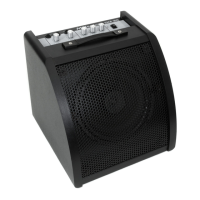

 To Next Page
 General