5.11.3 Importing les
1. Create in the root directory of the USB ash drive (USB stick) a folder named
‘pad_wave’ and store the user samples to be imported as WAV les in it.
Alternatively, use the software ‘Wave Manager’ which is available for down‐
load on the product page of our homepage www.thomann.de to create a le
named ‘pad-content.hppd’ containing the user samples to be imported as WAV
les. Store the le in the root directory of the USB ash drive (USB stick).
2. Press [SETUP] and [OK] simultaneously to enter the USB menu.
ð
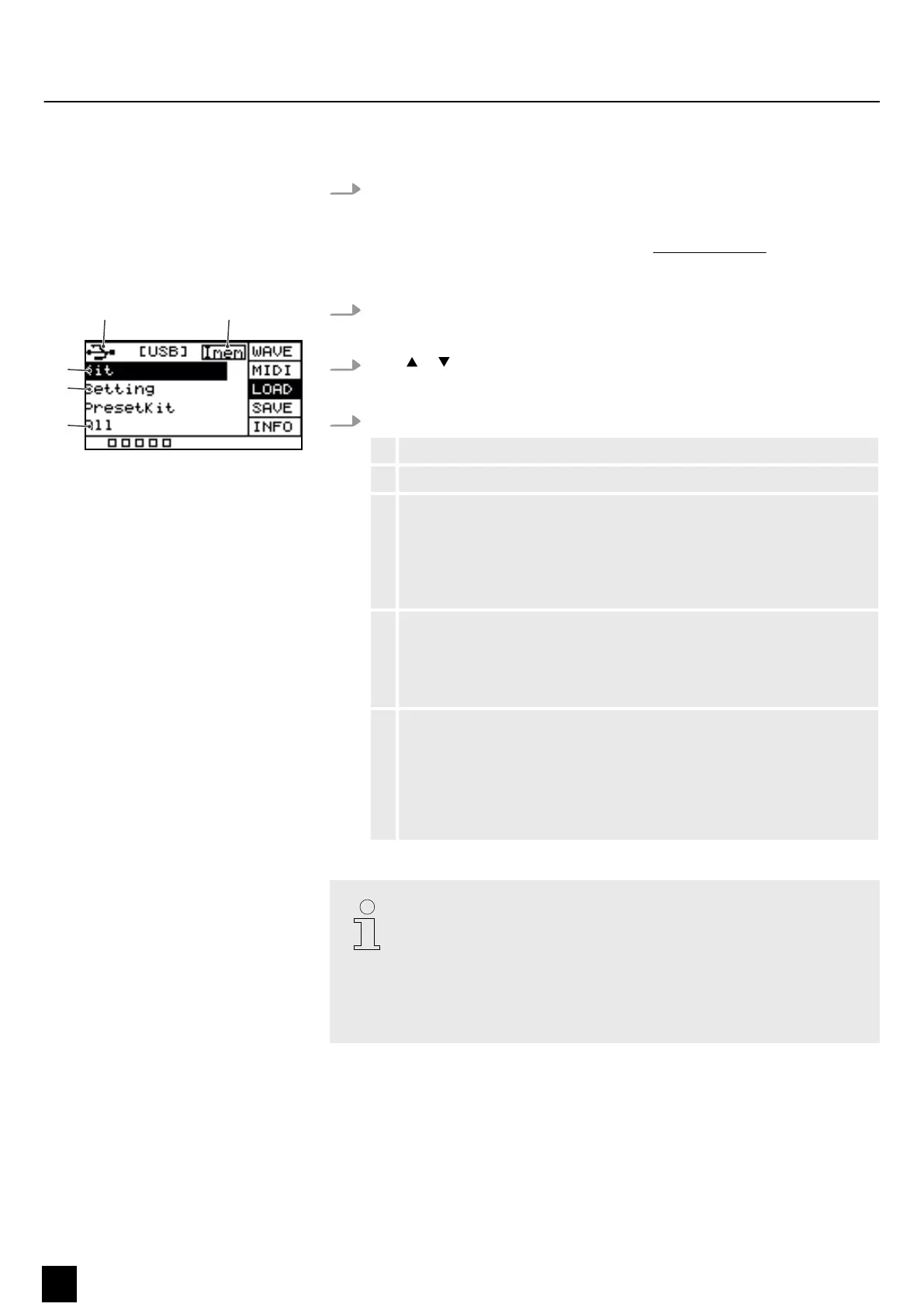
The display shows the respective submenus.
3.
Press or to select the menu item ‘LOAD’ .
ð
The display shows the respective submenus.
4. Press [SELECT] repeatedly to switch between submenus.
1 Indicates that a USB ash drive is connected.
2 Shows the memory capacity of the user samples.
3 Imports the user-dened samples, drum kits, and MIDI les.
Conrm the selection with [OK].
Press [SELECT] repeatedly to choose between ‘Cancel’ (cancel import),
‘Cover’ (replace) and ‘Append’ (import) and conrm your selection with
[OK].
4 Imports user-dened settings for the pads.
Conrm the selection with [OK].
Press [SELECT] repeatedly to choose between ‘No’ (cancel import) and
‘Yes’ (import) and conrm your selection with [OK].
5 Imports all user-dened samples and drum kits on the USB ash drive
(USB stick).
Conrm the selection with [OK].
Press [SELECT] repeatedly to choose between ‘Cancel’ (cancel import),
‘Cover’ (replace) and ‘Append’ (import) and conrm your selection with
[OK].
All user samples on the USB ash drive (USB stick) to be imported must meet
the following criteria to be played back on the Sampling Pad without any
problems.
– Sampling rate: 48 kHz, 16 bit, mono
– File name length: max. 16 characters
– Only WAV les can be imported; it is not possible to import MP3 or MIDI
les for the user samples.
Operating
28
NonaPad
Sampling Percussion Pad


 To Next Page