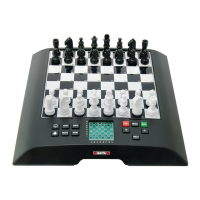
This document is a Quick Start Manual for the MILLENNIUM Chess Classics, specifically models M827 (Chess Classics Element) and M828 (Chess Classics Exclusive). It provides essential information for setting up, operating, and maintaining these electronic chess computers.
Function Description
The MILLENNIUM Chess Classics are electronic chess computers designed for playing chess against a built-in engine. They offer two distinct chess engines: "The King" and "ChessGenius," allowing users to choose their preferred playing style and difficulty. The devices are designed to simulate playing on a physical chessboard, with piece recognition and LED indicators for moves and errors. They support standard chess moves, special moves like en passant, pawn promotion, and castling, and provide feedback on the computer's moves, including checks and game results. The computers also feature game saving and loading capabilities, allowing users to store and resume games.
Important Technical Specifications
- Product: Chess Classics Element / Chess Classics Exclusive
- Item No: M827 / M828
- Hardware: ARM Cortex M7
- Software (Chess Programs):
- Johan de Koning (NL) - The King
- Richard Lang (GB) - ChessGenius
- Opening Books:
- "Master Book" by M.Uniacke © Applied Computer Concepts Ltd (UK) – approx. 300,000 positions
- "Aegon 1994 Book" © C. de Gorter (NL) – approx. 61,000 positions
- "London Book" – approx. 57,000 positions
- Power Supply:
- Input: 100-240 V 50/60 Hz, 0.45A max
- Output: 9V DC 1A (via original AC adaptor supplied with the MILLENNIUM M820 chessboard)
- Connectivity: USB cable (type A to B) for PC/laptop connection to load/save games or install software updates.
- Memory: Retains current game and specified parameters (level, etc.) even after power disconnection if switched off correctly.
- Display: LCD display with adjustable backlighting.
Usage Features
Getting Started and Setup
- Cable Connection: The device requires connection to the AC adaptor and the MILLENNIUM M820 chessboard using supplied cables. Connect the AC adaptor to the right-hand socket of the computer unit and the chessboard cable to the left socket of the computer unit and the right-hand socket of the chessboard.
- Engine Selection: Upon switching on, users can select between "The King" and "ChessGenius" engines from an initial display. This selection can be changed later using the ON/OFF and RED buttons.
- Language Selection: Both engines allow language selection. For "The King," navigate to "Options" in the "Comfort" menu and select "Language." For "ChessGenius," access "OPTS" in the main menu, then "LANGUAGE," and use arrow keys to choose from German, English, French, Dutch, Italian, Spanish, or Russian.
- Game Preparation:
- The King: Press the NEW button to start a "New game?" and choose between "Classic" chess or "Chess 960" (Fischer Random Chess). Placing all 32 pieces on starting squares or pressing GREEN starts a classic game.
- ChessGenius: Press the NEW button, then GREEN to confirm "New game?".
- Backlight Adjustment: The LCD display backlight can be adjusted by repeatedly pressing the dedicated button.
- Power On/Off: The device can be switched on or off using the power button. If disconnected from mains, it will present the engine selection menu on restart. If not disconnected, it will directly load the last selected program.
Playing the Game
- Making Your Move: Players make moves on the physical chessboard. The device registers the move after approximately 0.3 seconds, indicated by a short buzz. Captures can be made by picking up either piece first.
- Special Moves:
- En Passant: Remove the captured pawn before, during, or after your pawn's move.
- Pawn Promotion: Move the pawn to the promotion square (or remove it), then place the queen (or other piece) on the promotion square.
- Castling: First move the king, then the rook.
- Computer's Move: The computer's move is announced by blinking red LEDs on the chessboard (indicating "from" and "to" squares) and shown in notation on the "Game score" screen. A double buzz indicates a check.
- Error Handling: If the chessboard position is incorrect (e.g., illegal move, knocked piece), "prompts" on the bottom line and red LEDs at square corners indicate where adjustments are needed. The "Verify" (VERFY) function can provide further guidance.
- Retracting Moves: Press the clockwise arrow button to retract the last move. The LEDs and screen prompts guide the user to move the piece back. Multiple moves can be retracted sequentially.
- Replaying Moves: Press the anticlockwise arrow button to replay a retracted move. Multiple moves can be replayed sequentially or by pressing the button several times to reconstruct the end position.
- Resuming Play: After retracting or replaying moves, users can resume the game from the current position by making a move or selecting "Move" from the menu.
- Game Results: The end of a game is indicated by three beeps and a message on the display (e.g., Mate, Stalemate, Draw by threefold repetition, Draw by 50-move rule, Draw due to insufficient material, Game too long).
- Resignation/Draw Offers: The computer may offer resignation if its position is hopeless or a draw if the position is very drawish. Users can continue the game or start a new one after pressing a GREEN or RED button.
- Saving and Loading Games: The computer has 9 "slots" for saving and loading games. Select "SAVE" from the King or ChessGenius menu. Use the cursor to navigate to the "Save" or "Load" line, select a slot, and press GREEN. An occupied slot can be cleared by saving a game in the starting position (no moves played) to that slot. Both chess programs share the game memory.
User Interface
- Cursor: A flashing character on the screen indicates the cursor, which can be moved up/down using arrow buttons to navigate functions.
- Buttons:
- GREEN button: Confirms an instruction.
- RED button: Cancels an instruction.
- Power button: Switches the computer on or off.
- NEW button: Starts a new game.
- Backlight button: Adjusts the display's backlighting.
- Clockwise arrow button: Retracts moves.
- Anticlockwise arrow button: Replays moves.
- Left/Right arrow buttons: Move cursor left/right, switch screens, alter parameters.
- Up/Down arrow buttons: Move cursor up/down.
- Bottom Line Prompts: The bottom line of the display shows button functions (inverted text for RED/GREEN) and game status symbols (e.g., rotating hourglass for computer thinking, symbols for White/Black to move).
Engine Modes (The King)
- Comfort Mode: Offers maximum user-friendliness with game levels that adjust to playing strength and a simplified menu system.
- Expert Mode: Provides access to the full range of functions and playing strength, allowing adjustment of engine parameters. The menu system is similar to ChessGenius.
Maintenance Features
- Storage: Store the device in a dry place, away from strong sunlight and heat sources (e.g., radiators). Avoid exposure to moisture.
- Cleaning: Clean the device's surface only with a slightly damp cloth. Ensure no moisture penetrates the device. Do not use solvents or aggressive/abrasive cleaning agents, as these can damage surfaces and lettering.
- Power Adaptor: Only use the original AC adaptor. Ensure the power socket is easily accessible. Disconnect the adaptor from the mains before cleaning the device. Regularly check the product and adaptor for damage; do not use if damaged. Never open them up.
- General Safety:
- Keep packaging bags and film away from babies and small children due to suffocation risk.
- Avoid operating near devices that create magnetic fields or electromagnetic radiation (e.g., televisions, loudspeakers, mobile/cordless phones, WiFi devices).
- Do not open the device; it contains no serviceable parts. Contact service address or local shop for malfunctions.
- Disposal: Dispose of packaging materials environmentally. At the end of its service life, dispose of the device properly according to EC Directive 2012/19/EU for recycling. Contact local waste disposal company or municipal administration for information.

 Need help?
 General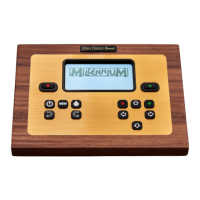

 To Next Page