4
3 Using ChessLink
3.1 What is ChessLink?
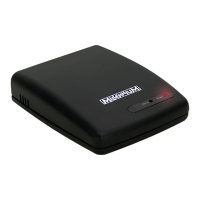
ChessLink connects Millennium chessboards to your
smartphone, tablet, laptop or desktop computer via Bluetooth
or USB. In conjunction with the relevant software (which you
can find on www.computerchess.com), you can use the
ChessGenius to, for example:
Increase playing level
Play online against opponents from all over the world
Access chess databases
Save as many chess games as you like
Automatically analyse games
3.2 Putting into operation
Insert the mains adaptor for your ChessGenius Exclusive
into the 9V DC socket on the rear of the ChessLink.
Connect the ChessLink to the sensor board.
To do so, use the mini-DIN cable included with the
ChessGenius Exclusive.
Switch the ChessLink on. The red LED lights up.
Pairing: Connect the ChessLink to your Bluetooth device
by activating this function. See fig:


 To Next Page