Section-2 Setting Up
Making Connections
Your Millennium can be connected in several different ways to meet the requirements of specific applications. The following diagrams offer
some different ways your Millennium can be connected.
NOTE: In the following diagrams, we have shown use of the external FX loop.
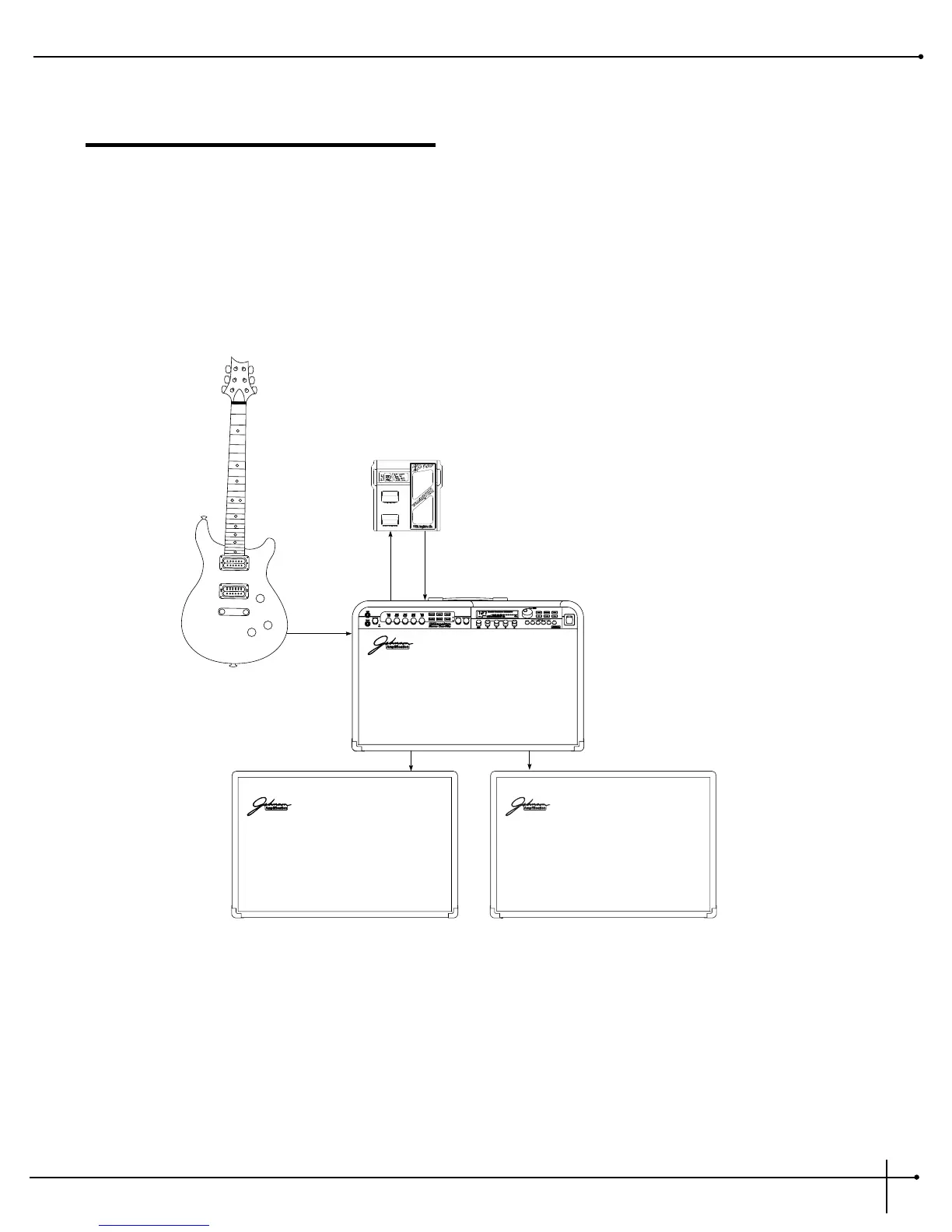
Millennium into Two 2x12 Extension Speaker Cabinets
For those of you out there that feel that “bigger is better”, this set-up should work quite nicely for you. First plug into either the Normal or
Bright input. Using the Bright input will produce a slightly brighter tone. From the left and right extension cabinet outputs (located on the
rear of the Millennium), use an un-shielded speaker cable and run into the input jacks of the Johnson 2X12 extension cabinets. Using a set-up
such as this will let you produce that classic Stack Sound. This is also a great set-up to produce lush and thick stereo effects.
Always make sure that the extension speaker cabinet being used has minimum input load resistance of 4 ohms.


 To Next Page