GENERAL
Quick Start details the minimum recommended start up
procedure for most AIRANGER DPL PLUS installations.
Refer to the individual product instruction manuals for
complete installation and interconnection instructions for the:
AIRANGER DPL PLUS
Ultrasonic Transducers
TS-3 Temperature Sensors (if used)
BIC-II Buffered Interface Converter (if used)
To measure distances greater than 60 m (200ft), refer to the
AIRANGER DPL PLUS manual (PL-421).
Ensure all process control equipment is disabled until
satisfactory AIRANGER DPL PLUS performance is verified.
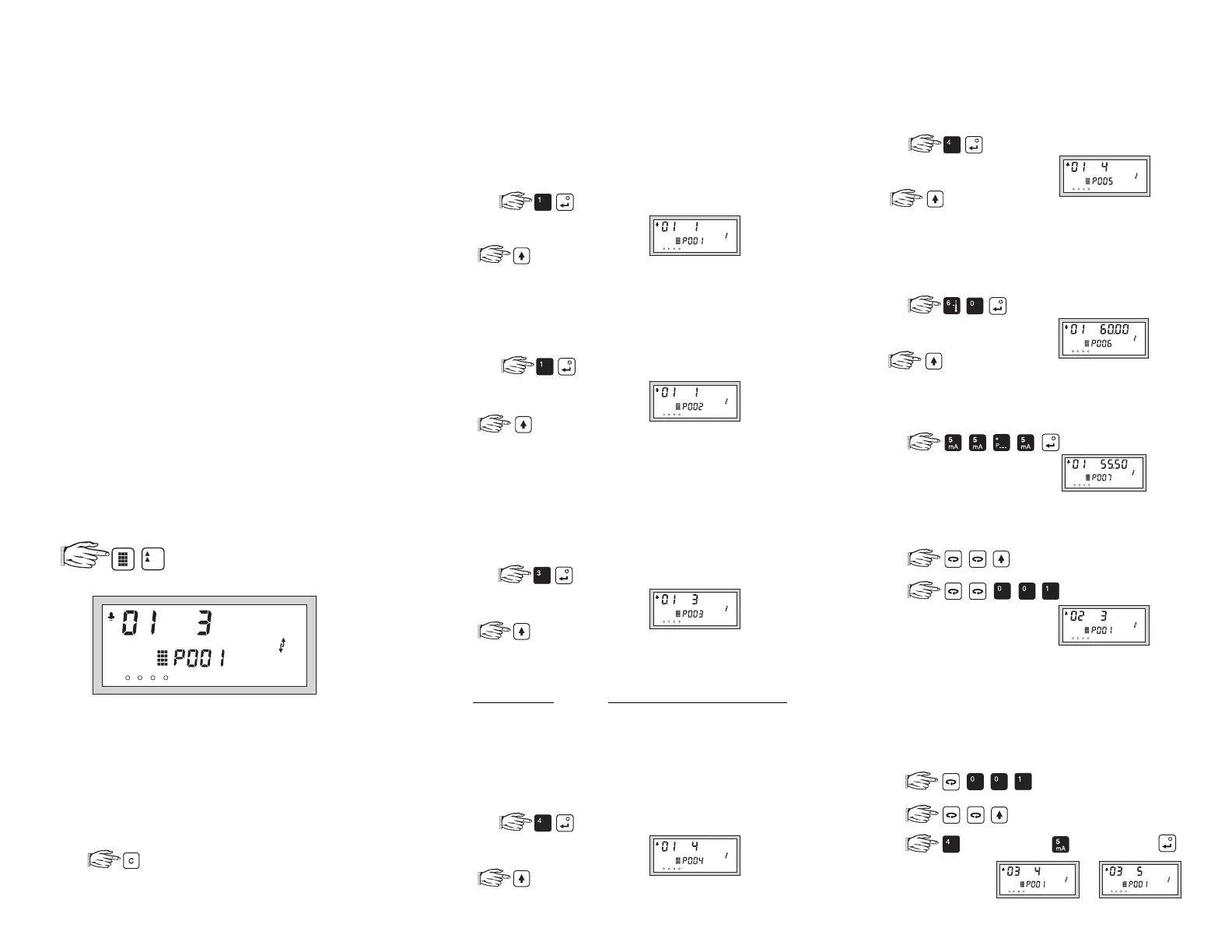
INITIAL START UP
1.
Place the programmer in the AIRANGER DPL PLUS
enclosure lid recess. The magnetic programmer base
holds it in place.
2.
Apply power to the AIRANGER DPL PLUS,
OFF
is displayed.
3.
During the following procedure:
a) If the selection desired is already displayed...
no entry is required. (Advance to the next step.)
b) If an entry error is made...
and try again.
VESSEL # 1
STEP 1
Which type of
Operation
is desired?
(P001)
0 =
off
(point out of service)
1 =
level
(how full the vessel is)
2 =
space
(how empty the vessel is)
3 =
distance
(from the transducer face)
e.g. for level
to advance
STEP 2
Which
Material
is being monitored?
(P002)
1 =
liquid
(flat level surface)
2 =
solid
(uneven sloped surface)
e.g. for liquid
to advance
STEP 3
Which
Measurement Response
is desired?
(P003)
1 =
slow
(0.1 m/min)
2 =
medium
(1 m/min)
3 =
fast
(10 m/min)
(Slower response improves measurement stability!)
e.g. for fast
to advance
STEP 4
Which
Transducer
is connected (check nameplate)?
(P004)
ULTRASONIC
ULTRASONIC/TEMPERATURE
0 =
not entered
100 =
ST-H
106 =
XPS-40
1 =
ST-25
101 =
XCT-8
107 =
XLT-30
2 =
ST-50
102 =
XPS-10
108 =
XLT-60
3 =
ST-100
103 =
XCT-12
109 =
XLS-30
4 =
LR-21
104 =
XPS-15
110 =
XLS-60
5 =
LR-13
105 =
XPS-30
111
=
XKS-6
e.g. for LR-21
to advance
STEP 5
Which measurement
Units
are desired?
(P005)
1 =
metres (m)
4 =
feet (ft)
2 =
centimetres (cm)
5 =
inches (in)
3 =
millimetres (mm)
e.g. for feet
to advance
STEP 6
Where is
Empty
(transducer face to vessel bottom)?
(P006)
(Presets Span to the maximum recommended value).
0.000 to 9999
e.g. for 60 Units
to advance
STEP 7
What is the
Span
(Empty to highest material level)?
(P007)
0.000 to 9999
e.g.
To monitor 1 vessel, proceed to OPERATION.
VESSEL # 2
a.
b.
c. Repeat STEP 1 to 7
(Use the same STEP 5 value as for Vessel # 1).
To monitor 2 vessels, proceed to OPERATION.
DIFFERENCE or AVERAGE DISPLAYS
To display the difference or average of 2 vessels...
a.
b.
c. (difference) or (average) and .
112 =
XRS-5
(return to STEP 1)
1
234
%
to enter the program mode
and display . . .
1
234
1
234
1
234
1
234
1
234
1
234
1
234
1
234
(switch to next vessel)
1
234
1
234
or
Proceed to OPERATION.
432



 To Previous Page