6
ONE-KEY™
To learn more about the ONE-KEY™ functionality for
this tool, please refer to the quick reference included with
this product or go to milwaukeetool.com/One-Key. To
download the ONE-KEY™ app, visit the App Store or
Google Play from your smart device.
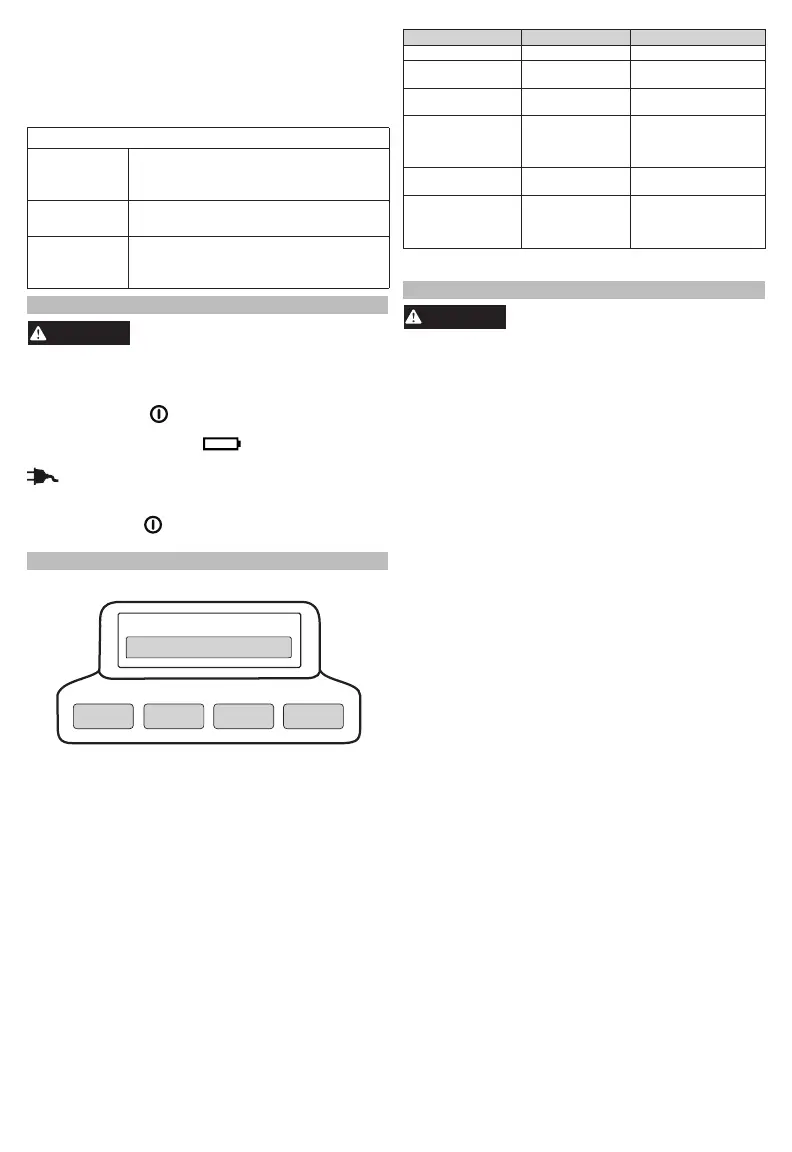
ONE-KEY™ Indicator
Solid Blue Wireless mode is active and ready
to be congured via the ONE-KEY™
app.
Blinking Blue Tool is actively communicating with
the ONE-KEY™ app.
Blinking Red Tool is in security lockout and can
be unlocked by the owner via the
ONE-KEY™ app.
LIGHT OPERATION
To reduce the risk of injury, do not
look directly into the light when
the light is on.
Using the Light
1. Insert battery pack(s) or plug into AC power.
2. Press the Arm
button.
NOTE: When the light is running on battery, the
Battery Power Indicator
will light. When the
light is running on AC power, the AC Power Indicator
will light.
3. Press the - and + buttons to cycle through High,
Medium, and Low.
4. Press the Arm
button to turn the light o. Always
turn o power before unplugging the light.
BATTERY OPERATION
Fuel Gauge
Less than 10% if rst light ashes 4 times
10-32%
Approximate Run Time Remaining
32-55%
55-77%
77-100%
Fuel Gauge Button
Use the Fuel Gauge to determine the battery pack's
remaining run time. Press the Fuel Gauge button to
display the lights. The Fuel Gauge will light up for
2-3 seconds. When less than 10% of charge is left,
1 light on the fuel gauge will ash 4 times. When the
battery reaches 0% charge, 1 light on the fuel gauge
will ash 8 times. Charge the battery pack.
An alternating blinking pattern indicates that an error
or overtemperature state was encountered. Allow
the battery pack to cool and reinsert. If the pattern
continues, contact a MILWAUKEE service facility.
If the Fuel Gauge doesn't appear to be working,
place the battery pack on the charger and charge
as needed.
Immediately after using the battery pack, the Fuel
Gauge may display a lower charge than it will if
checked a few minutes later. The battery cells "re-
cover" some of their charge after resting.
Under extreme circumstances, the internal tem-
perature of the battery could become too high. If
this happens, the fuel gauge lights will ash in an
alternating pattern and the product will not run. Allow
the battery to cool down.
Fuel Gauge Lights Diagnosis Solution
Lights 1 - 4 Solid Remaining run time Continue working
1 Light, ashing
slowly
Less than 10% run
time left
Prepare to charge pack
1 Light, ashing
quickly
End of discharge Charge pack
Lights 1-4, ashing
quickly
Current draw too
high
Release trigger. Once
fuel gauge has stopped
ashing, restart and
reduce pressure
Lights 1&3 / 2&4,
ashing alternatingly
Battery temperature
too high
Release trigger and
allow battery to cool
Lights 1&4 / 2&3,
ashing alternatingly
Communication
error
Remove the battery.
Press the Fuel Gauge
button to clear. Reinsert
the battery.
†
†
If the problem persists, take the product, charger, and battery pack
to a MILWAUKEE service facility.
CHARGER OPERATION
Charge only MILWAUKEE MX
FUEL™Li-Ion batteries in this
MILWAUKEE Li-Ion charger. Other types of bat-
teries may cause personal injury and damage.
When to Charge the Battery Pack
with this MILWAUKEE Charger
Remove the battery pack from the product for charging
when convenient for you and your job. MILWAUKEE
batteries do not develop a "memory" when charged
after only a partial discharge. It is not necessary to run
down the battery pack before placing it on the charger.
• Use the Fuel Gauge to determine when to charge
your MILWAUKEE Li-Ion battery pack.
• You can "Top-O" your battery pack's charge before
starting a big job or long day of use.
• The only time it is necessary to charge the
MILWAUKEE Li-Ion battery pack is when the battery
pack has reached the end of its charge. To signal
the end of charge, power to the product will drop
quickly, allowing you just enough power to nish
the operation. Charge the battery pack as needed.
How to Charge the Battery Pack
Align the battery pack with the bay and slide the
battery pack into the charger as far as possible.
The red light will come on, either ashing quickly
(battery pack or charger is too hot or cold), ashing
slowly (communication between pack and charger)
or continuous (pack is charging).
• A fully discharged battery pack with an internal tem-
perature in the normal range will charge in about 45
to 90 minutes, depending on the battery pack and
internal temperature of the charger.
• Heavily cycled batteries may take longer to charge
completely.
• The fuel gauge lights are displayed as the pack is be-
ing charged, indicating how fully charged the pack is.
The fuel gauge will turn o when charging is complete.
• After charging is complete, the continuous green
light will come on.
• The charger will keep the battery pack fully charged
if it is left on the charger. The light indicator will be
same as normal charging.
• If the light indicator ashes red and green, check that
the battery pack is fully seated into the bay. Remove
the battery pack and reinsert. If the light continues
to ash red and green, remove pack(s) and unplug
charger for at least 2 minutes. After 2 minutes,
plug charger back in and insert pack. If the problem
persists, contact a MILWAUKEE service facility.


 To Next Page