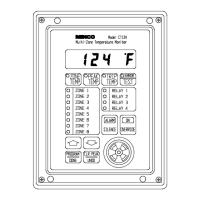
PROGRAMMING
Backing Up:
• Press to cancel your current choice and back up to the previous step. Press it repeatedly
to move backward through all previous program steps.
Note: The button only cancels the most recent program step. Any steps previous to that are already
stored in the CT124’s memory. Pressing while programming relays or zones returns you a step at
a time to the front of the line you are on. When at the beginning of a line, will move you to the
beginning of the previous line. The button always moves you forward in single steps.
PROGRAMMING STEPS
The first letter of code below indicates: d = Display, r = Relay, A = Alarm
Display:
Code Choices Description
dS °C or °F Display Scale: Set the temperature scale to degrees Celsius or
degrees Fahrenheit. Trip points automatically convert to the
new scale.
dC HI
LO
AnY
Display Channel: If the keyboard has been untouched for 15
seconds, the CT124 will switch to display the highest or lowest
temperature being sensed, or any (last) selected zone.
Relays and Alarms:
Each step is repeated for each relay and the alarm.
rt or
At
-40 to 250°C
-40 to 492°F
(to 530°C or 986°F with
platinum RTD)
OFF
Relay or Alarm Trip Temperature: Set the trip point
temperature for the indicated relay or alarm. Select "OFF"
(below 40°) to lock out the output. Subsequent programming
steps will skip a locked-out relay or alarm.
rH or
AH
2 to 20°C
2 to 20°F
Relay or Alarm Hysteresis: Set the hysteresis (deadband) for
the indicated relay or alarm.
rP or
AP
HI or Lo Relay or Alarm Trip mode: Set the relay or alarm to trip on
overtemperature (HI) or undertemperature (Lo).
rA YES or no Relay Alarm: Sound alarm when the indicated relay trips?
rS YES or no Relay Silence: Untrip this relay (return to normal) when
Silence is pressed?
AS 1to60
or---
Alarm Silence: Set the duration of alarm silence in minutes.
Select "- - -" (above 60) if the silence is not to be timed. Any
new alarms will cause the alarm to sound.
rd YES or no Relay Diagnostic Test: Should the indicated relay trip when
the test button is pressed?
ro or
Ao
no
On
OFF
Relay or Alarm Override: Select effect of override on alarm
or relay. Select "no" for no effect.
Minco Products, Inc. CT124 Instruction Manual
13


 To Next Page
 Loading...