INSTALLATION
INSTALLATION INSTRUCTIONS
MOUNTING
1. Choose a mounting location which meets these conditions:
• Operating ambient temperatures must be within 0 to 55°C (32 to 131°F).
• Air must be free to circulate around the sides and rear of the case.
• The front panel is sealed against dust and moisture. The sides and rear must be protected
from water and excessive dust inside a suitable enclosure.
• Do not use the CT124 in hazardous (explosive) atmospheres.
• Do not expose the CT124 to continuous or excessive shock and vibration.
• Mount the CT124 at any angle.
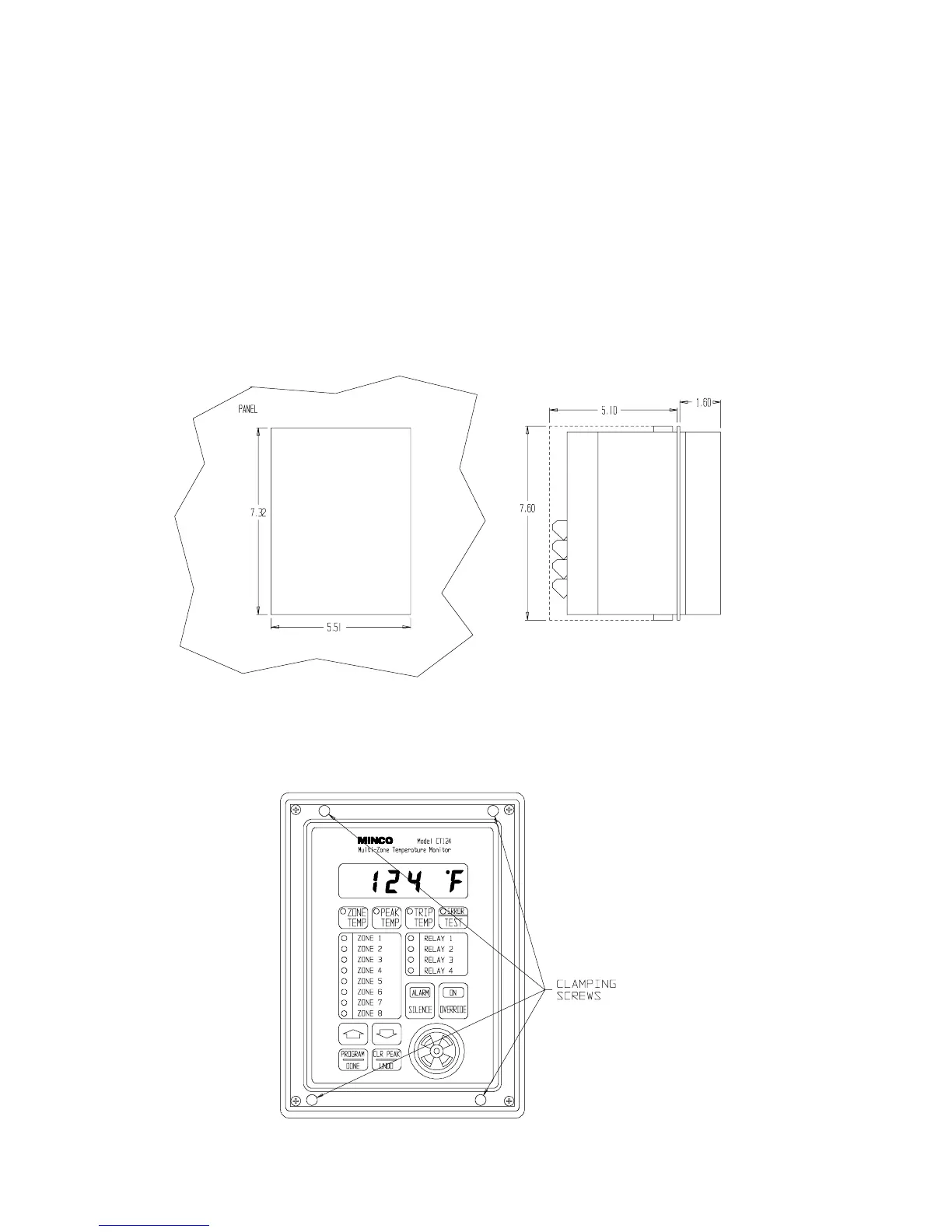
2. Cut a rectangular hole in your panel according to the dimensions shown in Figure 1.
Figure 1 Panel Cutout Dimensions (in inches)
3. Place the controller into the panel hole. Using a Phillips screwdriver with a shaft diameter less
than ¼" (6.3 mm), tighten the four clamping screws shown in Figure 2.
Figure 2 Clamping Screw Access Locations
Minco Products, Inc. CT124 Instruction Manual
4


 To Next Page