SMARTFRIDGE OWNER’S MANUAL Page
7
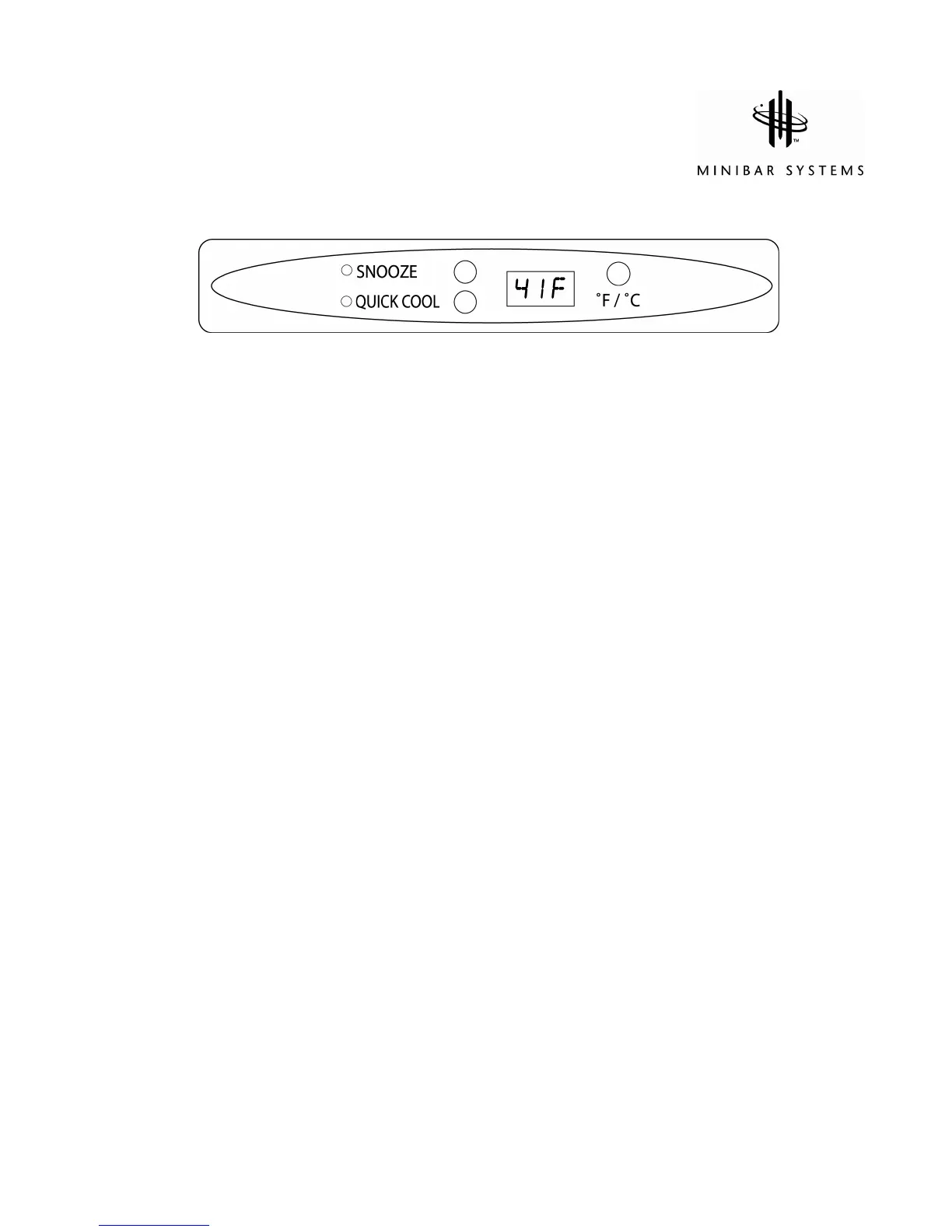
Use of the LED Control Panel
The appliance is set to maintain a standard temperature of 41°F / 5°C which is shown on the
LED display. There are three functions to suit your needs.
Pressing the SNOOZE button
• Red light comes on.
• The compressor system is turned off for complete silence whilst sleeping.
• Upon reaching an internal temperature of 50°F / 13°C, the Control Panel will activate the
compressor system automatically.
Pressing the QUICK COOL button
• Blue light comes on
• By pressing the Quick Cool button the compressor system will be activated to cool to a
maximum capacity until inside temperature of 34°F / 2°C is reached.
• The unit will then resume normal cooling at 41°F / 5°C.
Pressing the °F / °C button
• The °F / °C button allows you to convert the internal temperature read out from Fahrenheit
into Celsius and vice versa.



 To Next Page