Changing the MiniMed® Quick-set® Infusion Set for the MiniMed® 530G Insulin Pump
To Insert the Quick-set
®
Infusion Set:
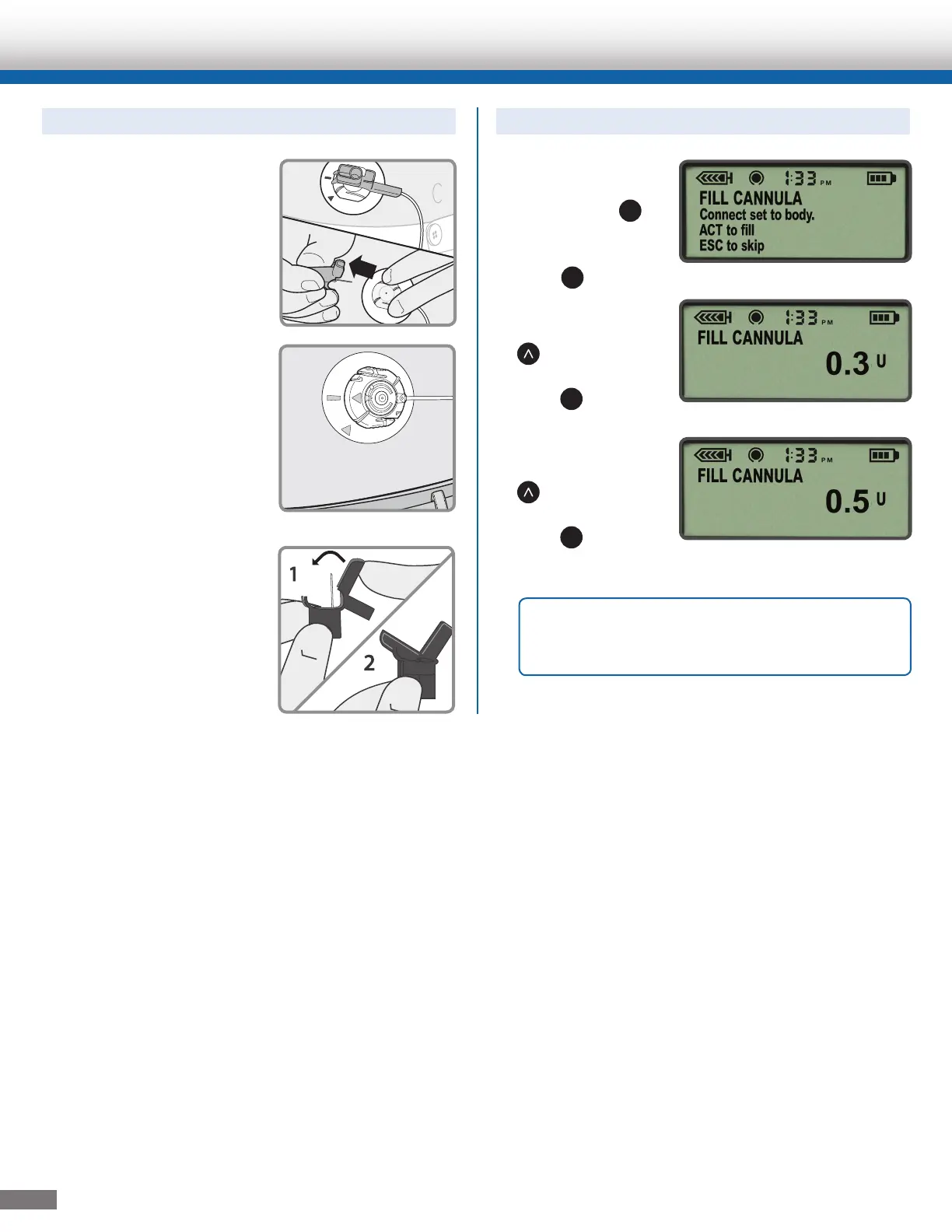
7. With one hand, place
your fingers on the
Quick-set. With the other
hand, pull the blue
hub straight out to
remove the insertion
needle.
8. Fold the hub handle in
half until it locks into
place. Dispose into a
sharps container.
1. If the pump has
returned to HOME
screen, press
ACT
.
On the FILL
CANNULA screen,
press
ACT
.
2. If you are using a
6mm cannula, press
to enter 0.3
units of insulin.
Press
ACT
.
Or, if you are using a
9mm cannula, press
to enter 0.5
units of insulin.
Press
ACT
.
To Fill the Cannula:
4
Quick-set, Quick-serter and MiniMed 530G are registered trademarks of Medtronic MiniMed, Inc.
950M10486-011 20130903 ©Medtronic MiniMed, Inc. 2013. All rights reserved.
OR
Note: Fill Cannula is to fill the empty cannula
after the insertion needle has been removed.
The tubing is already filled.



 To Previous Page