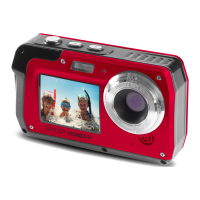
The Minolta MN40WP is a waterproof digital camera designed for capturing photos and videos in various environments, including underwater. It boasts a 48.0-megapixel resolution for still images and records videos in MOV format at 2.7K, 1080p, and 720p. The camera is equipped with a 16X digital zoom and a 13MP CMOS sensor, ensuring clear and detailed captures.
Technical Specifications:
- Model Number: Minolta MN40WP
- Lens: Fixed Focus, f=8.15mm, F/3.0
- Zoom: 16X Digital Zoom
- Image Sensor: 13MP CMOS Sensor
- Shutter: Electronic, Anti-Shake Image Stabilization
- Pixels (photo): JPEG; 48 MP, 30 MP, 24 MP, 20 MP, 16 MP, 12 MP, 10 MP, 8 MP, 5 MP, 3 MP, 2 MP
- Pixels (video): MOV; 2.7K, 1080p, 720p
- ISO Sensitivity: Auto, 100, 200, 400
- LCD Screen: Rear: 3.0" TFT LCD Screen; Front: 2.0" TFT LCD Screen
- Assistive Light: White LED
- Waterproof: Up to 10 feet for up to 60 minutes
- Power Saving Mode: OFF, 1 Minute, 3 Minutes, 5 Minutes
- White Balance Control: Auto, Daylight, Cloudy, Fluorescent, Incandescent
- Scene Modes: Auto, Scenery, Portrait, Night Scenery, Night Portrait, High Sensitivity, Sport, Beach, Party
- Recording Media: Micro SD, MicroSDHC; Maximum: 128GB
- I/O Ports: 5-pin Micro USB, USB 2.0 (high speed), Microphone (built-in MIC), Speaker
- Power: Lithium-ion 3.7V, 1500mAh, 5.55Wh
- Dimensions: 4.4 x 2.7 x 1.3 in., 5.8 oz.
Usage Features:
The MN40WP offers a user-friendly interface with a variety of functions accessible through its buttons and LCD screens.
- Power: Press for 3 seconds to turn on or off.
- Settings | OK: Tap to access the settings menu and confirm selected settings.
- Zoom Out | Left: In Video or Photo mode, press to zoom out. In Settings, press to select a submenu. In Playback, press to view multiple images on the screen.
- Zoom In | Right: In Video or Photo mode, press to zoom in. In Settings, press to select a submenu. In Playback, press to zoom in on the image displayed on the screen.
- Flash | Up: In Photo mode, press to change flash settings. In Playback, press to go to the previous image. In Settings, press to select desired settings.
- Delete | Down: In Video or Photo mode, press to delete the last recorded video or image. In Playback, press to go to the next image. In Settings, press to select desired settings.
- Mode: Tap to cycle between Photo, Video, and Playback modes.
- Shutter: In Photo mode, tap to capture a photo. In Video mode, tap to start and stop recording. In Playback mode, tap to play and pause recorded videos.
- Switch Screen: Switches the LCD screen that is powered on.
- Tripod Mount: Mount port for attaching to a tripod nut.
- Battery Door: Door to cover the battery compartment and memory card slot.
- Speaker: Built-in speaker output for playback of video files when audio recording is enabled.
- Lens: Front capture device for all video and photo.
Photo Mode Functions:
The camera provides extensive control over photo settings:
- Photo Mode: Switches to photo mode.
- Image Size (Resolution): Sets photo resolution (48MP, 30MP, 24MP, 20MP, 16MP, 12MP, 8MP, 7MP, 5MP, 3MP, 2MP).
- Image Quality: Adjusts compression for saving (Normal, Fine, Super Fine).
- Anti-Shake: Electronically minimizes motion blur.
- Face Detect: Detects faces for optimal picture settings.
- Pictures Remaining: Displays remaining storage for photos.
- Memory Card Inserted: Indicates if a memory card is present.
- Battery Level: Shows current battery charge.
- Current Date: Displays the current date.
- Flash Needed: Indicates if flash is recommended.
- Flash Status: Shows current flash setting.
- White Balance: Adjusts color balance (Auto, Daylight, Cloudy, Fluorescent, Incandescent).
- Scene: Selects scene modes (Auto, Scenery, Portrait, Night Scenery, Night Portrait, High Sensitivity, Sport, Beach, Party).
- ISO: Adjusts light sensitivity (Auto, ISO 100, ISO 200, ISO 400).
- Metering: Determines appropriate exposure (Center, Multi, Spot).
- Language: Sets the camera's interface language.
- Date/Time: Sets current date and time.
- Silent Mode: Turns camera sounds on/off.
- Auto Power Off: Sets duration before automatic power off (1 Minute, 3 Minutes, 5 Minutes, Off).
- Frequency: Sets frequency for location (50 Hz, 60 Hz).
- Format Memory Card: Erases all photos, videos, and data on the memory card.
- Restore Default Settings: Restores factory default settings.
Video Mode Functions:
Similar to photo mode, video mode offers various settings:
- Video Mode: Switches to video mode.
- Video Size (Resolution): Sets video resolution (2.7K 2688x1520, FHD 1920x1080, HD 1280x720).
- Video Quality: Adjusts compression for saving (Normal, Fine, Super Fine).
- Video Time Remaining: Displays remaining recording time.
- Memory Card Inserted: Indicates if a memory card is present.
- Battery Level: Shows current battery charge.
- Current Date: Displays the current date.
- Metering: Determines appropriate exposure (Center, Multi, Spot).
- ISO: Adjusts light sensitivity (Auto, ISO 100, ISO 200, ISO 400).
- Light Exposure: Adjusts frame brightness.
- Image Sharpness: Adjusts visible detail (Soft, Normal, Sharp).
- Color Effect: Sets color filter (Standard, Sepia, Monochrome, Vivid).
- White Balance: Adjusts color balance (Auto, Daylight, Cloudy, Fluorescent, Incandescent).
- Frequency: Sets frequency for location (50 Hz, 60 Hz).
- Auto Power Off: Sets duration before automatic power off (1 Minute, 3 Minutes, 5 Minutes, Off).
- Format Memory Card: Erases all photos, videos, and data on the memory card.
- Restore Default Settings: Restores factory default settings.
Playback Mode Functions:
- Playback Mode: Displays captured photos and videos.
- Delete: Deletes selected photos and videos.
- Rotate: Rotates stored images (90°, 180°, 270°, Cancel).
- Protect/Lock: Protects photo/video files from accidental deletion (Lock This Image, Unlock This Image, Lock All Images, Unlock All Images).
- Print This Photo: Prints images when connected to a Pictbridge printer.
- Slideshow: Views photographs as a slideshow (3 Seconds, 5 Seconds, 10 Seconds).
Maintenance Features:
- Battery Installation: Insert the lithium-ion battery into the battery compartment with the metal contacts facing inside.
- Memory Card Installation: Insert a Micro SD memory card into the slot until it clicks. Ensure the metal contacts are inserted first. Format the memory card before initial use.
- Charging: Connect the camera to the included AC adapter with the USB cable. The LED indicator light will light up solid red when charging and turn off when complete.
- Connecting to a Computer: Connect the camera to a computer via USB to transfer photos and videos. The camera's screen will enter "Mass Storage" mode automatically.
- Cleaning: Do not puncture the microphone or speaker openings. If the camera is damaged, the waterproof performance will deteriorate. Do not use soap, natural detergents, or chemicals such as benzene for cleaning.
- Storage: Store the camera in a shallow basin filled with fresh water for 10 minutes after using it underwater or at the beach. Ensure the battery cover is closed and washed off with fresh water.
- Waterproof Precautions:
- Immerse the camera in fresh water and shake it sufficiently to remove any foreign substances.
- Air bubbles may come out from the water drain holes of the camera, microphone, or speakers; this is normal.
- Wipe off water droplets with a soft cloth and dry the camera in a well-ventilated and shady place.
- Place the camera on a dry cloth to dry it.
- Do not dry the camera with hot air from a hair dryer or clothes dryer.
- After making sure there are no water droplets on the camera, open the battery cover and use a soft dry cloth to gently wipe off any water or sand remaining on the waterproof packing or inside the camera.
- If the cover is closed when the inside is wet, this could cause condensation or a malfunction.
- General Precautions:
- Do not disassemble or attempt to service the camera yourself.
- Do not expose the camera to moisture or extreme temperatures.
- Allow the camera to warm up when moving from cold to warm temperatures.
- Do not touch and put pressure on the camera lens.
- Do not expose the lens to direct sunlight for extended periods.
- Do not use abrasive chemicals, cleaning solvents, or strong detergents.
- Do not use the flash or LED Light near a person's eyes.
- To prevent falling over or resulting in traffic accidents, do not use the camera while walking, driving, or riding a vehicle.
- Handle the camera strap with care and never place the strap around the neck of an infant or child.
- Do not subject the LCD screen to impact.
- To prevent the risk of fire or electric shock, do not expose the inside of this product to rain or moisture.
- Turn off the camera before installing or removing the battery.
- Use only the provided batteries or charger.
- Inserting the battery upside down can cause damage.
- When the camera is used for an extended period, it is normal for the camera body to feel warm.
- Download all pictures and remove the battery from the camera if you are going to store the camera for a long period.
- Risk of explosion if battery is replaced by an incorrect type.
- Keep the batteries out of the reach of children.
- If the battery's color or shape changes, stop using the battery.
- Do not expose the adapter to high temperatures or moisture.
- Do not attempt to repair, disassemble, change, or transform the adapter.
- Avoid sudden changes in temperature, which may cause condensation.
- Do not touch the plug with wet hands.
- Do not use the travel voltage converter or AC/DC power inverter.
- Do not cause damage, overheating, malfunction, or fire to the camera.
- The waterproof and dustproof performance is not guaranteed under all conditions.
- Do not subject the camera to excessive shock, vibration, or pressure.
- The battery door must be closed securely and the lock engaged for the camera to be waterproof.
- Do not drop the camera, strike it against a hard object, or throw it against a water surface.
- Do not subject the camera to shock when using it underwater.
- Do not continuously use the camera underwater for 60 minutes or more.
- Do not insert a wet memory card or battery.
- Do not open the battery cover when the camera or your hands are wet.
- If moisture such as water droplets adheres to the outside of the camera or inside of the battery cover, immediately wipe it off with a soft dry cloth.
- If a foreign substance adheres to the outside or inside of the battery cover, immediately remove it with a soft cloth.
- Do not leave the camera in cold conditions or hot conditions (40°C (104°F) or more) for a long period.
- When using the camera underwater, make sure the water temperature is from 0°C-40°C (32°F to 104°F).
- Do not use the camera in hot springs.
- Ensure there are no foreign substances inside the battery cover.
- Make sure that the waterproof packing of the battery cover is not cracked or deformed.
- Make sure that the battery door is firmly closed and the battery cover security lock is in the LOCK position.
- Failure to follow these steps can result in damage.
- Do not apply strong impact to the camera.
- Avoid sudden changes in temperature.
- Keep away from strong magnetic fields.
- Do not point the lens at strong light sources for extended periods.
- Remove the battery when the product is on, or while images are being saved or deleted.
- The LCD screens are constructed with extremely high precision; at least 99.99% of pixels are effective, with no more than 0.01% being missing or defective.
- Images viewed on the LCD screen may be difficult to see under certain lighting.
- Do not apply pressure to the LCD screen, as this could cause damage or malfunction.
- Note that the battery may become hot after use.
- Do not use the battery at ambient temperatures below 0°C (32°F) or above 40°C (104°F).
- If you notice any abnormalities such as excessive heat, smoke, or an unusual smell coming from the battery, immediately discontinue use and consult your retailer.
- After removing the battery from the camera or optional battery charger, put the battery in a plastic bag, etc. in order to insulate it.
- Check the battery level before using the camera and replace or charge the battery if necessary.
- Charge the battery indoors with an ambient temperature of 5°C (41°F) to 35°C (95°F).
- A high battery temperature may prevent the battery from charging properly or completely, and may reduce battery performance.
- When charging the battery inserted into this camera using the charging AC adapter or a computer, the battery is not charged at battery temperature below 0°C (41°F) or above 55°C (131°F).
- When the battery is between 45°C (113°F) - 55°C (131°F), the chargeable capacity may decrease.
- Do not continue charging once the battery is fully charged.
- The battery temperature may increase during charging.
- On cold days, the capacity of batteries tends to decrease. If an exhausted battery is used at a low temperature, the camera may not turn on.
- Replace the battery when it no longer holds a charge.
- Follow the procedure below to rinse the camera with fresh water within 30 minutes after using it under saltwater or at the beach.

 To Next Page

 General










