Need help?
Do you have a question about the Minshine T154-1 and is the answer not in the manual?
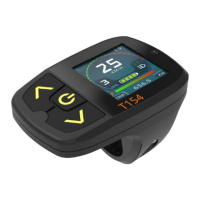
Detailed technical specifications for the T154 display series.
Overview of various indicators on the T154 display.
Detailed technical specifications for the T24 display series.
Overview of various indicators on the T24 display.
Detailed technical specifications for the M15 display series.
Overview of various indicators on the M15 display.
How to power the system on/off and control bike lights.
Adjusting assistance levels and selecting riding modes.
Using walk assistance and cruise control functions.
Configuration options for general bike operation.
Configuring motor-related parameters.
Settings for battery, sensors, and phase table.
Adjusting settings for the Pedal Assist Sensor (PAS).
Configuring throttle and accessory-related functions.
Torque sensor, warnings, screen options, and firmware.
Explanation of common warning messages and their solutions.
Identifying and resolving common error codes.
How to change display skins and font colors directly on the device.
Using the application to customize display font colors.
How to load custom power-on/off images using the application.
Process for updating controller firmware using the application.
Using the app to manage firmware databases for multiple bikes.
Using specialized tools for bike service and password reset.
Visual guide to the T154 display screen layouts.
Visual guide to T24 and M15 display screen layouts.
 General
| Type | Bicycle Light |
|---|---|
| Mounting Placement | Handlebar |
| Product Type | Front Light |
| Color | Black |
| Power Source | Battery |

 To Next Page