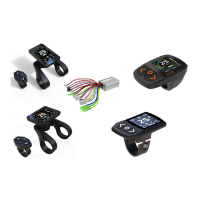
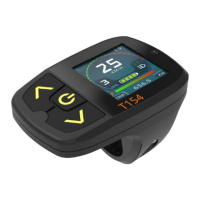
This document outlines the features and operations of the Minshine Smart eBike Drive System, providing a user guide for its various components, including displays (T154, T24, M15 series) and controllers. The system is designed to enhance the eBike riding experience with smart functionalities.
Function Description
The Smart eBike Drive System integrates a display and a controller to manage the eBike's power, speed, and various assistance modes. The display serves as the primary interface for the rider, showing real-time information such as speed, battery level, assistance level, and riding mode. It also allows riders to customize settings and monitor system status. The controller, working in conjunction with the display, manages the motor's power output based on rider input and selected settings.
Key functions include:
- Power On/Off: The system can be powered on by a long press of the POWER button. A password protection feature can be activated for added security.
- Bike Light Control: Riders can turn the bike lights on or off, with options for Manual, Auto-Manual, and Auto modes. In Auto mode, a light sensor detects environmental light intensity to automatically control the lights.
- Assistance Level Switching: The system offers multiple assistance levels (1 to 8, plus special levels like REVERSE, AUTO, and Climb). Short presses of the UP or DOWN buttons adjust the assistance level, with higher levels providing more power and speed. The motor assistance can be switched off at Zero Level. Special levels can be activated via menu options.
- Walk Assistance: This feature provides assistance up to 6km/h, making it easier to push the eBike. It is recommended for use only when pushing the bike.
- Cruise Control: By long-pressing the DOWN button when the bike speed exceeds an activated threshold and power assisting is on, the bike will enter cruise mode. This mode can be canceled by pulling the brake, moving the pedal, pulling the throttle, or pressing any key on the display.
- Riding Mode Switching: Three riding modes are available: ECO, CITY, and SPORT. These can be selected by long-pressing the POWER and UP buttons (T154 or M15 displays) or the Info button (T24 display).
- ECO: Provides effective assistance for maximum efficiency and cruising range.
- CITY: Offers uniform assistance for long cruising ranges.
- SPORT: Delivers powerful assistance for sporty off-road riding and urban traffic.
- Clear Trip: A long press of both POWER and DOWN buttons for 3 seconds will reset the trip meter to zero.
- Bike Information Display: The display can show various bike information, including TRIP, TRIP TIME, ODO, MAX SPEED, AVG SPEED, TEST SCREEN, and ABOUT. This information can be cycled through by short-pressing the POWER button.
- System Test: A dedicated TEST interface allows users to check the status of all connected components, including real-time voltage, current, power, motor information (speed, reduction ratio, hall status), and battery information (total consumed, single consumed, timer).
- Customization: The display offers options to change the skin (three preset color skins) and font color (three preset font solutions). These customizations can be performed directly on the display or through a dedicated APP.
- Picture Loading: Two images can be loaded to the display to replace the default power-on and power-off screens using a dedicated APP.
- Firmware Management: The system supports firmware updates and management. Firmware packages, which include battery, motor, controller, and riding feeling settings, can be loaded to the controller via an APP. The display can store up to 100 firmware files, allowing for easy management of different bike configurations.
Usage Features
The Minshine Smart eBike Drive System is designed for intuitive and safe operation.
- User Interface: The displays feature colorful TFT screens and transparent silicon rubber buttons with LED backlights, ensuring clear visibility and ease of use in various lighting conditions.
- Ergonomic Design: Displays can be fixed on either the left or right side of the handlebar (T154, M15) or in the middle (T24), offering flexibility for different rider preferences.
- Communication: The system uses UART/TS232/CAN communication protocols, ensuring reliable data exchange between components.
- Durability: Components are made of ABS material and have an Ingress Protection rating of IP54, making them dust and splash-water protected.
- APP Integration: Advanced applications are available via APPs, which can be downloaded from the website. A special USB dongle is required to use these APPs for advanced functionalities like changing font colors, loading pictures, and loading firmware.
- Safety Warnings: The display shows blinking warning messages for critical events such as communication interruption, over current, low voltage, speed sensor broken, motor hall broken, controller over-temperature, and motor over-temperature. These warnings guide the user to take appropriate action or seek service.
- Error Messages: The system provides error messages for issues like version mismatch, synchro fail, controller broken, controller memory fail, gallop throttle fail, and motor disconnected. These messages help diagnose problems and indicate when professional service is required.
Maintenance Features
The system incorporates features to aid in maintenance and troubleshooting.
- Firmware Database Management: The display can store a database of up to 100 firmware files, allowing dealers or eBike builders to easily manage configurations for different bikes. This simplifies the process of setting up and maintaining multiple eBikes.
- Diagnostic Tools: The TEST interface provides detailed information about the system's components, which can be invaluable for diagnosing issues. For instance, it can help determine the correct motor reduction ratio for unknown motors.
- USB Dongle for PC Connection: Special USB dongles (USB-D1 for display, USB-C1 for controller) facilitate connection to a PC for using APPs, installing drive software, and performing advanced configurations or firmware updates.
- Service Setting Display (T154-S): A dedicated service setting display allows dealers to set a service distance for a bike. Once this distance is exceeded, the display will alert the user that the bike needs to return for maintenance.
- Password Reset Tool: A tool is available to reset the password for a display if the user forgets it, simplifying recovery in such cases.
- Caution for Repairs: The manual strongly advises against attempting repairs without a complete understanding of the system, especially when error messages appear, to prevent further damage or hazardous injury. It recommends sending the bike to a service station for complex issues.

 Need help?
 General

 To Next Page