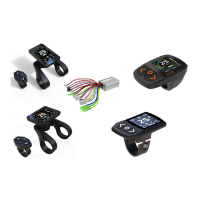
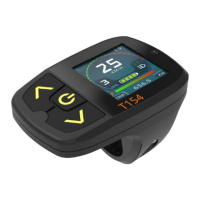
Caution:
Stop Bike if you want to make some
operations on display , If you do not
focus exclusively on your riding
environment, you risk being involved in
an accident.
Power on & off
--Long press POWER button with 3
seconds ; user have to input password
after power on if system was activated with
password protecting function.
Bike light on & off
--Long press UP button with 3
seconds ,there has 3 options for light on or
off , Manual ,Auto-Manual, Auto, LIGHT
SENSOR will detect the environmental light
intensity and turn the light on or off
automatically if select Auto-Manual, Auto
options
Switching Assistance level
--Short pressing UP to increase assistance
level or DOWN button to decrease
assistance level . the maxim assistance
level can be set from 1 to 8 .
usually more bigger level means more
powerful and more speed;
--The motor assistance is switched off at
Zero Level ,
-System will automatically adjust the power
and motor speed according to the bike
speed at A level
--Motor will run backwards at R level
--Motor will have more power at C level
when use pedal sensor up hill
--Three special level REVERSE , AUTO and
Climb Level can be activated by menu
options
Walk assistance
--The walk assistance can make it easier for
you to push the eBike. The assisting speed
can reach a maximum of 6km/h , Using the
walk assistance function is only recom-
mended when pushing the eBike.
Cruise
--Long press DOWN button when bike speed
is more than activated speed and power
assisting is on , then ,bike will start cruise.
--Pull brake or move the pedal or pull the
throttle or press any key on display will cancel
cruise
--Caution: There is risk of accident if you
didn’t concentrate on riding
Switching riding mode
--Three riding mode is ,ECO ,CITY ,SPORT,
you can select desired mode by both long
press POWER and UP button(T154 or M15).
Press Info button(T24)
--ECO : Effective assistance at maximum
efficiency for maximum cruising range
--CITY : Uniform assistance with long cruising
range
--SPORT: Powerful assistance for sporty off-
road riding, as well as for urban traffic
Clear Trip
--Both long press POWER and DOWN with 3
seconds , Trip meter will be cleared to zero



 To Next Page