Note: This table is only a suggested ranger.
Zone Alert Mode (3-Zone)
Training Zone Mode is the factory default on Mio LINK. To switch to Zone Alert Mode, or to customize
the upper and lower boundaries of each HR zone, please refer to Customizing Heart Rate Zones.
In Zone Alert Mode, the LED will blink slowly to indicate whether you are below, within, or above the
target HR zone. A double LED flash indicates your heart rate is outside of the target HR zone by 10 BPM
or more.
Note: This table is only a suggested ranger.
Customizing Heart Rate Zones
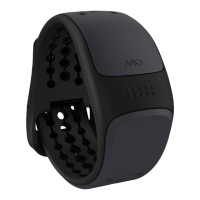
To achieve the full potential of training with Mio LINK, you should configure your LINK through the Mio
GO app. Mio GO allows you to:
Switch between Training Zone Mode and Zone Alert Mode
Customize your upper and lower limits of each HR zone
Mio GO is available for download in the Apple App Store and Google Play store.
Note: Currently, the Android version of Mio GO will be for setup only. Full features coming soon!
Configuring Your Mio LINK
1. Turn on the Heart Rate Mode of your Mio LINK.
2. Open the Mio GO app on your smartphone or tablet. If you are opening the app for the first
time, you will be asked to register and connect your LINK, as well as set up a user profile. For
instructions on pairing your LINK with Mio GO, please see Using Mio LINK With Devices And
Apps.
3. Tap the Connect icon to see all your previously connected devices.


 To Next Page