!
1200 WATTS PMPO FOR 21/29 OXYGEN THUNDER.
!
KY BASS / BASS BOOST.
!
BASS TREBLE ADJUSTMENT.
!
VOLUME LOCK.
!
ZOOM 1 / ZOOM 2 / NORMAL.
!
HYPERBAND COVERAGE WITH 0 TO 199 CHANNEL MEMORY.
!
NTSC PLAYBACK.
!
DIGITAL CLOCK.
!
CHANNEL SCHEDULER.
!
AUDIO STATUS MEMORIES.
!
VIDEO STATUS MEMORIES.
!
SURROUND SOUND.
!
FAVOURITE CHANNEL.
!
CHANNEL SCAN / SWAP.
!
FULL FUNCTION REMOTE CONTROL.
!
AUTO SHUT OFF.
!
BLUE BACK.
!
SKIN TONE ADJUSTMENT.
!
MUSIC MODE.
!
CHILD SAFE.
!
ZAP/TIMER RETURN.
!
DIGITAL EYE.
!
PICTURE TILT *.
* available in 29 Oxygen Thunder only.
1. Features
4
!
!
!
The Bass Blaster unit is packaged
separately. Before you use the TV,
mount the Bass Blaster Unit
correctly on the TV as shown below:
Fit the mounting slots of the Bass
Blaster unit with the mounting pins
on top of the TV.
Firmly insert the Bass Blaster unit
connector into the corresponding
terminal provided at the rear of the
TV.
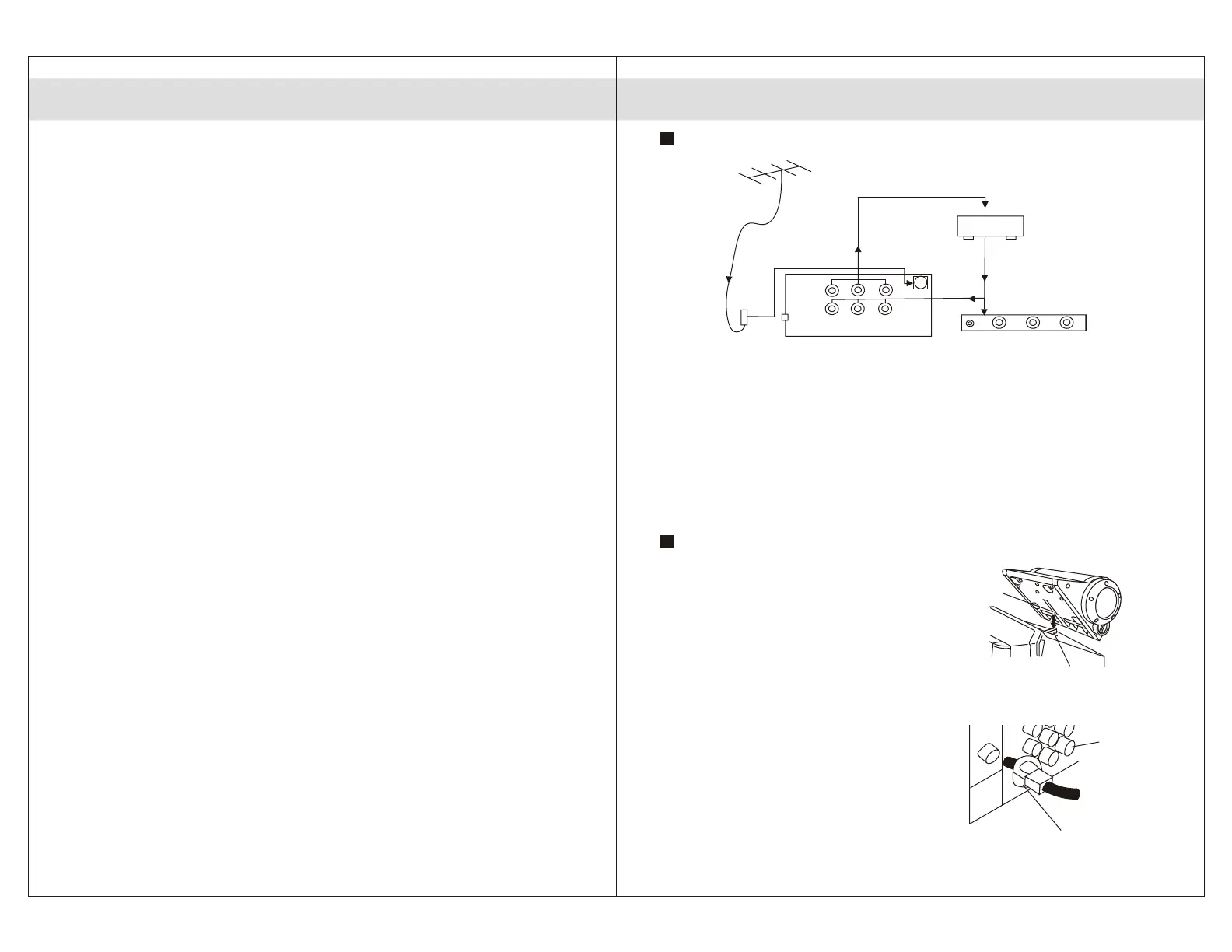
Connecting the Aerial / Cable and External Device
Place your TV on a flat surface, with
atleast half a foot separating it from
the nearest wall. Insert the 'mains'
plug into the appropriate source.
As shown above, connect the
antenna cable to the socket (s)
using a balun transformer attached
to the cable end. You can connect a
VCR / VCD / LD / DVD player to your
TV as shown above.
Note: 1. RF cord of video can also be
connected to socket (s). 2. Switch off TV
before connecting the antenna input.
3. Before connecting any external inputs to
your TV, switch off the TV.
How to Mount the Bass Blaster Unit.
Fig. 2.2
2. Pre-Installation
5
Mounting hole
Mounting
pin
Fig. 2.3
Fig. 2.1
OUTPUT
INPUT
(S)
BALUN
VIDEO
L / MONO R
(AUDIO)
HEAD VIDEO L/MONO R
PHONE
FRONT AV PANEL
TO AV / INPUT TERMINALS
OF THE VCR/VCP/DVD
REAR AV PANEL
FROM AV / INPUT TERMINALS
OF THE VCR/VCP/DVD
ANTENNA (300 OHMS)
Connector
Lever



 To Next Page