FAV
i
SHIFT
1
1
CH ---------
2
3 4
5
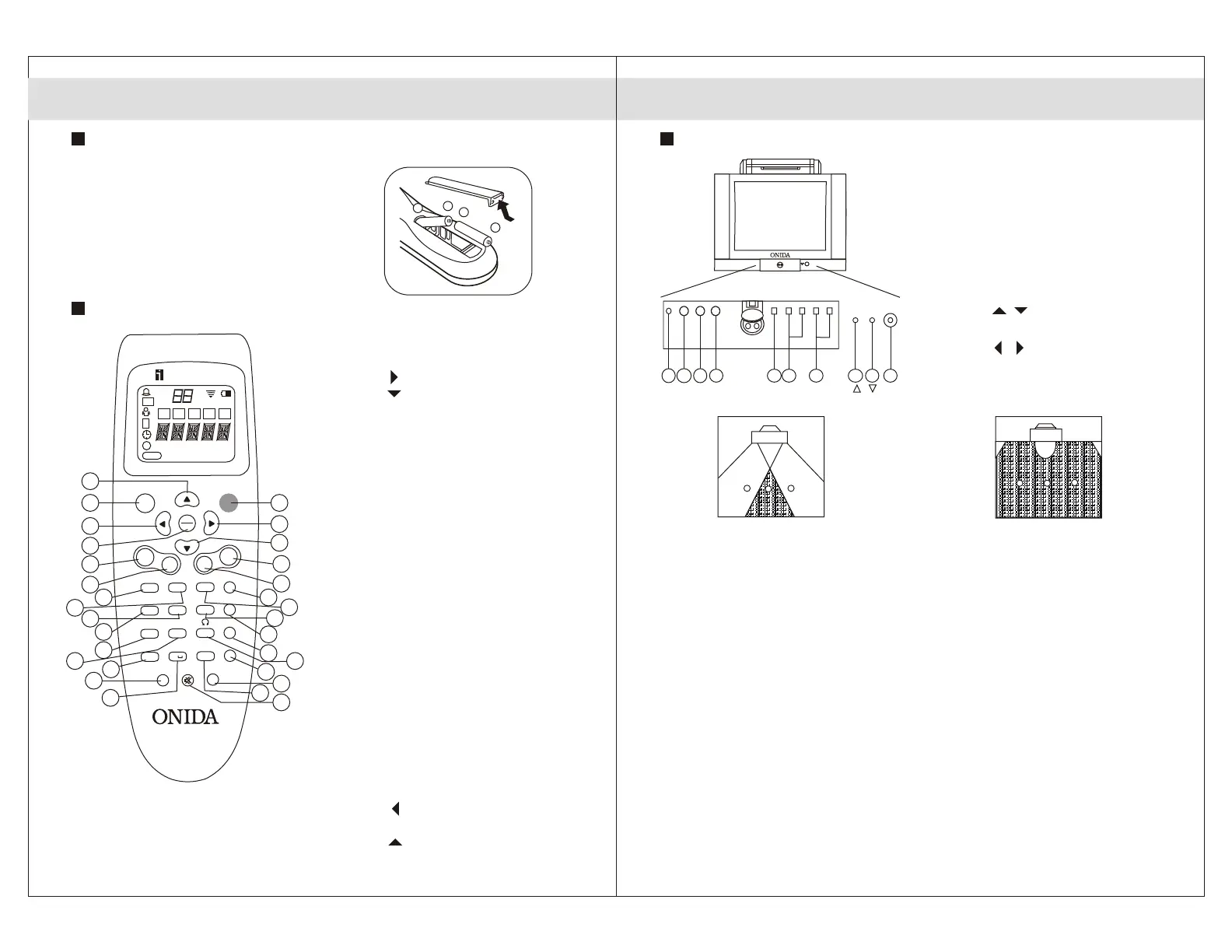
Inserting Batteries into the Remote Control.
Correctly insert two AA/R6/UM-3 dry
cell batteries, observing the (+) and (-)
polarities. Do not use a combination of
old and new batteries or two different
types of batteries. If the remote
controls operates erratically,
replace batteries with a new set.
Function of the Remote Control. (R/C)
3. LCD Remote & TV Controls
6
ONIDA TV provides a rich theatre-
like experience with all the power
and performance of multi-speaker
surround sound without adding extra
speakers. This television incorporates
a newly Developed high-quality
surround audio processor that
provides an incredible audio filed
which envelops you completely. Like
live performances, you can move
around the room upto an angle of
180 and still continue to feel
immersed in the surround sound. This
is not possible in conventional
televisions as the coverage area for
Function of Front / Side Panel Buttons and Lamps.
01. Headphone Socket.
02. Video In.
03. Audio (L/Mono) In.
04. Audio ® In.
05. Digital Eye / Remote Sensor.
06. Menu button.
07. Channel -/+ buttons or
Menu / button.
08. Volume -/+ buttons or
Menu / button.
09. Alarm lamp.
10. Power lamp.
11. Main Power button.
surround sound becomes limited to a
very narrow angle.
Note: In order to service your TV through the
remote control, numeric keys have been
assigned more functions apart from their
normal operation. If you press numeric keys on
the remote control for long time, you may get a
display of service menu. This is not a
malfunction. Press Disp button on your remote
control to get back to your normal viewing.
Conventional TV
(with narrow surround area)
ONIDA TV
(with 180 surround area)
LCD Remote & TV Controls
7
-
+
+
-
Note : Features will vary from model to
model.DISP/C key function operate
interchangeably.All the key functions
mentioned above may or may not operate.
21/29 OXYGEN THUNDER
Without SHIFT With SHIFT
1. POWER
2. Key
3. Key
4-5. VOLUME +/-
6. VSM ZOOM/ R+
7. 3, DEF SIZE
8. SSM COL. SYSTEM
9. 6, Mn0 SKIN TONE
10. SURROUND SPORTS
11. 9,WXYZ ZAP/TIMER
RETURN
12. KY BASS
13. -/-- TV/FAV
14. CANCEL/
DISPLAY
15. MUTE MUSIC MODE
16. SHIFT
17. 0 FM RADIO
18. SWAP CHANNEL SCAN
19. 8,TUV CHILD SAFE
20. 7, PQRS ZOOM
21. 5, JKL DIGITAL EYE
22. 4, GHI SLEEP
23. 2, ABC INDEX
24. 1 TV/TXT
25-26.CHANNEL +/-
27. OK/MENU
28. Key
29. FAV Mode Key
30. Key
control
FAV
POWER
OK
MENU
CH
VOL
+
-
+
-
TV/TXT INDEX SIZE ZOOM/R+
SLEEP
DIGITAL EYE SKINTONE
COLSYS
ZOOM CHILD SAFE T SPORTS
CHSCAN FM RADIO TV/FAV KYBASS
SHIFT MUSIC MODE DISF
1
2
ABC
3
DEF
4
GHI
5
JKL
6
MNO
VSM
SSM
7
PQ
RS
8
TUV
9
WX
YZ
SURR
SWAP
0
- - -
C
1
2
3
29
30
28
27
25
26
4
5
24 6
23
7
21
9
22
8
19 11
20
10
16
14
15
12
18
17
13
6 7 8
1
3
2
4
9 10 11
Fig 3.1
Fig 3.2
Fig 3.4
Fig 3.3
Fig 3.5


 To Next Page
 Loading...